


Fortune Client Example▲
This example uses https://, and is intended to be run alongside the https:// example or the https:// example.
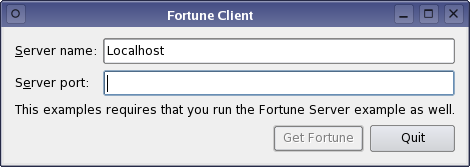
This example uses a simple https://-based data transfer protocol to request a line of text from a fortune server (from the https:// example). The client requests a fortune by simply connecting to the server. The server then responds with a https:// which contains the fortune text.
https:// supports two general approaches to network programming:
-
The asynchronous (non-blocking) approach. Operations are scheduled and performed when control returns to Qt's event loop. When the operation is finished, https:// emits a signal. For example, https://() returns immediately, and when the connection has been established, https:// emits https://().
-
The synchronous (blocking) approach. In non-GUI and multithreaded applications, you can call the waitFor...() functions (e.g., https://()) to suspend the calling thread until the operation has completed, instead of connecting to signals.
In this example, we will demonstrate the asynchronous approach. The https:// illustrates the synchronous approach.
Our class contains some data and a few private slots:
class Client : public QDialog
{
    Q_OBJECT

public:
    explicit Client(QWidget *parent = nullptr);

private slots:
    void requestNewFortune();
    void readFortune();
    void displayError(QAbstractSocket::SocketError socketError);
    void enableGetFortuneButton();
    void sessionOpened();

private:
    QComboBox *hostCombo = nullptr;
    QLineEdit *portLineEdit = nullptr;
    QLabel *statusLabel = nullptr;
    QPushButton *getFortuneButton = nullptr;

    QTcpSocket *tcpSocket = nullptr;
    QDataStream in;
    QString currentFortune;

    QNetworkSession *networkSession = nullptr;
};
Other than the widgets that make up the GUI, the data members include a https:// pointer, a https:// object that operates on the socket, and a copy of the fortune text currently displayed.
The socket is initialized in the Client constructor. We'll pass the main widget as parent, so that we won't have to worry about deleting the socket:
Client::Client(QWidget *parent)
    : QDialog(parent)
    , hostCombo(new QComboBox)
    , portLineEdit(new QLineEdit)
    , getFortuneButton(new QPushButton(tr("Get Fortune")))
    , tcpSocket(new QTcpSocket(this))
{
    setWindowFlags(windowFlags() & ~Qt::WindowContextHelpButtonHint);
    ...
    in.setDevice(tcpSocket);
    in.setVersion(QDataStream::Qt_4_0);
The protocol is based on https://, so we set the stream device to the newly created socket. We then explicitly set the protocol version of the stream to https:// to ensure that we're using the same version as the fortune server, no matter which version of Qt the client and server use.
The only https:// signals we need in this example are https://(), signifying that data has been received, and https://(), which we will use to catch any connection errors:
    ...
    connect(tcpSocket, &QIODevice::readyRead, this, &Client::readFortune);
    connect(tcpSocket, QOverload<QAbstractSocket::SocketError>::of(&QAbstractSocket::error),
    ...
}
Clicking the Get Fortune button will invoke the requestNewFortune() slot:
void Client::requestNewFortune()
{
    getFortuneButton->setEnabled(false);
    tcpSocket->abort();
    tcpSocket->connectToHost(hostCombo->currentText(),
                             portLineEdit->text().toInt());
}
Because we allow the user to click Get Fortune before the previous connection finished closing, we start off by aborting the previous connection by calling https://(). (On an unconnected socket, this function does nothing.) We then proceed to connecting to the fortune server by calling https://(), passing the hostname and port from the user interface as arguments.
As a result of calling https://(), one of two things can happen:
-
The connection is established. In this case, the server will send us a fortune. https:// will emit https://() every time it receives a block of data.
-
An error occurs. We need to inform the user if the connection failed or was broken. In this case, https:// will emit https://(), and Client::displayError() will be called.
Let's go through the https://() case first:
void Client::displayError(QAbstractSocket::SocketError socketError)
{
    switch (socketError) {
    case QAbstractSocket::RemoteHostClosedError:
        break;
    case QAbstractSocket::HostNotFoundError:
        QMessageBox::information(this, tr("Fortune Client"),
                                 tr("The host was not found. Please check the "
                                    "host name and port settings."));
        break;
    case QAbstractSocket::ConnectionRefusedError:
        QMessageBox::information(this, tr("Fortune Client"),
                                 tr("The connection was refused by the peer. "
                                    "Make sure the fortune server is running, "
                                    "and check that the host name and port "
                                    "settings are correct."));
        break;
    default:
        QMessageBox::information(this, tr("Fortune Client"),
                                 tr("The following error occurred: %1.")
                                 .arg(tcpSocket->errorString()));
    }

    getFortuneButton->setEnabled(true);
}
We pop up all errors in a dialog using https://(). QTcpSocket::RemoteHostClosedError is silently ignored, because the fortune server protocol ends with the server closing the connection.
Now for the https://() alternative. This signal is connected to Client::readFortune():
void Client::readFortune()
{
    in.startTransaction();

    QString nextFortune;
    in >> nextFortune;

    if (!in.commitTransaction())
        return;

    if (nextFortune == currentFortune) {
        QTimer::singleShot(0, this, &Client::requestNewFortune);
        return;
    }

    currentFortune = nextFortune;
    statusLabel->setText(currentFortune);
    getFortuneButton->setEnabled(true);
}
Now, TCP is based on sending a stream of data, so we cannot expect to get the entire fortune in one go. Especially on a slow network, the data can be received in several small fragments. https:// buffers up all incoming data and emits https://() for every new block that arrives, and it is our job to ensure that we have received all the data we need before we start parsing.
For this purpose we use a https:// read transaction. It keeps reading stream data into an internal buffer and rolls it back in case of an incomplete read. We start by calling startTransaction() which also resets the stream status to indicate that new data was received on the socket. We proceed by using https://'s streaming operator to read the fortune from the socket into a https://. Once read, we complete the transaction by calling https://(). If we did not receive a full packet, this function restores the stream data to the initial position, after which we can wait for a new readyRead() signal.
After a successful read transaction, we call https://() to display the fortune.