


Qt Quick Examples - Canvas▲
Canvas is a collection of small QML examples relating to the Canvas type. Each example is a small QML file emphasizing a particular type or feature.
Running the Example▲
To run the example from Qt Creator, open the Welcome mode and select the example from Examples. For more information, visit Building and Running an Example.
Red Heart▲
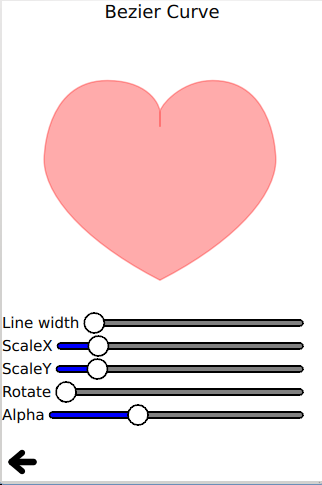
Red heart uses the bezier curve API to stroke and fill a red heart.
ctx.beginPath();
ctx.moveTo(75,40);
ctx.bezierCurveTo(75,37,70,25,50,25);
ctx.bezierCurveTo(20,25,20,62.5,20,62.5);
ctx.bezierCurveTo(20,80,40,102,75,120);
ctx.bezierCurveTo(110,102,130,80,130,62.5);
ctx.bezierCurveTo(130,62.5,130,25,100,25);
ctx.bezierCurveTo(85,25,75,37,75,40);
ctx.closePath();
Talk Bubble▲
Talk bubble uses the quadraticCurveTo() API to stroke and fill a customized talk bubble:
ctx.beginPath();
ctx.moveTo(75,25);
ctx.quadraticCurveTo(25,25,25,62.5);
ctx.quadraticCurveTo(25,100,50,100);
ctx.quadraticCurveTo(50,120,30,125);
ctx.quadraticCurveTo(60,120,65,100);
ctx.quadraticCurveTo(125,100,125,62.5);
ctx.quadraticCurveTo(125,25,75,25);
ctx.closePath();
This example also demonstrates the fillText() API:
ctx.fillStyle = "white";
ctx.font = "bold 17px sans-serif";
ctx.fillText("Qt Quick", 40, 70);Squircle▲
Squircle uses a collection of simple moveTo() and lineTo() path APIs to draw a smooth squircle.
Rounded Rectangle▲
Rounded rectangle uses a collection of lineTo() and arcTo() path APIs to draw a rounded rectangle.
Smile Face▲
Smile face uses several paths to draw and fill a smiling face.
Clip▲
Clip uses the clip API to clip a given image.
ctx.clip();
ctx.drawImage(canvas.imagefile, 0, 0);Tiger▲
Tiger uses the SVG path API to draw a tiger with a collection of SVG path strings.
for (var i = 0;