


Qt Quick Examples - MouseArea▲
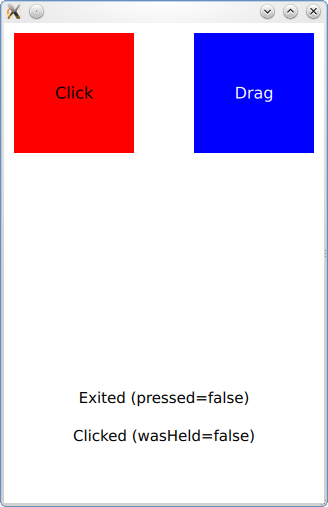
MouseArea example shows how to respond to clicks and drags with a https://. For more information, visit https://.
Running the Example▲
To run the example from http://, open the Welcome mode and select the example from Examples. For more information, visit http://.
MouseArea Behavior▲
When you click inside the red square, the https:// type will list several properties of that click which are available to QML. The opacity of the red square will be reduced while the mouse is pressed and remains inside the https://.
Signals are emitted by the https:// when clicks or other discrete operations occur within it.
onPressAndHold: btn.text = 'Press and hold'
onClicked: btn.text = 'Clicked (wasHeld=' + mouse.wasHeld + ')'
onDoubleClicked: btn.text = 'Double clicked'
https:// can also be used to drag items around. By setting the parameters of the drag property, the target item will be dragged around if the user starts to drag within the mouse area boundary.
drag.target: blueSquare
drag.axis: Drag.XAndYAxis
drag.minimumX: 0
drag.maximumX: box.width - parent.width
drag.minimumY: 0
drag.maximumY: box.height - parent.width
List of Files▲
Files:
List of Files▲
-
mousearea/main.cpp
-
mousearea/mousearea-wheel-example.qml
-
mousearea/mousearea.pro
-
mousearea/mousearea.qml
-
mousearea/mousearea.qmlproject
-
mousearea/mousearea.qrc