


DayOfWeekRow QML Type▲
-
Import Statement: import Qt.labs.calendar 1.0
-
Inherits: FocusScope
Detailed Description▲
https:// presents day of week names in a row. The names of the days are ordered and formatted using the specified https://.

DayOfWeekRow {
    locale: Qt.locale("en_US")
}
https:// can be used as a standalone control, but it is most often used in conjunction with https://. Regardless of the use case, positioning of the row is left to the user.
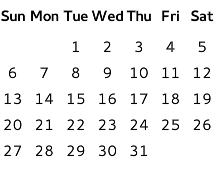
ColumnLayout {
    DayOfWeekRow {
        locale: grid.locale
        Layout.fillWidth: true
    }

    MonthGrid {
        id: grid
        month: Calendar.December
        year: 2015
        locale: Qt.locale("en_US")
        Layout.fillWidth: true
    }
}
The visual appearance of https:// can be changed by implementing a https://.
Types in Qt.labs modules are not guaranteed to remain compatible in future versions.
See Also▲
See also https://, https://
Property Documentation▲
delegate : Component▲
This property holds the item delegate that visualizes each day of the week.
In addition to the index property, a list of model data roles are available in the context of each delegate:
|
model.day : int |
The day of week (https://) |
|
model.longName : string |
The long version of the day name; for example, "Monday" (https://) |
|
model.shortName : string |
The short version of the day name; for example, "Mon" (https://) |
|
model.narrowName : string |
A special version of the day name for use when space is limited; for example, "M" (https://) |
The following snippet presents the default implementation of the item delegate. It can be used as a starting point for implementing custom delegates.
delegate: Text {
    text: model.shortName
    font: control.font
    horizontalAlignment: Text.AlignHCenter
    verticalAlignment: Text.AlignVCenter
}