


MonthGrid QML Type▲
-
Import Statement: import Qt.labs.calendar 1.0
-
Inherits: FocusScope
Detailed Description▲
https:// presents a calendar month in a grid. The contents are calculated for a given https:// and https://, using the specified https://.
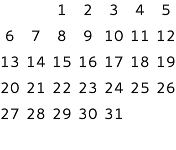
MonthGrid {
    month: Calendar.December
    year: 2015
    locale: Qt.locale("en_US")
}
https:// can be used as a standalone control, but it is most often used in conjunction with https:// and https://. Regardless of the use case, positioning of the grid is left to the user.
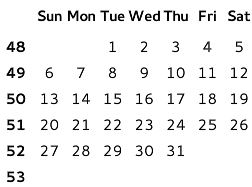
GridLayout {
    columns: 2

    DayOfWeekRow {
        locale: grid.locale

        Layout.column: 1
        Layout.fillWidth: true
    }

    WeekNumberColumn {
        month: grid.month
        year: grid.year
        locale: grid.locale

        Layout.fillHeight: true
    }

    MonthGrid {
        id: grid
        month: Calendar.December
        year: 2015
        locale: Qt.locale("en_US")

        Layout.fillWidth: true
        Layout.fillHeight: true
    }
}
The visual appearance of https:// can be changed by implementing a https://.
Types in Qt.labs modules are not guaranteed to remain compatible in future versions.
See Also▲
See also https://, https://, https://
Property Documentation▲
delegate : Component▲
This property holds the item delegate that visualizes each day.
In addition to the index property, a list of model data roles are available in the context of each delegate:
|
model.date : date |
The date of the cell |
|
model.day : int |
The number of the day |
|
model.today : bool |
Whether the delegate represents today |
|
model.weekNumber : int |
The week number |
|
model.month : int |
The number of the month |
|
model.year : int |
The number of the year |
The following snippet presents the default implementation of the item delegate. It can be used as a starting point for implementing custom delegates.
delegate: Text {
    horizontalAlignment: Text.AlignHCenter
    verticalAlignment: Text.AlignVCenter
    opacity: model.month === control.month ? 1 : 0
    text: model.day
    font: control.font
}
month : int▲
This property holds the number of the month. The default value is the current month.
The Qt Labs Calendar module uses 0-based month numbers to be consistent with the JavaScript Date type, that is used by the QML language. This means that Date::getMonth() can be assigned to this property as is. When dealing with dealing with month numbers directly, it is highly recommended to use the following enumeration values to avoid confusion.
|
Constant |
Description |
|---|---|
|
Calendar.January |
January (0) |
|
Calendar.February |
February (1) |
|
Calendar.March |
March (2) |
|
Calendar.April |
April (3) |
|
Calendar.May |
May (4) |
|
Calendar.June |
June (5) |
|
Calendar.July |
July (6) |
|
Calendar.August |
August (7) |
|
Calendar.September |
September (8) |
|
Calendar.October |
October (9) |
|
Calendar.November |
November (10) |
|
Calendar.December |
December (11) |
See Also▲
See also https://
style : Component▲
title : string▲
This property holds a title for the calendar.
This property is provided for convenience. https:// itself does not visualize the title. The default value consists of the month name, formatted using https://, and the year number.
year : int▲
This property holds the number of the year.
The value must be in the range from -271820 to 275759. The default value is the current year.
Signal Documentation▲
clicked(date date)▲
This signal is emitted when date is clicked.
The corresponding handler is onClicked.
pressAndHold(date date)▲
This signal is emitted when date is pressed and held down.
The corresponding handler is onPressAndHold.
pressed(date date)▲
This signal is emitted when date is pressed.
The corresponding handler is onPressed.
released(date date)▲
This signal is emitted when date is released.
The corresponding handler is onReleased.