


Button QML Type▲
-
Import Statement: import QtQuick.Controls 1.4
-
Since: Qt 5.1
-
Inherited By:: https://, https://, and https://
-
Inherits: FocusScope
-
Group: Button is part of https://
Detailed Description▲
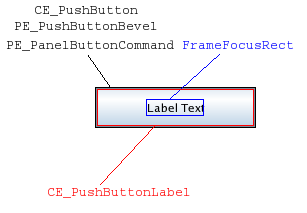
The push button is perhaps the most commonly used widget in any graphical user interface. Pushing (or clicking) a button commands the computer to perform some action or answer a question. Common examples of buttons are OK, Apply, Cancel, Close, Yes, No, and Help buttons.
Button {
    text: "Button"
}
Button is similar to the https:// widget.
You can create a custom appearance for a Button by assigning a https://.
Property Documentation▲
action : Action▲
This property holds the associated button action.
If a button has an action associated, the action defines the button's properties like checked, text, tooltip etc.
When an action is set, it's still possible to override the https://, https://, https://, and https:// properties.
The default value is null.
activeFocusOnPress : bool▲
This property specifies whether the button should gain active focus when pressed.
The default value is false.
checkable : bool▲
This property holds whether the button is checkable.
The default value is false.
checked : bool▲
This property holds whether the button is checked.
Only checkable buttons can be checked.
The default value is false.
exclusiveGroup : ExclusiveGroup▲
This property holds the https:// that the button belongs to.
The default value is null.
[read-only] hovered : bool▲
This property indicates whether the control is being hovered.
iconName : string▲
The image label source as theme name. When an icon from the platform icon theme is found, this takes precedence over https://.
This property requires https://.
iconSource : url▲
This property holds the icon shown on the button. If the button has no icon, the https:// property will be an empty string.
The default value is the empty string.
isDefault : bool▲
This property holds whether the push button is the default button. Default buttons decide what happens when the user presses enter in a dialog without giving a button explicit focus.
This property only changes the appearance of the button. The expected behavior needs to be implemented by the user.
The default value is false.
menu : Menu▲
The default value is null.
[read-only] pressed : bool▲
This property holds whether the button is being pressed.
style : Component▲
text : string▲
This property holds the text shown on the button. If the button has no text, the https:// property will be an empty string.
The default value is the empty string.
tooltip : string▲
This property holds the button tooltip.
Signal Documentation▲
clicked()▲
This signal is emitted when the button is clicked.
The corresponding handler is onClicked.