


RadioButton QML Type▲
-
Import Statement: import QtQuick.Controls 1.4
-
Since: Qt 5.1
-
Inherits: FocusScope
-
Group: RadioButton is part of https://
Detailed Description▲
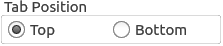
A https:// is an option button that can be switched on (checked) or off (unchecked). Radio buttons typically present the user with a "one of many" choices. In a group of radio buttons, only one radio button can be checked at a time; if the user selects another button, the previously selected button is switched off.
GroupBox {
    title: "Tab Position"

    RowLayout {
        ExclusiveGroup { id: tabPositionGroup }
        RadioButton {
            text: "Top"
            checked: true
            exclusiveGroup: tabPositionGroup
        }
        RadioButton {
            text: "Bottom"
            exclusiveGroup: tabPositionGroup
        }
    }
}
You can create a custom appearance for a https:// by assigning a https://.
Property Documentation▲
activeFocusOnPress : bool▲
This property is true if the control takes the focus when it is pressed; https://() will be called on the control.
checked : bool▲
This property is true if the control is checked.
exclusiveGroup : ExclusiveGroup▲
This property stores the https:// that the control belongs to.
[read-only] hovered : bool▲
This property indicates whether the control is being hovered.
pressed : bool▲
This property is true if the control is being pressed. Set this property to manually invoke a mouse click.
style : Component▲
text : string▲
This property holds the text that the label should display.
[since QtQuick.Controls 1.7] tooltip : string▲
This property holds the button tooltip.
This property was introduced in QtQuick.Controls 1.7.