


Gauge QML Type▲
-
Import Statement: import QtQuick.Extras 1.4
-
Since: Qt 5.5
-
Inherits: FocusScope
-
Group: Gauge is part of extras, extras-non-interactive
Detailed Description▲
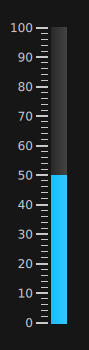
The Gauge control displays a value within some range along a horizontal or vertical axis. It can be thought of as an extension of https://, providing tickmarks and labels to provide a visual measurement of the progress.
The minimum and maximum values displayable by the gauge can be set with the https:// and https:// properties.
Example:
Gauge {
    minimumValue: 0
    value: 50
    maximumValue: 100
    anchors.centerIn: parent
}
You can create a custom appearance for a Gauge by assigning a https://.
Property Documentation▲
font : font▲
The font to use for the tickmark text.
formatValue : var▲
This property accepts a function that formats the given value for display in https://.
For example, to provide a custom format that displays all values with 3 decimal places:
formatValue: function(value) {
    return value.toFixed(3);
}
The default function does no formatting.
maximumValue : alias▲
This property holds the largest value displayed by the gauge.
The default value is 100.
minimumValue : alias▲
This property holds the smallest value displayed by the gauge.
The default value is 0.
minorTickmarkCount : int▲
This property determines the amount of minor tickmarks drawn between each regular tickmark.
The default value is 4.
orientation : int▲
This property determines the orientation of the gauge.
The default value is Qt.Vertical.
style : Component▲
tickmarkAlignment : int▲
This property determines the alignment of each tickmark within the gauge. When https:// is Qt.Vertical, the valid values are:
-
Qt.AlignLeft
-
Qt.AlignRight
Any other value will cause Qt.AlignLeft to be used, which is also the default value for this orientation.
When https:// is Qt.Horizontal, the valid values are:
-
Qt.AlignTop
-
Qt.AlignBottom
Any other value will cause Qt.AlignBottom to be used, which is also the default value for this orientation.
tickmarkStepSize : real▲
This property determines the rate at which tickmarks are drawn on the gauge. The lower the value, the more often tickmarks are drawn.
The default value is 10.
value : alias▲
This property holds the value displayed by the gauge.
The default value is 0.