


PieMenu QML Type▲
-
Import Statement: import QtQuick.Extras 1.4
-
Since: Qt 5.5
-
Inherits: FocusScope
-
Group: PieMenu is part of extras, extras-interactive
Detailed Description▲

The https:// provides a radial context menu as an alternative to a traditional menu. All of the items in a https:// are an equal distance from the center of the control.
Populating the Menu▲
PieMenu {
    id: pieMenu

    MenuItem {
        text: "Action 1"
        onTriggered: print("Action 1")
    }
    MenuItem {
        text: "Action 2"
        onTriggered: print("Action 2")
    }
    MenuItem {
        text: "Action 3"
        onTriggered: print("Action 3")
    }
}
By default, only the currently selected item's text is displayed above the menu. To provide text that is always visible when there is no current item, set the https:// property.
Displaying the Menu▲
MouseArea {
    anchors.fill: parent
    acceptedButtons: Qt.RightButton

    onClicked: pieMenu.popup(mouseX, mouseY)
}
If the menu is opened in a position where some of its menu items would be outside of https://, it is automatically moved to a position where they will not be hidden. By default, the https:// is set to the parent of the menu. It can also be set to null to prevent this behavior.
https:// can be displayed at any position on the screen. With a traditional context menu, the menu would be positioned with its top left corner at the position of the right click, but since https:// is radial, we position it centered over the position of the right click.
To create a https:// that opens after a long press and selects items upon releasing, you can combine ActivationMode.ActivateOnRelease with a https:// using a Timer:
MouseArea {
    id: touchArea
    anchors.fill: parent

    Timer {
        id: pressAndHoldTimer
        interval: 300
        onTriggered: pieMenu.popup(touchArea.mouseX, touchArea.mouseY);
    }

    onPressed: pressAndHoldTimer.start()
    onReleased: pressAndHoldTimer.stop();
}

PieMenu {
    id: pieMenu

    triggerMode: TriggerMode.TriggerOnRelease

    MenuItem {
        text: "Action 1"
        onTriggered: print("Action 1")
    }
    MenuItem {
        text: "Action 2"
        onTriggered: print("Action 2")
    }
    MenuItem {
        text: "Action 3"
        onTriggered: print("Action 3")
    }
}
You can hide individual menu items by setting their visible property to false. Hiding items does not affect the https:// or https://; the remaining items will grow to consume the available space.
You can create a custom appearance for a https:// by assigning a https://
Property Documentation▲
boundingItem : Item▲
The item which the menu must stay within.
A typical use case for https:// involves:
-
A https:// that determines the clickable area within which the menu can be opened.
-
The bounds that the menu must not go outside of.
Although they sound similar, they have different purposes. Consider the example below:
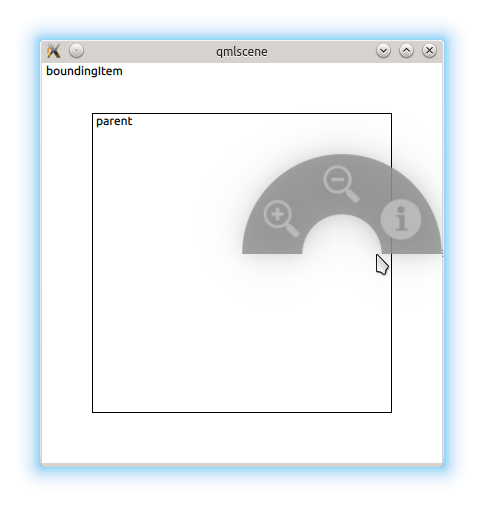
The user can only open the menu within the inner rectangle. In this case, they've opened the menu on the edge of the https://, but there would not be enough room to display the entire menu centered at the cursor position, so it was moved to the left.
If for some reason we didn't want this restriction, we can set boundingItem to null:
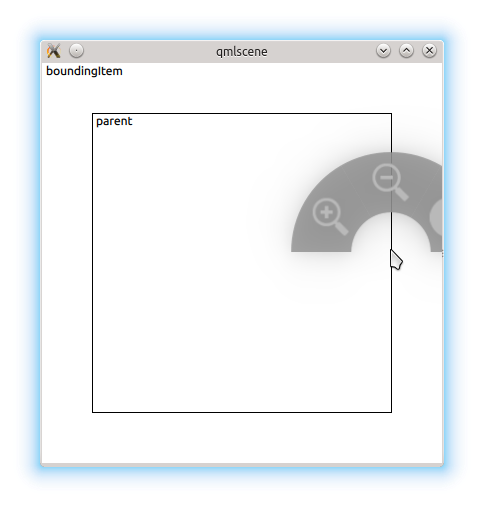
By default, the menu's https:// is the boundingItem.
[read-only] currentIndex : int▲
The index of the the menu item that is currently under the mouse, or -1 if there is no such item.
[read-only] currentItem : int▲
The menu item that is currently under the mouse, or null if there is no such item.
[default] menuItems : list<MenuItem>▲
You can assign menu items by declaring them as children of https://:
PieMenu {
    MenuItem {
        text: "Action 1"
        onTriggered: function() { print("Action 1"); }
    }
    MenuItem {
        text: "Action 2"
        onTriggered: function() { print("Action 2"); }
    }
    MenuItem {
        text: "Action 3"
        onTriggered: function() { print("Action 3"); }
    }
}
[read-only] selectionAngle : real▲
This property reflects the angle (in radians) created by the imaginary line from the center of the menu to the position of the cursor.
Its value is undefined when the menu is not visible.
style : Component▲
title : string▲
This property defines the text that is shown above the menu when there is no current menu item (https:// is -1).
The default value is "" (an empty string).
triggerMode : int▲
This property determines the method for selecting items in the menu.
-
A triggerMode of TriggerMode.TriggerOnPress means that menu items will only be selected when a mouse press event occurs over them.
-
A triggerMode of TriggerMode.TriggerOnRelease means that menu items will only be selected when a mouse release event occurs over them. This means that the user must keep the mouse button down after opening the menu and release the mouse over the item they wish to select.
-
A triggerMode of TriggerMode.TriggerOnClick means that menu items will only be selected when the user clicks once over them.
Changing the triggerMode while the menu is visible will result in undefined behavior.
Method Documentation▲
void addItem(string text)▲
Adds an item to the end of the menu items.
Equivalent to passing calling insertItem(menuItems.length, text).
Returns the newly added item.
void insertItem(int before, string text)▲
Inserts a https:// with text before the index at before.
To insert an item at the end, pass menuItems.length.
Returns the newly inserted item, or null if before is invalid.
void popup(real x, real y)▲
Opens the menu at coordinates x, y.
void removeItem(item)▲
Removes item from the menu.
Obsolete Members for PieMenu▲
The following members of QML type https:// are deprecated. We strongly advise against using them in new code.
Obsolete Property Documentation▲
activationMode : enumeration▲
This property is deprecated. We strongly advise against using it in new code.
This property determines the method for selecting items in the menu.
-
An activationMode of ActivationMode.ActivateOnPress means that menu items will only be selected when a mouse press event occurs over them.
-
An activationMode of ActivationMode.ActivateOnRelease means that menu items will only be selected when a mouse release event occurs over them. This means that the user must keep the mouse button down after opening the menu and release the mouse over the item they wish to select.
-
An activationMode of ActivationMode.ActivateOnClick means that menu items will only be selected when the user clicks once over them.
Changing the activationMode while the menu is visible will result in undefined behavior.
Use https:// instead.