


Qt 3D: Planets QML Example▲
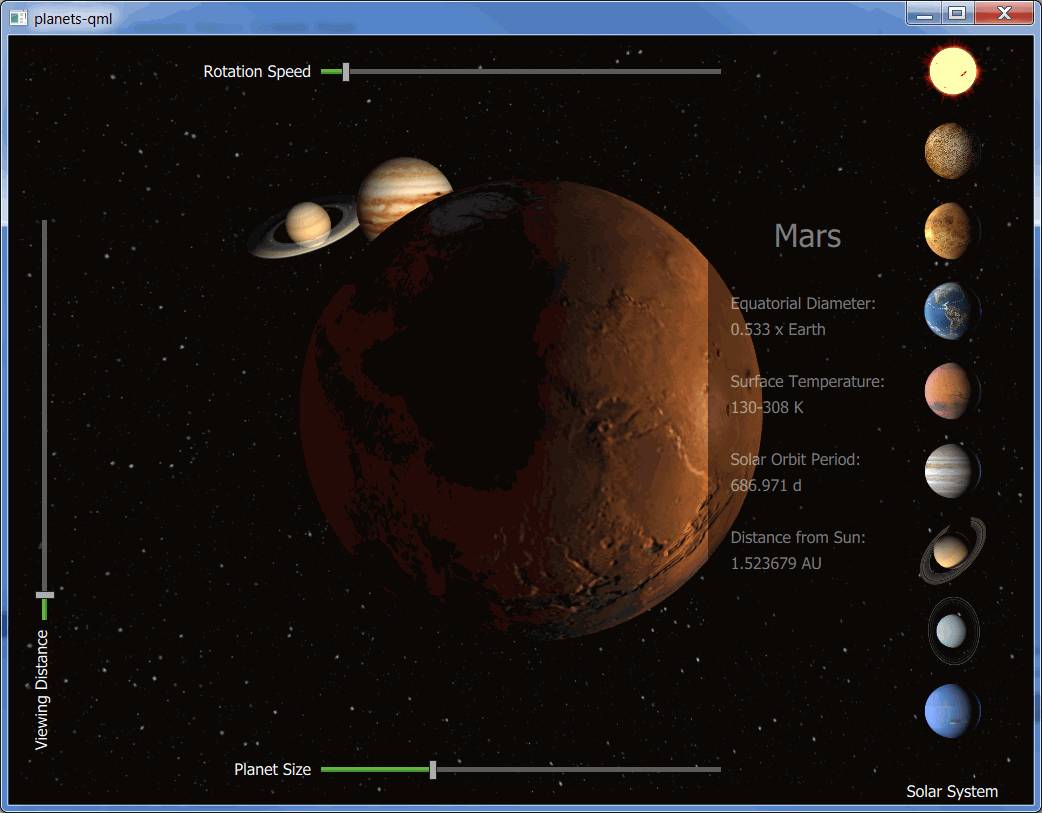
Planets demonstrates how to implement an application that combines the use of Qt 3D rendering with Qt Quick 2D elements. The example shows the eight planets of our Solar System with the Sun.
Planet texture maps are Copyright (c) by James Hastings-Trew http:// used with permission.
The planets are rotating around the Sun based on their orbit at a given time. The rotation starts at 2000 Jan 0.0 UT. The planet positions are calculated based on the formulas found here: http:// and http://.
Running the Example▲
To run the example from http://, open the Welcome mode and select the example from Examples. For more information, visit http://.
Qt Quick 2D Implementation▲
The Qt Quick Implementation PlanetsMain.qml of the example renders the 3D content using the Scene3D type.
Scene3D {
    anchors.fill: parent
    aspects: ["render", "logic", "input"]

    SolarSystem { id: solarsystem }
}
The planet related information is stored into a ListModel. The selection buttons for the planets and the information sheet are created based on the model. The 2D elements, selection buttons and sliders, are implemented in the PlanetsMain.qml.
The selection buttons change the focusedPlanet property of the mainview. As the property changes, the planet information is updated, and the camera is animated to the new position.
onFocusedPlanetChanged: {
    if (focusedPlanet == 100) {
        info.opacity = 0
        updatePlanetInfo()
    } else {
        updatePlanetInfo()
        info.opacity = 1
    }

    solarsystem.changePlanetFocus(oldPlanet, focusedPlanet)
    oldPlanet = focusedPlanet
}
The camera position and the camera look at point are updated based on values that are animated in the SolarSystem.qml, triggered from the changePlanetFocus() function.
QQ2.NumberAnimation {
    id: lookAtOffsetAnimation
    target: sceneRoot
    properties: "xLookAtOffset, yLookAtOffset, zLookAtOffset"
    to: 0
    easing.type: Easing.InOutQuint
    duration: 1250
}

QQ2.NumberAnimation {
    id: cameraOffsetAnimation
    target: sceneRoot
    properties: "xCameraOffset, yCameraOffset, zCameraOffset"
    to: 0
    easing.type: Easing.InOutQuint
    duration: 2500
}
The sliders are used to adjust the rotation speed, the planet size, and the viewing distance. When a slider value changes, a JavaScript function in SolarSystem.qml is called to adjust the given property. For example, changing the value of the Viewing Distance slider calls the changeCameraDistance() method.
onValueChanged: solarsystem.changeCameraDistance(value)Qt 3D Implementation▲
The main part of the implementation, including the movement and rotation maths for the planets, is done in the SolarSystem.qml.
First, a Camera, a Light, and a Configuration are added, followed by Effects for the planet Materials, and finally the planets themselves. For example, Earth is constructed as follows:
Entity {
    id: earthEntity

    Planet {
        id: earth
        tilt: planetData[Planets.EARTH].tilt
    }

    PlanetMaterial {
        id: materialEarth
        effect: effectDSB
        ambientLight: ambientStrengthPlanet
        diffuseMap: "qrc:/images/solarsystemscope/earthmap2k.jpg"
        specularMap: "qrc:/images/solarsystemscope/earthspec2k.jpg"
        normalMap: "qrc:/images/solarsystemscope/earthnormal2k.jpg"
        shininess: shininessSpecularMap
    }

    property Transform transformEarth: Transform {
        matrix: {
            var m = Qt.matrix4x4()
            m.translate(Qt.vector3d(earth.x, earth.y, earth.z))
            m.rotate(earth.tilt, tiltAxis)
            m.rotate(earth.roll, rollAxis)
            m.scale(earth.r)
            return m
        }
    }

    components: [ earth, materialEarth, transformEarth ]
}
Planet data, which is needed for the movement and rotation calculations, among other things, is constructed with JavaScript in planets.js by calling loadPlanetData() as the component completes. Other initializations, such as inserting the planets into an array for easier handling, calculating the ring radii for Saturn and Uranus rings, and setting the default scale, speed, and camera offset, are done as well:
QQ2.Component.onCompleted: {
    planetData = Planets.loadPlanetData()
    // Push in the correct order
    planets.push(sun)
    planets.push(mercury)
    planets.push(venus)
    planets.push(earth)
    planets.push(mars)
    planets.push(jupiter)
    planets.push(saturn)
    planets.push(uranus)
    planets.push(neptune)
    planets.push(moon)
    // TODO: Once support for creating meshes from arrays is implemented take these into use
    //saturnRing.makeRing()
    //uranusRing.makeRing()
    saturnRingOuterRadius = planetData[Planets.SATURN].radius + Planets.saturnOuterRadius
    saturnRingInnerRadius = planetData[Planets.SATURN].radius + 6.630
    uranusRingOuterRadius = planetData[Planets.URANUS].radius + Planets.uranusOuterRadius
    uranusRingInnerRadius = planetData[Planets.URANUS].radius + 2
    ready = true
    changeScale(1200)
    changeSpeed(0.2)
    setLookAtOffset(Planets.SUN)
}
The scene is animated by calling the animate() function. That is also the place where the time is advanced, and the new positions for all of the planets are calculated. The planets are rotated in the positionPlanet() function based on their axial tilt and their sidereal rotation period. Finally, the new camera position is calculated in the updateCamera() function.
List of Files▲
Files:
List of Files▲
-
planets-qml/AppleTVInput.qml
-
planets-qml/FpsDisplay.qml
-
planets-qml/InfoSheet.qml
-
planets-qml/Planet.qml
-
planets-qml/PlanetButton.qml
-
planets-qml/PlanetEffect.qml
-
planets-qml/PlanetFrameGraph.qml
-
planets-qml/PlanetMaterial.qml
-
planets-qml/PlanetsLight.qml
-
planets-qml/PlanetsMain.qml
-
planets-qml/Ring.qml
-
planets-qml/ShadowEffect.qml
-
planets-qml/SolarSystem.qml
-
planets-qml/StyledSlider.qml
-
planets-qml/SunEffect.qml
-
https://
-
planets-qml/main.cpp
-
planets-qml/networkcontroller.cpp
-
planets-qml/networkcontroller.h
-
planets-qml/planets-qml-images.qrc
-
planets-qml/planets-qml.pro
-
planets-qml/planets-qml.qrc
-
planets-qml/planets-watchos/PlanetsClient WatchKit Extension/ExtensionDelegate.h
-
planets-qml/planets-watchos/PlanetsClient WatchKit Extension/InterfaceController.h
-
planets-qml/planets-watchos/PlanetsClient/AppDelegate.h
-
planets-qml/planets-watchos/PlanetsClient/ViewController.h
-
planets-qml/planets.js
-
planets-qml/shaders/es2/planetD.vert
-
planets-qml/shaders/es2/planetDB.vert
-
planets-qml/shaders/es2/sun.vert
-
planets-qml/shaders/gl3/planetD.vert
-
planets-qml/shaders/gl3/planetDB.vert
-
planets-qml/shaders/gl3/planetDShadow.vert
-
planets-qml/shaders/gl3/shadowmap.vert
-
planets-qml/shaders/gl3/sun.vert
List of Files▲
Images:
List of Files▲
-
planets-qml/android/res/drawable-hdpi/icon.png
-
planets-qml/android/res/drawable-ldpi/icon.png
-
planets-qml/android/res/drawable-mdpi/icon.png
-
planets-qml/images/earth.png
-
planets-qml/images/jupiter.png
-
planets-qml/images/mars.png
-
planets-qml/images/mercury.png
-
planets-qml/images/nasa/uranusringcolortrans.png
-
planets-qml/images/neptune.png
-
planets-qml/images/saturn.png
-
planets-qml/images/solarsystemscope/earthcloudmapcolortrans.png
-
planets-qml/images/solarsystemscope/earthcloudmapspec.jpg
-
planets-qml/images/solarsystemscope/earthmap2k.jpg
-
planets-qml/images/solarsystemscope/earthnormal2k.jpg
-
planets-qml/images/solarsystemscope/earthspec2k.jpg
-
planets-qml/images/solarsystemscope/galaxy_starfield.jpg
-
planets-qml/images/solarsystemscope/jupitermap.jpg
-
planets-qml/images/solarsystemscope/marsmap2k.jpg
-
planets-qml/images/solarsystemscope/marsnormal2k.jpg
-
planets-qml/images/solarsystemscope/mercurymap.jpg
-
planets-qml/images/solarsystemscope/mercurynormal.jpg
-
planets-qml/images/solarsystemscope/moonmap2k.jpg
-
planets-qml/images/solarsystemscope/moonnormal2k.jpg
-
planets-qml/images/solarsystemscope/neptunemap.jpg
-
planets-qml/images/solarsystemscope/saturnmap.jpg
-
planets-qml/images/solarsystemscope/saturnringcolortrans.png
-
planets-qml/images/solarsystemscope/sunmap.jpg
-
planets-qml/images/solarsystemscope/uranusmap.jpg
-
planets-qml/images/solarsystemscope/venusmap.jpg
-
planets-qml/images/solarsystemscope/venusnormal.jpg
-
planets-qml/images/sun.png
-
planets-qml/images/uranus.png
-
planets-qml/images/venus.png
-
planets-qml/planets-watchos/PlanetsClient WatchKit App/Assets.xcassets/AppIcon.appiconset/home_icon.png
-
planets-qml/planets-watchos/PlanetsClient/Assets.xcassets/AppIcon.appiconset/icon120.png
-
planets-qml/planets-watchos/PlanetsClient/Assets.xcassets/AppIcon.appiconset/icon180.png