


Qt Quick Item as Texture Example▲
The Qt Quick Item as Texture example shows how to use other Qt Quick items as a texture source for Qt Canvas3D textures.
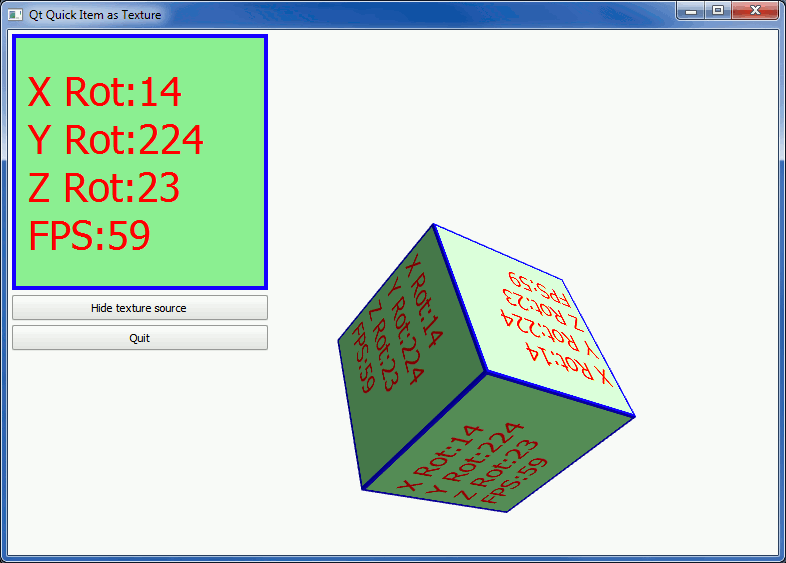
Using Qt Quick Item as a Texture▲
First we create a https:// with a label that displays the current frame rate and rotation values of the cube:
Rectangle {
    id: textureSource
    color: "lightgreen"
    width: 256
    height: 256
    border.color: "blue"
    border.width: 4
    layer.enabled: true
    layer.smooth: true
    Label {
        anchors.fill: parent
        anchors.margins: 16
        text: "X Rot:" + (canvas3d.xRotAnim | 0) + "\n"
            + "Y Rot:" + (canvas3d.yRotAnim | 0) + "\n"
            + "Z Rot:" + (canvas3d.zRotAnim | 0) + "\n"
            + "FPS:" + canvas3d.fps
        color: "red"
        font.pointSize: 26
        horizontalAlignment: Text.AlignLeft
        verticalAlignment: Text.AlignVCenter
    }
}
We want to use the above https:// as the texture on our 3D cube. As a https:// item doesn't implement https://() by itself, we make it layered by setting the layer.enabled property to true.
To create a Canvas3DTexture out of our layered https://, we create a https:// extension and the texture in the initializeGL() function in our JavaScript implementation:
canvasTextureProvider = gl.getExtension("QTCANVAS3D_texture_provider");
cubeTexture = canvasTextureProvider.createTextureFromSource(textureSourceItem);
Once the cubeTexture item is created, it can be used like any other texture item in the JavaScript.
The method of creating the texture from a Qt Quick item differs from how one would create texture from an HTML item in WebGL API. Textures created with https:// extension support automatic live updates, without having to call textureImage2D each frame to re-upload fresh texture data from the item.
List of Files▲
Files:
List of Files▲
-
quickitemtexture/main.cpp
-
quickitemtexture/qml/quickitemtexture/main.qml
-
quickitemtexture/qml/quickitemtexture/quickitemtexture.js
-
quickitemtexture/quickitemtexture.pro
-
quickitemtexture/quickitemtexture.qrc