


DateTimeAxis Example▲
Running the Example▲
To run the example from http://, open the Welcome mode and select the example from Examples. For more information, visit http://.
Creating Line Charts▲
To create line chart, https:// instance is needed. Let's create one.
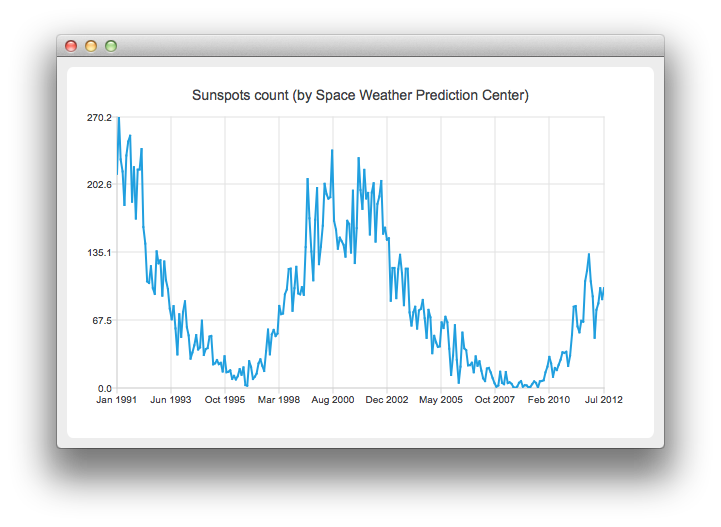
QLineSeries *series = new QLineSeries();On the charts we will present how the number of sun spots changes in time. The data (from the Space Weather Prediction Center) is read from a text file. In the snippet below, notice how the https:// method is used to convert the https:// object into a number that can be passed to the https:// append method.
// data from http://www.swpc.noaa.gov/ftpdir/weekly/RecentIndices.txt
// http://www.swpc.noaa.gov/ftpdir/weekly/README
// http://www.weather.gov/disclaimer
QFile sunSpots(":sun");
if (!sunSpots.open(QIODevice::ReadOnly | QIODevice::Text)) {
    return 1;
}

QTextStream stream(&sunSpots);
while (!stream.atEnd()) {
    QString line = stream.readLine();
    if (line.startsWith("#") || line.startsWith(":"))
        continue;
    QStringList values = line.split(" ", QString::SkipEmptyParts);
    QDateTime momentInTime;
    momentInTime.setDate(QDate(values[0].toInt(), values[1].toInt() , 15));
    series->append(momentInTime.toMSecsSinceEpoch(), values[2].toDouble());
}
sunSpots.close();
To present the data on the chart we need the https:// instance. We add the series to it, hide the legend, create the default axes and set the title of the chart.
QChart *chart = new QChart();
chart->addSeries(series);
chart->legend()->hide();
chart->setTitle("Sunspots count (by Space Weather Prediction Center)");
Since we use https://, calling createDefaultAxes will create https:// both as X- and Y-axis. To use https:// we need to set it manually to the chart. First, the instance of https:// is created, then the number of ticks to be shown is set. The number of sun spots is provided as an average for the month. Therefore we don't need the axis labels to contain the information about the time and the day. This is achieved by setting a custom label format. Please refer to the https://() method documentation to learn about the available format options.
QDateTimeAxis *axisX = new QDateTimeAxis;
axisX->setTickCount(10);
axisX->setFormat("MMM yyyy");
axisX->setTitleText("Date");
chart->addAxis(axisX, Qt::AlignBottom);
series->attachAxis(axisX);

QValueAxis *axisY = new QValueAxis;
axisY->setLabelFormat("%i");
axisY->setTitleText("Sunspots count");
chart->addAxis(axisY, Qt::AlignLeft);
series->attachAxis(axisY);
Then we create a https:// object with https:// as a parameter. This way we don't need to create the https:// scene ourselves. We also set the Antialiasing on to have the rendered lines look nicer.
QChartView *chartView = new QChartView(chart);
chartView->setRenderHint(QPainter::Antialiasing);
The chart is ready to be shown.
QMainWindow window;
window.setCentralWidget(chartView);
window.resize(820, 600);
window.show();