


MIME Type Browser Example▲
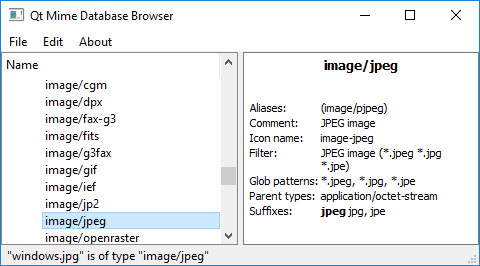
MIME Type Browser is intended to be a tool for exploring MIME types rather than an example showing the typical usage of Qt's MIME API.
Running the Example▲
To run the example from http://, open the Welcome mode and select the example from Examples. For more information, visit http://.
Main Window▲
The main window consists of a tree view displaying the hierarchy of MIME types based on the model MimetypeModel inheriting https:// on the left and a https:// for showing detailed information about the selected MIME type on the right.
It has a main menu with an option File/Detect File Type, which lets you pick a file and then displays its MIME type.
For more information, see https:// and https://.
List of Files▲
Files:
List of Files▲
-
mimetypes/mimetypebrowser/main.cpp
-
mimetypes/mimetypebrowser/mainwindow.cpp
-
mimetypes/mimetypebrowser/mainwindow.h
-
mimetypes/mimetypebrowser/mimetypebrowser.pro
-
mimetypes/mimetypebrowser/mimetypemodel.cpp
-
mimetypes/mimetypebrowser/mimetypemodel.h