


World Time Clock Builder Example▲
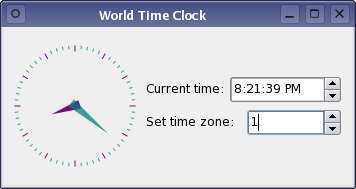
This example uses a form containing the custom widget plugin described in the https:// example, and dynamically generates a user interface using the https:// class, part of the https:// module.
Preparation▲
As with the https:// example, the project file for this example needs to include the appropriate definitions to ensure that it is built against the required Qt modules.
QT          += widgets uitools
SOURCES     = main.cpp
RESOURCES   = worldtimeclockbuilder.qrc
By appending form to the CONFIG declaration, we instruct qmake to generate a dependency on the libQtUiTools library containing the https:// classes.
Note that we do not inform qmake about any UI files, and so none will be processed and built into the application. The resource file contains an entry for the particular form that we wish to use:
<!DOCTYPE RCC><RCC version="1.0">
<qresource prefix="/forms">
   <file>form.ui</file>
</qresource>
</RCC>
Forms do not need to be included with the application in this way. We only include a form in the application's resources for convenience, and to keep the example short.
Loading and Building the Form▲
Since this example only loads and displays a pre-prepared form, all of the work can be done in the main() function. We are using a class from the https:// library so, in addition to any other Qt classes that are normally required to write an application, we must include the appropriate header file:
#include <QtUiTools>The main function initializes the resource system with the https://() macro and constructs an https:// instance in the usual way:
int main(int argc, char *argv[])
{
    Q_INIT_RESOURCE(worldtimeclockbuilder);

    QApplication app(argc, argv);

    QUiLoader loader;
We construct a https:// object to handle the form we want to use.
The form itself is obtained from the resource file system using the path defined in the resource file. We use the form loader to load and construct the form:
    QFile file(":/forms/form.ui");
    file.open(QFile::ReadOnly);

    QWidget *widget = loader.load(&file);

    file.close();
    widget->show();
Once the form has been loaded, the resource file can be closed and the widget is shown.
    return app.exec();
}
The form loader ensures that all the signal and slot connections between objects in the form are set up correctly when the form is loaded. As a result, the time is updated by the World Time Clock widget, and the time zone spin box can be used to change the position of the hour hand.
List of Files▲
Files:
List of Files▲
-
worldtimeclockbuilder/form.ui
-
worldtimeclockbuilder/main.cpp
-
worldtimeclockbuilder/worldtimeclockbuilder.pro
-
worldtimeclockbuilder/worldtimeclockbuilder.qrc