


Places List (QML)▲
Running the Example▲
To run the example from http://, open the Welcome mode and select the example from Examples. For more information, visit http://.
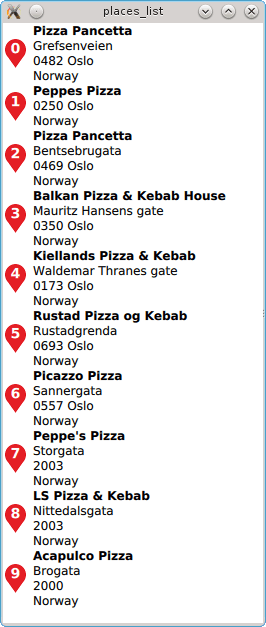
The Places List example demonstrates how to search for a list of places in a certain area and displays the result using a https://. In this particular case, a search for places associated with the term pizza is performed.
Performing a Place Search▲
To write a QML application that will show places in a list, we start by making the following import declarations.
import QtQuick 2.0
import QtPositioning 5.5
import QtLocation 5.6
Instantiate a https:// instance. The https:// is effectively the backend from where places are sourced from. Depending on the type of the plugin, some mandatory parameters may be need to be filled in. The most likely type of https:// are some form of service access token which are documented in the service plugin. As an example see the https:// documentation. In this snippet the osm plugin is used which does not require any further parameter:
Plugin {
    id: myPlugin
    name: "osm"
    //specify plugin parameters as necessary
    //PluginParameter {...}
    //PluginParameter {...}
    //...
}
Next we instantiate a https:// which we can use to specify search parameters and perform a places search operation. For illustrative purposes, https://() is invoked once construction of the model is complete. Typically https://() would be invoked in response to a user action such as a button click.
PlaceSearchModel {
    id: searchModel

    plugin: myPlugin

    searchTerm: "pizza"
    searchArea: QtPositioning.circle(startCoordinate);

    Component.onCompleted: update()

}
Finally we instantiate a https:// to show the search results found by the model. An inline delegate has been used and we have assumed that every search result is of https:// PlaceSearchesult. Consequently it is assumed that we always have access to the place https://, other search result types may not have a place https://.
ListView {
    anchors.fill: parent
    model: searchModel
    delegate: Component {
        Row {
            spacing: 5
            Marker { height: parent.height }
            Column {
                Text { text: title; font.bold: true }
                Text { text: place.location.address.text }
            }
        }
    }
}