


Places Map (QML)▲
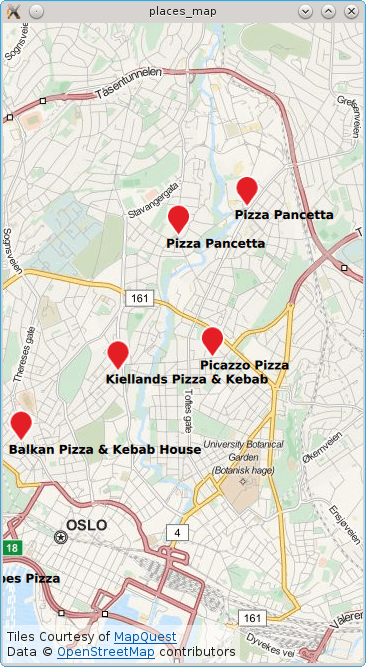
The example displays a map of the current location or, if no position is available, it uses Brisbane/Australia. Subsequently a search for places matching the term "pizza" is performed and each result shown on the map.
Running the Example▲
To run the example from http://, open the Welcome mode and select the example from Examples. For more information, visit http://.
Local Search▲
To write the QML application that will show places on a map, we start by making the following import declarations.
import QtQuick 2.0
import QtPositioning 5.5
import QtLocation 5.6
Instantiate a https:// instance. The https:// is effectively the backend from where places are sourced from. Depending on the chosen plugin some manadatory parameters may be needed. In this case the https:// is selected which does not have any mandatory parameters.
Plugin {
    id: myPlugin
    name: "osm" // "mapboxgl", "esri", ...
    //specify plugin parameters if necessary
    //PluginParameter {...}
    //PluginParameter {...}
    //...
}
Next we instantiate a https:// which we can use to specify search parameters and perform a places search operation. For illustrative purposes, https://() is invoked once construction of the model is complete. Typically https://() would be invoked in response to a user action such as a button click.
property variant locationOslo: QtPositioning.coordinate( 59.93, 10.76)

PlaceSearchModel {
    id: searchModel

    plugin: myPlugin

    searchTerm: "Pizza"
    searchArea: QtPositioning.circle(locationOslo)

    Component.onCompleted: update()
}
The map is displayed by using the https:// type and inside we declare the https:// and supply the search model and a delegate. An inline delegate has been used and we have assumed that every search result is of https:// PlaceSerachesult. Consequently it is assumed that we always have access to the place https://, other search result types may not have a place https://.
Map {
    id: map
    anchors.fill: parent
    plugin: myPlugin;
    center: locationOslo
    zoomLevel: 13

    MapItemView {
        model: searchModel
        delegate: MapQuickItem {
            coordinate: place.location.coordinate

            anchorPoint.x: image.width * 0.5
            anchorPoint.y: image.height

            sourceItem: Column {
                Image { id: image; source: "marker.png" }
                Text { text: title; font.bold: true }
            }
        }
    }
}
Finally, a PositionSource is used to reset the map to the curent location and find "pizza" places in the new area. The position information is updated every 2 minutes and if the new position is more than 500 meters away from the last pizza search area the place search is retriggered.
PositionSource {
    id: positionSource
    property variant lastSearchPosition: locationOslo
    active: true
    updateInterval: 120000 // 2 mins
    onPositionChanged:  {
        var currentPosition = positionSource.position.coordinate
        map.center = currentPosition
        var distance = currentPosition.distanceTo(lastSearchPosition)
        if (distance > 500) {
            // 500m from last performed pizza search
            lastSearchPosition = currentPosition
            searchModel.searchArea = QtPositioning.circle(currentPosition)
            searchModel.update()
        }
    }
}