


Audio Recorder Example▲
Audio Recorder demonstrates how to identify the available devices and supported codecs, and the use of https:// class.
Running the Example▲
To run the example from http://, open the Welcome mode and select the example from Examples. For more information, visit http://.
Displaying the Window and Audio Settings▲
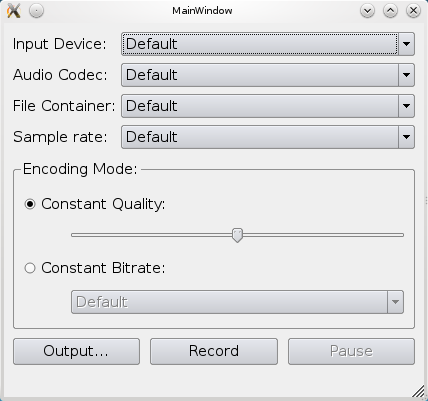
We display a window for the user to select the appropriate audio input, codec, container, and sample rate. Allow a setting of either quality or bitrate. Finally, the output file can be selected and recording can be started.
The lists are setup using the https://(), https://(), https://(), https://(), and https://() methods. The quality slider is setup from 0 (zero) to https:// with a default value of https://, while the bitrates are hardcoded into the list.
Recording Audio▲
To record audio we simply create a https:// object.
audioRecorder = new QAudioRecorder(this);And setup the lists as described above. The text on the record and pause buttons are toggled depending on the https:// of the audioRecorder object. This means that if the state is https:// then the button text will be "Record" and "Pause". In https:// the record button will have the text "Stop", and in https:// the pause button will have the text "Resume".
Pressing the buttons will also result in a toggle based on the state. If recording is stopped, then pressing the record button will setup the https:// based on the values of the selection lists, will set the encoding settings and container on the audioRecorder object, and start recording using the https://() method.
QAudioEncoderSettings settings;
settings.setCodec(boxValue(ui->audioCodecBox).toString());
settings.setSampleRate(boxValue(ui->sampleRateBox).toInt());
settings.setBitRate(boxValue(ui->bitrateBox).toInt());
settings.setQuality(QMultimedia::EncodingQuality(ui->qualitySlider->value()));
settings.setEncodingMode(ui->constantQualityRadioButton->isChecked() ?
                         QMultimedia::ConstantQualityEncoding :
                         QMultimedia::ConstantBitRateEncoding);

QString container = boxValue(ui->containerBox).toString();

audioRecorder->setEncodingSettings(settings, QVideoEncoderSettings(), container);
audioRecorder->record();
While recording, the status bar of the application is updated with duration information from the https:// signal from the audioRecorder object.
ui->statusbar->showMessage(tr("Recorded %1 sec").arg(duration / 1000));List of Files▲
Files:
List of Files▲
-
multimedia/audiorecorder/audiolevel.cpp
-
multimedia/audiorecorder/audiolevel.h
-
multimedia/audiorecorder/audiorecorder.cpp
-
multimedia/audiorecorder/audiorecorder.h
-
multimedia/audiorecorder/audiorecorder.pro
-
multimedia/audiorecorder/audiorecorder.ui
-
multimedia/audiorecorder/main.cpp