


QML CorkBoard Example▲
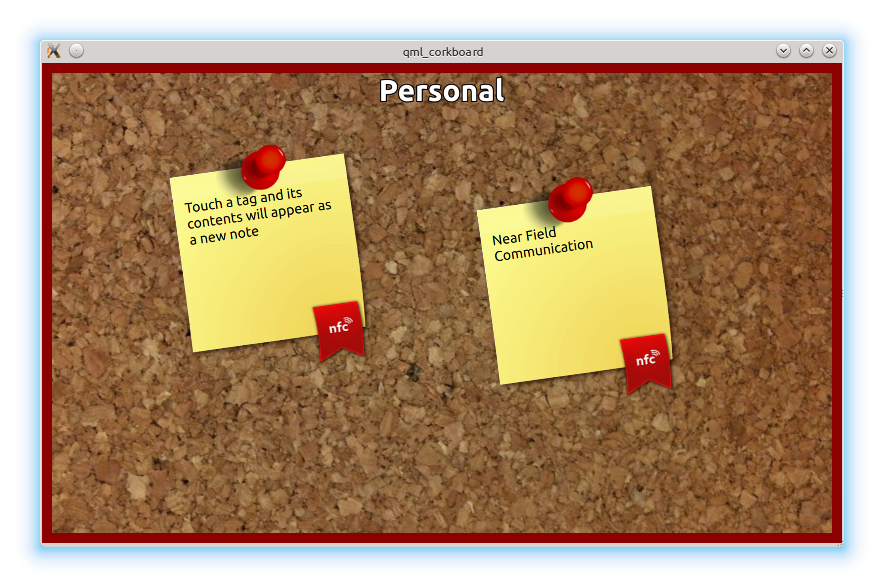
The QML corkboard example displays the contents of NDEF messages read from an NFC Tag. Each newly detected NDEF message is added to the corkboard and can be dragged into an arbitrary position on the board. The corkboard has a Personal and Work space. The workspace can be changed by sliding left or right.
Implementation details▲
In the corkboard example, we use the following .qml files:
-
corkboards.qml
-
Mode.qml
The main.cpp holds the application logic to load the main view stored in the corkboards.qml file.
int main(int argc, char *argv[])
{
    QGuiApplication application(argc, argv);
    QQuickView view;
    view.setSource(QUrl("qrc:/corkboards.qml"));
    view.setResizeMode(QQuickView::SizeRootObjectToView);
    view.show();
    return application.exec();
}
corkboards.qml details▲
There are two basic QML components in this file:
-
https://
-
https://
The first time the https:// QML type is instantiated, the Component.onCompleted handler will start the NFC polling process. The https:// handler parses NFC Messages that are detected by the https:// component and builds up a data model that is passed into the https://. Additionally, every time the https:// manager stops the polling process, the onPollingChanged handler restarts it.
    NearField {
        property bool requiresManualPolling: false
        orderMatch: false

        onMessageRecordsChanged: {
        ...
        onPollingChanged: {
        ...
        Component.onCompleted: {
        ...
        }
The https:// component takes a https:// as parameter (built from the NFC records). The view of each of the items of the model is defined by the Mode component (its implementation details can be found in the file Mode.qml). The data model consists of a list of corkboards. Each corkboard can display multiple NFC text message records.
    ListView {
        id: listView
        ...
        model: list
        ...
        delegate: Mode {}
    }
Mode.qml details▲
A corkboard title is displayed for each of the items that form part of the data model:
        Text {
            anchors { horizontalCenter: parent.horizontalCenter; top: parent.top; topMargin: 10}
            text: name;
            font { pixelSize: 30; bold: true }
Every text record that was read from an NFC message, is represented by a sticky note with its own position on the display. Initially the position is set randomly. The text on the sticky note is set on a https://.
        Repeater {
            model: notes
            Item {
                id: stickyPage

                x: ListView.width * (0.7 * Math.random() + 0.1)
                y: ListView.height * (0.7 * Math.random() + 0.1)
                ...
                Item {
                    id: sticky
                    ...
                    TextEdit {
                        id: myText
                        text: noteText
                        ...
                    }
                    ...
Running the Example▲
To run the example from http://, open the Welcome mode and select the example from Examples. For more information, visit http://.