


GeoFlickr (QML)▲
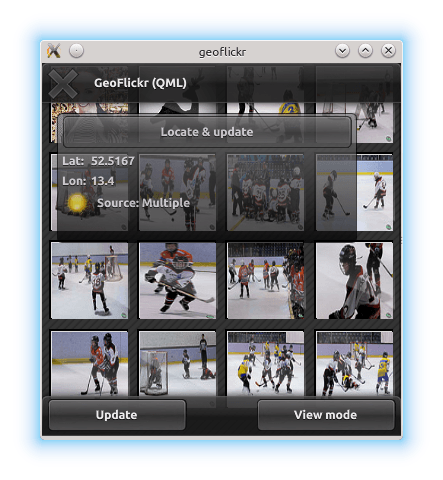
This is a small example, illustrating one of the very core parts of the https:// API: the ability to retrieve and use the user's current geographic position.
Key QML types shown in this example:
-
https://
-
https://
Running the Example▲
To run the example from http://, open the Welcome mode and select the example from Examples. For more information, visit http://.
Retrieving the Current Position▲
Retrieving the user's current position is achieved using the https:// type. In this example, we instantiate the https:// as part of the GeoTab component (the floating "window" describing current position and status).
    PositionSource {
        id: positionSource
        onPositionChanged: { planet.source = "images/sun.png"; }

        onSourceErrorChanged: {
            if (sourceError == PositionSource.NoError)
                return

            console.log("Source error: " + sourceError)
            activityText.fadeOut = true
            stop()
        }

        onUpdateTimeout: {
            activityText.fadeOut = true
        }
    }
When the "Locate and update" button is pressed, we first interrogate the https:// to check if it has an available backend for positioning data. If it does not, we fall back to using a pre-recorded NMEA log for demonstration. We then instruct the https:// to update.
    Button {
        id: locateButton
        text: "Locate & update"
        onClicked: {
            if (positionSource.supportedPositioningMethods ===
                    PositionSource.NoPositioningMethods) {
                positionSource.nmeaSource = "nmealog.txt";
                sourceText.text = "(filesource): " + printableMethod(positionSource.supportedPositioningMethods);
            }
            positionSource.update();
        }
    }
To share the new position data with the rest of the application, we use properties that we have created on the GeoTab component:
property variant coordinateUsing the Current Position▲
The longitude and latitude values retrieved here are eventually set on in properties on the RestModel component. The RestModel is an https://, which retrieves XML data from a URL and creates a data model by performing XPath queries on it.
In this case, it retrieves data from the Flickr REST API online, based on our current position
XmlListModel {
    property variant coordinate

    source: "https://api.flickr.com/services/rest/?" +
            "min_taken_date=2000-01-01+0:00:00&" +
            "extras=date_taken&" +
            "method=flickr.photos.search&" +
            "per_page=30&" +
            "sort=date-taken-desc&" +
            "api_key=e36784df8a03fea04c22ed93318b291c&" +
            "lat=" + coordinate.latitude + "&lon=" + coordinate.longitude;
    query: "/rsp/photos/photo"

    XmlRole { name: "title"; query: "@title/string()" }
    XmlRole { name: "datetaken"; query: "@datetaken/string()" }
    XmlRole { name: "farm"; query: "@farm/string()" }
    XmlRole { name: "server"; query: "@server/string()" }
    XmlRole { name: "id"; query: "@id/string()" }
    XmlRole { name: "secret"; query: "@secret/string()" }
}
This model data is then shown in a variety of Qt Quick views to produce the example application.
List of Files▲
Files:
List of Files▲
-
geoflickr/flickr-90.qml
-
geoflickr/flickr.qml
-
geoflickr/flickr.qrc
-
geoflickr/flickrcommon/Progress.qml
-
geoflickr/flickrcommon/RestModel.qml
-
geoflickr/flickrcommon/ScrollBar.qml
-
geoflickr/flickrcommon/Slider.qml
-
geoflickr/flickrmobile/Button.qml
-
geoflickr/flickrmobile/GeoTab.qml
-
geoflickr/flickrmobile/GridDelegate.qml
-
geoflickr/flickrmobile/ImageDetails.qml
-
geoflickr/flickrmobile/ListDelegate.qml
-
geoflickr/flickrmobile/TitleBar.qml
-
geoflickr/flickrmobile/ToolBar.qml
-
geoflickr/geoflickr.pro
-
geoflickr/geoflickr.qmlproject
-
geoflickr/qmllocationflickr.cpp
List of Files▲
Images:
List of Files▲
-
geoflickr/flickrmobile/images/gloss.png
-
geoflickr/flickrmobile/images/lineedit.png
-
geoflickr/flickrmobile/images/moon.png
-
geoflickr/flickrmobile/images/quit.png
-
geoflickr/flickrmobile/images/star.png
-
geoflickr/flickrmobile/images/stripes.png
-
geoflickr/flickrmobile/images/sun.png
-
geoflickr/flickrmobile/images/titlebar.png
-
geoflickr/flickrmobile/images/toolbutton.png