


Weather Info (C++/QML)▲
Key https:// classes used in this example:
-
https://
-
https://
Running the Example▲
To run the example from http://, open the Welcome mode and select the example from Examples. For more information, visit http://.
The example uses weather data provided by http://.
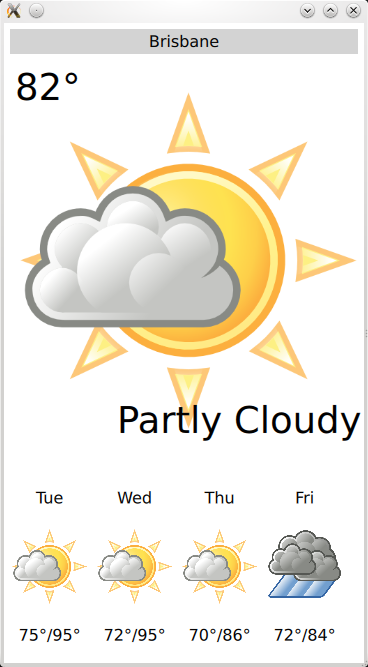
The key part of this example is the application's data model, contained in the WeatherData and AppModel classes. WeatherData represents the weather information taken from the HTTP service. It is a simple data class, but we give it Q_PROPERTies to expose it nicely to QML, later.
class WeatherData : public QObject {
    Q_OBJECT
    Q_PROPERTY(QString dayOfWeek
               READ dayOfWeek WRITE setDayOfWeek
               NOTIFY dataChanged)
    Q_PROPERTY(QString weatherIcon
               READ weatherIcon WRITE setWeatherIcon
               NOTIFY dataChanged)
    Q_PROPERTY(QString weatherDescription
               READ weatherDescription WRITE setWeatherDescription
               NOTIFY dataChanged)
    Q_PROPERTY(QString temperature
               READ temperature WRITE setTemperature
               NOTIFY dataChanged)

public:
    explicit WeatherData(QObject *parent = 0);
    WeatherData(const WeatherData &other);

    QString dayOfWeek() const;
    QString weatherIcon() const;
    QString weatherDescription() const;
    QString temperature() const;

    void setDayOfWeek(const QString &value);
    void setWeatherIcon(const QString &value);
    void setWeatherDescription(const QString &value);
    void setTemperature(const QString &value);

signals:
    void dataChanged();
};
AppModel models the state of the entire application. At startup, the application first begins by waiting for network connectivity. We do this using the https:// and https:// family of C++ APIs.
AppModel::AppModel(QObject *parent) :
        QObject(parent),
        d(new AppModelPrivate)
{
    // make sure we have an active network session
    d->nam = new QNetworkAccessManager(this);

    QNetworkConfigurationManager ncm;
    d->ns = new QNetworkSession(ncm.defaultConfiguration(), this);
    connect(d->ns, SIGNAL(opened()), this, SLOT(networkSessionOpened()));
    // the session may be already open. if it is, run the slot directly
    if (d->ns->isOpen())
        this->networkSessionOpened();
    // tell the system we want network
    d->ns->open();
}
Once the network session is open, we proceed to get the platform's default position source using QGeoPositionInfo::createDefaultSource()
void AppModel::networkSessionOpened()
{
    d->src = QGeoPositionInfoSource::createDefaultSource(this);

    if (d->src) {
        d->useGps = true;
        connect(d->src, SIGNAL(positionUpdated(QGeoPositionInfo)),
                this, SLOT(positionUpdated(QGeoPositionInfo)));
        connect(d->src, SIGNAL(error(QGeoPositionInfoSource::Error)),
                this, SLOT(positionError(QGeoPositionInfoSource::Error)));
        d->src->startUpdates();
    } else {
        d->useGps = false;
        d->city = "Brisbane";
        emit cityChanged();
        this->refreshWeather();
    }
}
If no default source is available, we take a static position and fetch weather for that. If, however, we do have a position source, we connect its positionUpdated() signal to a slot on the AppModel and call startUpdates(), which begins regular updates of device position.
When a position update is received, we use the longitude and latitude of the returned coordinate to retrieve the current "city" name for use in the weather lookup.
void AppModel::positionUpdated(QGeoPositionInfo gpsPos)
{
    d->coord = gpsPos.coordinate();

    if (!(d->useGps))
        return;

    queryCity();
}
To inform the UI about this process, the cityChanged() signal is emitted when a new city is used, and the weatherChanged() signal whenever a weather update occurs.
class AppModel : public QObject
{
    Q_OBJECT
    Q_PROPERTY(bool ready
               READ ready
               NOTIFY readyChanged)
    Q_PROPERTY(bool hasSource
               READ hasSource
               NOTIFY readyChanged)
    Q_PROPERTY(bool hasValidCity
               READ hasValidCity
               NOTIFY cityChanged)
    Q_PROPERTY(bool hasValidWeather
               READ hasValidWeather
               NOTIFY weatherChanged)
    Q_PROPERTY(bool useGps
               READ useGps WRITE setUseGps
               NOTIFY useGpsChanged)
    Q_PROPERTY(QString city
               READ city WRITE setCity
               NOTIFY cityChanged)
    Q_PROPERTY(WeatherData *weather
               READ weather
               NOTIFY weatherChanged)
    Q_PROPERTY(QQmlListProperty<WeatherData> forecast
               READ forecast
               NOTIFY weatherChanged)

public:
    explicit AppModel(QObject *parent = 0);
    ~AppModel();

    bool ready() const;
    bool hasSource() const;
    bool useGps() const;
    bool hasValidCity() const;
    bool hasValidWeather() const;
    void setUseGps(bool value);
    void hadError(bool tryAgain);

    QString city() const;
    void setCity(const QString &value);

    WeatherData *weather() const;
    QQmlListProperty<WeatherData> forecast() const;

public slots:
    Q_INVOKABLE void refreshWeather();

signals:
    void readyChanged();
    void useGpsChanged();
    void cityChanged();
    void weatherChanged();

};
We use a https:// for the weather forecast information, which contains the next 4 days of forecast weather. This makes it easy to access from QML.
To expose these to the QML UI layer, we use the https://() function. We call this once for each type we wish to register, before loading the actual QML file.
#include "appmodel.h"

int main(int argc, char *argv[])
{
    QLoggingCategory::setFilterRules("wapp.*.debug=false");
    QGuiApplication application(argc, argv);

    qmlRegisterType<WeatherData>("WeatherInfo", 1, 0, "WeatherData");
    qmlRegisterType<AppModel>("WeatherInfo", 1, 0, "AppModel");

    const QString mainQmlApp = QStringLiteral("qrc:///weatherinfo.qml");
    QQuickView view;
    view.setSource(QUrl(mainQmlApp));
    view.setResizeMode(QQuickView::SizeRootObjectToView);

    QObject::connect(view.engine(), SIGNAL(quit()), qApp, SLOT(quit()));
    view.setGeometry(QRect(100, 100, 360, 640));
    view.show();
    return application.exec();
}
Finally, in the actual QML, we instantiate the AppModel.
import WeatherInfo 1.0

Item {
    id: window
    AppModel {
        id: model
        onReadyChanged: {
            if (model.ready)
                window.state = "ready"
            else
                window.state = "loading"
        }
    }
}
Once instantiated like this, we can use its properties elsewhere in the QML document:
            BigForecastIcon {
                id: current

                width: main.width -12
                height: 2 * (main.height - 25 - 12) / 3

                weatherIcon: (model.hasValidWeather
                          ? model.weather.weatherIcon
                          : "01d")
            }
Files and Attributions▲
The example bundles the following images from Third-Party sources:
|
Tango Icons |
Public Domain |
|
Tango Weather Icon Pack by Darkobra |
Public Domain |
List of Files▲
Files:
List of Files▲
-
weatherinfo/appmodel.cpp
-
weatherinfo/appmodel.h
-
weatherinfo/components/BigForecastIcon.qml
-
weatherinfo/components/ForecastIcon.qml
-
weatherinfo/components/WeatherIcon.qml
-
weatherinfo/main.cpp
-
weatherinfo/weatherinfo.pro
-
weatherinfo/weatherinfo.qml
-
weatherinfo/weatherinfo.qrc
List of Files▲
Images:
List of Files▲
-
weatherinfo/icons/weather-few-clouds.png
-
weatherinfo/icons/weather-fog.png
-
weatherinfo/icons/weather-haze.png
-
weatherinfo/icons/weather-icy.png
-
weatherinfo/icons/weather-overcast.png
-
weatherinfo/icons/weather-showers.png
-
weatherinfo/icons/weather-sleet.png
-
weatherinfo/icons/weather-snow.png
-
weatherinfo/icons/weather-storm.png
-
weatherinfo/icons/weather-sunny-very-few-clouds.png
-
weatherinfo/icons/weather-sunny.png
-
weatherinfo/icons/weather-thundershower.png