


Qt Quick Particles Examples - Image Particles▲
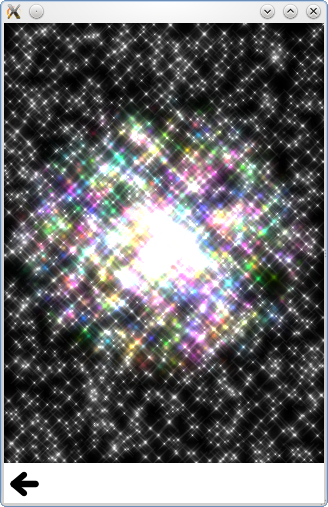
This is a collection of small QML examples relating to using Affectors in the particle system. Each example is a small QML file emphasizing a particular type or feature.
All at once shows off several of the features of https:// at the same time.
sprites: [
    Sprite {
        name: "bear"
        source: "../../images/bear_tiles.png"
        frameCount: 13
        frameDuration: 120
    }
]
colorVariation: 0.5
rotationVelocityVariation: 360
colorTable: "../../images/colortable.png"
Colored shows a simple https:// with some color variation.
ImageParticle {
    anchors.fill: parent
    source: "qrc:///particleresources/star.png"
    alpha: 0
    alphaVariation: 0.2
    colorVariation: 1.0
}
Color Table sets the color over life on the particles to provide a fixed rainbow effect.
source: "qrc:///particleresources/glowdot.png"
colorTable: "../../images/colortable.png"
sizeTable: "../../images/colortable.png"
Deformation spins and squishes a starfish particle.
ImageParticle {
    system: sys
    groups: ["goingLeft", "goingRight"]
    source: "../../images/starfish_4.png"
    rotation: 90
    rotationVelocity: 90
    autoRotation: true
}
ImageParticle {
    system: sys
    groups: ["goingDown"]
    source: "../../images/starfish_0.png"
    rotation: 180
    yVector: PointDirection { y: 0.5; yVariation: 0.25; xVariation: 0.25; }
}
Rotation demonstrates the autoRotate property, so that particles rotate in the direction that they travel.
Sharing demonstrates what happens when multiple ImageParticles try to render the same particle. The following https:// renders the particles inside the https://:
ImageParticle {
    anchors.fill: parent
    system: particles
    source: "../../images/flower.png"
    alpha: 0.1
    color: "white"
    rotationVariation: 180
    z: -1
}
The following https:// is placed inside the list highlight, and renders the particles above the other https://.
ImageParticle {
    anchors.fill: parent
    system: particles
    source: "../../images/flower.png"
    color: "red"
    clip: true
    alpha: 1.0
}
Note that because it sets the color and alpha in this https://, it renders the particles in a different color. Since it doesn't specify anything about the rotation, it shares the rotation with the other https:// so that the flowers are rotated the same way in both. Note that you can undo rotation in another https://, you just need to explicitly set rotationVariation to 0.
Sprites demonstrates using an image particle to render animated sprites instead of static images for each particle.
List of Files▲
Files:
List of Files▲
-
particles/imageparticle/content/allatonce.qml
-
particles/imageparticle/content/colored.qml
-
particles/imageparticle/content/colortable.qml
-
particles/imageparticle/content/deformation.qml
-
particles/imageparticle/content/rotation.qml
-
particles/imageparticle/content/sharing.qml
-
particles/imageparticle/content/sprites.qml
-
particles/imageparticle/imageparticle.pro
-
particles/imageparticle/imageparticle.qml
-
particles/imageparticle/imageparticle.qmlproject
-
particles/imageparticle/imageparticle.qrc
-
particles/imageparticle/main.cpp