


Qt Quick Controls - Swipe to Remove▲
This example demonstrates how https:// can be used to implement removal of list items by swiping. This UI pattern is often used in touch user interfaces.
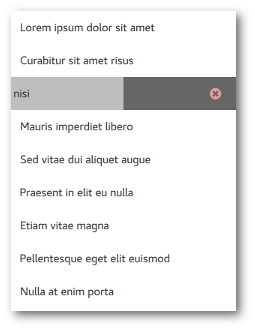
Each list item can be swiped to the left, which reveals a label on the https:// side indicating that the item will be removed if the swipe is completed. The following snippet contains the implementation of the side item.
swipe.right: Rectangle {
    width: parent.width
    height: parent.height

    clip: true
    color: SwipeDelegate.pressed ? "#555" : "#666"

    Label {
        font.family: "Fontello"
        text: delegate.swipe.complete ? "\ue805" // icon-cw-circled
                                      : "\ue801" // icon-cancel-circled-1

        padding: 20
        anchors.fill: parent
        horizontalAlignment: Qt.AlignRight
        verticalAlignment: Qt.AlignVCenter

        opacity: 2 * -delegate.swipe.position

        color: Material.color(delegate.swipe.complete ? Material.Green : Material.Red, Material.Shade200)
        Behavior on color { ColorAnimation { } }
    }

    Label {
        text: qsTr("Removed")
        color: "white"

        padding: 20
        anchors.fill: parent
        horizontalAlignment: Qt.AlignLeft
        verticalAlignment: Qt.AlignVCenter

        opacity: delegate.swipe.complete ? 1 : 0
        Behavior on opacity { NumberAnimation { } }
    }

    SwipeDelegate.onClicked: delegate.swipe.close()
    SwipeDelegate.onPressedChanged: undoTimer.stop()
}
The following snippet presents how the logic of removing items is implemented. When the swipe is https://, it starts a timer that waits a few seconds to let the user undo the remove action. Once the undo timer triggers, the item is removed from the list:
Timer {
    id: undoTimer
    interval: 3600
    onTriggered: listModel.remove(index)
}

swipe.onCompleted: undoTimer.start()
Finally, the removal of an item triggers the following transitions. The https:// transition applies to the item that is removed, and the https:// transition applies to the other items that got displaced due to the removal:
remove: Transition {
    SequentialAnimation {
        PauseAnimation { duration: 125 }
        NumberAnimation { property: "height"; to: 0; easing.type: Easing.InOutQuad }
    }
}

displaced: Transition {
    SequentialAnimation {
        PauseAnimation { duration: 125 }
        NumberAnimation { property: "y"; easing.type: Easing.InOutQuad }
    }
}
Running the Example▲
To run the example from http://, open the Welcome mode and select the example from Examples. For more information, visit http://.
List of Files▲
Files:
List of Files▲
-
swipetoremove/swipetoremove.cpp
-
swipetoremove/swipetoremove.pro
-
swipetoremove/swipetoremove.qml