


Qt Quick Controls 1 - Text Editor Example▲
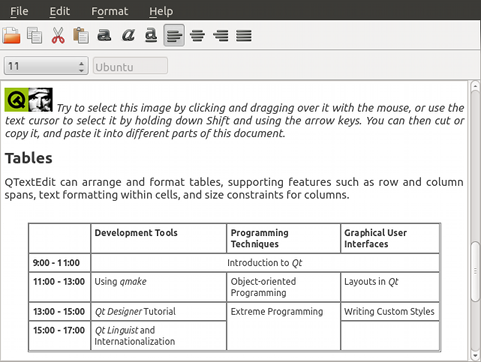
The Text Editor Example presents a sample HTML file using the https:// control, preserving the HTML formatting. It uses a C++ class to handle the document by providing options to open, format, and edit. The app also lets you open and edit a plain text files.
The C++ class, DocumentHandler, extends https:// and is registered as a QML type under the namespace, "org.qtproject.example 1.0".
The following snippets show how the type is registered under a namespace and later imported by main.qml.
QML type registration:
#include <QtQml/qqml.h>
...
qmlRegisterType<DocumentHandler>("org.qtproject.example", 1, 0, "DocumentHandler");
...
QML namespace import:
import org.qtproject.example 1.0For more information about registering C++ classes as QML types, see https://.
Running the Example▲
To run the example from http://, open the Welcome mode and select the example from Examples. For more information, visit http://.
List of Files▲
Files:
List of Files▲
-
texteditor/qml/ToolBarSeparator.qml
-
texteditor/qml/main.qml
-
texteditor/resources.qrc
-
texteditor/src/documenthandler.cpp
-
texteditor/src/documenthandler.h
-
texteditor/src/main.cpp
-
texteditor/texteditor.pro
List of Files▲
Images:
List of Files▲
-
texteditor/qml/images/editcopy.png
-
texteditor/qml/images/editcut.png
-
texteditor/qml/images/editpaste.png
-
texteditor/qml/images/editredo.png
-
texteditor/qml/images/editundo.png
-
texteditor/qml/images/exportpdf.png
-
texteditor/qml/images/filenew.png
-
texteditor/qml/images/fileopen.png
-
texteditor/qml/images/fileprint.png
-
texteditor/qml/images/filesave.png
-
texteditor/qml/images/qt-logo.png
-
texteditor/qml/images/textbold.png
-
texteditor/qml/images/textcenter.png
-
texteditor/qml/images/textitalic.png
-
texteditor/qml/images/textjustify.png
-
texteditor/qml/images/textleft.png
-
texteditor/qml/images/textright.png
-
texteditor/qml/images/textunder.png
-
texteditor/qml/images/zoomin.png
-
texteditor/qml/images/zoomout.png