


Qt Quick Controls 1 - UI Forms▲
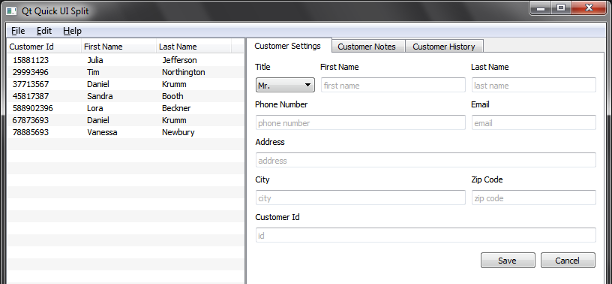
UI Forms demonstrates how to separate the application logic from the UI using ui.qml files. The example is a simple interface to a customer database, purely written in QML and JavaScript.
UI Forms are rigorously split into .qml and .js files that contain the business logic, and .ui.qml files that only contain the purely declarative description of the UI. The .ui.qml files act as forms and they should be only edited in the Design mode of Qt Creator.
Exporting Items from Forms▲
In all forms, items that are supposed to interact with the application logic are exported:
property alias cancel: cancel
property alias save: save
property alias textArea: textArea
This is the way the items are exported in NotesForm.ui.qml, so they can be used in Notes.ui.qml to implement the logic as follows:
function readData() {
    CustomerModel.selection.forEach(function (rowIndex) {
        form.textArea.text = CustomerModel.model.get(rowIndex).notes
    })

    save.enabled = true
    cancel.enabled = true
    form.textArea.enabled = true
}

function writeData() {
    CustomerModel.selection.forEach(function (rowIndex) {
        var data = CustomerModel.model.get(rowIndex)
        data.notes = form.textArea.text
        CustomerModel.model.set(rowIndex, data)
    })
}

cancel.onClicked: readData()
save.onClicked: writeData()
Implementing the Backend in a Singleton▲
Because the https:// is accessed from several different .qml files, we access the https:// through a singleton defined in CustomerModel.qml and registered in main.ccp. This way we do not have to rely on the QML context scoping rules to access the https://.
Running the Example▲
To run the example from http://, open the Welcome mode and select the example from Examples. For more information, visit http://.
List of Files▲
Files:
List of Files▲
-
uiforms/MainForm.ui.qml
-
uiforms/main.cpp
-
uiforms/main.qml
-
uiforms/qml/CustomerModel.qml
-
uiforms/qml/History.qml
-
uiforms/qml/HistoryForm.ui.qml
-
uiforms/qml/Notes.qml
-
uiforms/qml/NotesForm.ui.qml
-
uiforms/qml/Settings.qml
-
uiforms/qml/SettingsForm.ui.qml
-
uiforms/uiforms.pro
-
uiforms/uiforms.qrc