


Imagine Style▲
The Imagine Style is based on configurable image assets. https://
-
Import Statement: import QtQuick.Controls.Imagine 2.12
-
Since: Qt 5.10
Attached Properties▲
-
https:// : string
Detailed Description▲
The Imagine style is based on image assets. The style comes with a default set of images, but the images can be easily changed by providing a directory with images using a predefined naming convention.
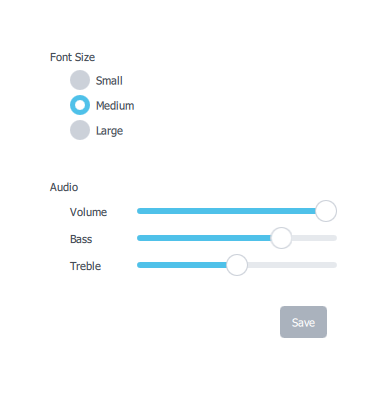
To run an application with the Imagine style, see https://.
File Names▲
The image files are named using the following convention:
<control>-<element>-<states>
The <control> and <element> sections are mandatory, but the <states> section is optional. For example, if a single file named "button-background.9.png" is provided for https://, it will be used for every state that Button supports. It is up to the developer to decide the set of states that they will provide images for. However, it is recommended to provide images for the most common control states where possible, such as disabled, pressed, etc. This will ensure that interactive controls visually behave as the end user would expect them to.
Element Reference▲
The following table lists which elements are supported for each control, along with the possible states for that element, and the file extension that it expects. An element is an image that represents a certain visual part of the control. For example, Button's "background" element represents its https://.
|
Control |
Element |
States |
Extension |
|---|---|---|---|
|
https:// |
background |
active |
.9.png (or .png) |
|
overlay |
modal |
.9.png (or .png) |
|
|
https:// |
animation |
disabled, running, mirrored, hovered |
.webp |
|
background |
same as above |
.webp |
|
|
https:// |
background |
disabled, pressed, checked, checkable, focused, highlighted, flat, mirrored, hovered |
.9.png |
|
https:// |
background |
disabled, pressed, checked, partially-checked, focused, mirrored, hovered |
.9.png (or .png) |
|
indicator |
same as above |
.png |
|
|
https:// |
background |
disabled, pressed, checked, partially-checked, focused, highlighted, mirrored, hovered |
.9.png (or .png) |
|
indicator |
same as above |
.png |
|
|
https:// |
background |
disabled, pressed, editable, open, focused, mirrored, hovered, flat |
.9.png (or .png) |
|
indicator |
same as above |
.png |
|
|
popup |
same as above |
.9.png (or .png) |
|
|
https:// |
background |
disabled, pressed, checked, checkable, focused, mirrored, hovered |
.9.png (or .png) |
|
progress |
same as above |
.9.png (or .png) |
|
|
mask |
same as above |
.9.png (or .png) |
|
|
https:// |
background |
disabled, pressed, focused, mirrored, hovered |
.9.png (or .png) |
|
handle |
same as above |
.9.png (or .png) |
|
|
https:// |
background |
modal, dim |
.9.png (or .png) |
|
title |
same as above |
.9.png (or .png) |
|
|
overlay |
modal |
.9.png (or .png) |
|
|
https:// |
background |
disabled, mirrored |
.9.png (or .png) |
|
https:// |
background |
modal, dim, top, left, right, bottom |
.9.png (or .png) |
|
overlay |
modal |
.9.png (or .png) |
|
|
https:// |
background |
disabled, mirrored |
.9.png (or .png) |
|
https:// |
background |
disabled, mirrored |
.9.png (or .png) |
|
title |
same as above |
.9.png (or .png) |
|
|
https:// |
background |
disabled, pressed, focused, highlighted, mirrored, hovered |
.9.png (or .png) |
|
https:// |
background |
disabled, mirrored, hovered |
.9.png (or .png) |
|
https:// |
background |
modal, dim |
.9.png (or .png) |
|
overlay |
modal |
.9.png (or .png) |
|
|
https:// |
arrow |
disabled, pressed, checked, focused, highlighted, mirrored, hovered |
.png |
|
background |
same as above |
.9.png (or .png) |
|
|
indicator |
same as above |
.png |
|
|
https:// |
background |
disabled, mirrored |
.9.png (or .png) |
|
separator |
same as above |
.9.png (or .png) |
|
|
https:// |
background |
disabled, mirrored |
.9.png (or .png) |
|
https:// |
background |
disabled, mirrored, hovered |
.9.png (or .png) |
|
delegate |
disabled, pressed, current, mirrored, hovered |
.png |
|
|
https:// |
background |
disabled, mirrored |
.9.png (or .png) |
|
https:// |
background |
modal, dim |
.9.png (or .png) |
|
overlay |
modal |
.9.png (or .png) |
|
|
https:// |
animation |
disabled, mirrored, hovered |
.png |
|
background |
disabled, indeterminate, mirrored, hovered |
.9.png (or .png) |
|
|
mask |
same as above |
.9.png (or .png) |
|
|
progress |
same as above |
.9.png (or .png) |
|
|
https:// |
background |
disabled, pressed, checked, focused, mirrored, hovered |
.9.png (or .png) |
|
indicator |
same as above |
.png |
|
|
https:// |
background |
disabled, pressed, checked, focused, highlighted, mirrored, hovered |
.9.png (or .png) |
|
indicator |
same as above |
.png |
|
|
https:// |
background |
vertical, horizontal, disabled, focused, mirrored, hovered |
.9.png (or .png) |
|
https:// |
progress |
same as above |
.9.png (or .png) |
|
handle |
first, second, vertical, horizontal, disabled, pressed, focused, mirrored, hovered |
.png |
|
|
https:// |
background |
disabled, pressed, checked, checkable, focused, highlighted, flat, mirrored, hovered |
.9.png (or .png) |
|
https:// |
background |
vertical, horizontal, disabled, interactive, pressed, mirrored, hovered |
.9.png (or .png) |
|
handle |
same as above |
.9.png (or .png) |
|
|
https:// |
background |
vertical, horizontal, disabled, mirrored, hovered |
.9.png (or .png) |
|
handle |
same as above |
.9.png (or .png) |
|
|
https:// |
background |
disabled, mirrored |
.9.png (or .png) |
|
https:// |
background |
vertical, horizontal, disabled, pressed, focused, mirrored, hovered |
.9.png (or .png) |
|
handle |
same as above |
.9.png (or .png) |
|
|
progress |
same as above |
.9.png (or .png) |
|
|
https:// |
background |
disabled, editable, focused, mirrored, hovered |
.9.png (or .png) |
|
editor |
disabled, focused, mirrored, hovered |
.9.png (or .png) |
|
|
indicator |
up, down, disabled, editable, pressed, focused, mirrored, hovered |
.9.png (or .png) |
|
|
https:// |
background |
disabled, mirrored |
.9.png (or .png) |
|
https:// |
background |
disabled, pressed, focused, highlighted, mirrored, hovered |
.9.png (or .png) |
|
https:// |
background |
vertical, horizontal, disabled, interactive, focused, mirrored |
.9.png (or .png) |
|
https:// |
background |
disabled, pressed, checked, focused, mirrored, hovered |
.9.png (or .png) |
|
handle |
same as above |
.9.png (or .png) |
|
|
indicator |
same as above |
.9.png (or .png) |
|
|
https:// |
background |
disabled, pressed, checked, focused, highlighted, mirrored, hovered |
.9.png (or .png) |
|
handle |
same as above |
.9.png (or .png) |
|
|
indicator |
same as above |
.9.png (or .png) |
|
|
https:// |
background |
disabled, header, footer, mirrored |
.9.png (or .png) |
|
https:// |
background |
disabled, pressed, checked, focused, mirrored, hovered |
.9.png (or .png) |
|
https:// |
background |
disabled, focused, mirrored, hovered |
.9.png (or .png) |
|
https:// |
background |
disabled, focused, mirrored, hovered |
.9.png (or .png) |
|
https:// |
background |
disabled, header, footer, mirrored |
.9.png (or .png) |
|
https:// |
background |
disabled, pressed, checked, checkable, focused, highlighted, flat, mirrored, hovered |
.9.png (or .png) |
|
https:// |
background |
vertical, horizontal, disabled, mirrored |
.9.png (or .png) |
|
separator |
same as above |
.9.png (or .png) |
|
|
https:// |
background |
.9.png (or .png) |
|
|
https:// |
background |
disabled, focused, mirrored, hovered |
.9.png (or .png) |
Asset Examples▲
The following table lists examples of assets (taken from the default Imagine style assets) for all controls. The list is not exhaustive, as not all elements need assets, but it can be used as a guide when creating your own assets.
|
Control |
Element |
States |
Asset |
Notes |
|---|---|---|---|---|
|
https:// |
background |
 |
https:// 1 |
|
|
overlay |
 |
https:// 1 |
||
|
overlay |
modal |
 |
https:// 1 |
|
|
https:// |
background |
 |
||
|
background |
disabled |
 |
||
|
background |
focused |
 |
||
|
background |
pressed |
 |
||
|
background |
checked |
 |
||
|
background |
checked, disabled |
 |
||
|
background |
checked, focused |
 |
||
|
background |
checked, hovered |
 |
||
|
background |
highlighted |
 |
||
|
background |
highlighted, disabled |
 |
||
|
background |
highlighted, focused |
 |
||
|
background |
highlighted, hovered |
 |
||
|
background |
highlighted, pressed |
 |
||
|
background |
highlighted, checked |
 |
||
|
background |
hovered |
 |
||
|
background |
flat |
 |
||
|
background |
flat, disabled |
 |
||
|
background |
flat, hovered |
 |
||
|
background |
flat, pressed |
 |
||
|
background |
flat, checked |
 |
||
|
https:// |
indicator |
 |
||
|
indicator |
disabled |
 |
||
|
indicator |
pressed |
 |
||
|
indicator |
checked |
 |
||
|
indicator |
checked, pressed |
 |
||
|
indicator |
checked, hovered |
 |
||
|
indicator |
checked, focused |
 |
||
|
indicator |
partially, checked |
 |
||
|
indicator |
partially, checked, pressed |
 |
||
|
indicator |
partially, checked, focused |
 |
||
|
indicator |
partially, checked, hovered |
 |
||
|
indicator |
focused |
 |
||
|
indicator |
hovered |
 |
||
|
https:// |
background |
 |
||
|
background |
disabled |
 |
||
|
background |
pressed |
 |
||
|
background |
focused |
 |
||
|
background |
hovered |
 |
||
|
indicator |
 |
|||
|
indicator |
disabled |
 |
||
|
indicator |
pressed |
 |
||
|
indicator |
checked |
 |
||
|
indicator |
checked, pressed |
 |
||
|
indicator |
checked, focused |
 |
||
|
indicator |
checked, hovered |
 |
||
|
indicator |
focused |
 |
||
|
indicator |
hovered |
 |
||
|
indicator |
partially, checked |
 |
||
|
indicator |
partially, checked, pressed |
 |
||
|
indicator |
partially, checked, focused |
 |
||
|
indicator |
partially, checked, hovered |
 |
||
|
indicator |
hovered |
|
||
|
https:// |
background |
 |
||
|
background |
disabled |
 |
||
|
background |
focused |
 |
||
|
background |
hovered |
 |
||
|
background |
pressed |
 |
||
|
background |
open |
 |
||
|
background |
editable |
 |
||
|
background |
editable, focused |
 |
||
|
background |
editable, disabled |
 |
||
|
indicator |
 |
|||
|
indicator |
disabled |
 |
||
|
indicator |
editable |
 |
||
|
indicator |
editable, disabled |
 |
||
|
indicator |
editable, mirrored |
 |
||
|
indicator |
editable, mirrored, disabled |
 |
||
|
popup |
 |
|||
|
https:// |
background |
 |
||
|
background |
disabled |
 |
||
|
background |
disabled, checked |
 |
||
|
background |
focused |
 |
||
|
background |
pressed |
 |
||
|
background |
checked |
 |
||
|
background |
checked, focused |
 |
||
|
background |
checked, hovered |
 |
||
|
background |
hovered |
 |
||
|
progress |
 |
|||
|
progress |
disabled |
 |
||
|
mask |
 |
|||
|
https:// |
background |
 |
||
|
background |
disabled |
 |
||
|
background |
focused |
 |
||
|
handle |
 |
|||
|
handle |
disabled |
 |
||
|
handle |
focused |
 |
||
|
handle |
focused, pressed |
 |
||
|
handle |
focused, hovered |
 |
||
|
handle |
pressed |
 |
||
|
handle |
hovered |
 |
||
|
https:// |
background |
 |
||
|
overlay |
 |
https:// 1 |
||
|
overlay |
modal |
 |
https:// 1 |
|
|
https:// |
background |
 |
||
|
https:// |
background |
left |
 |
|
|
background |
right |
 |
||
|
background |
top |
 |
||
|
background |
bottom |
 |
||
|
overlay |
 |
https:// 1 |
||
|
overlay |
modal |
 |
https:// 1 |
|
|
https:// |
background |
 |
||
|
https:// |
background |
 |
||
|
title |
 |
|||
|
https:// |
background |
 |
||
|
background |
disabled |
 |
||
|
background |
pressed |
 |
||
|
background |
focused |
 |
||
|
background |
hovered |
 |
||
|
background |
highlighted |
 |
||
|
https:// |
background |
 |
||
|
https:// |
background |
 |
||
|
background |
highlighted |
 |
||
|
arrow |
 |
|||
|
arrow |
mirrored |
 |
||
|
arrow |
disabled |
 |
||
|
arrow |
mirrored, disabled |
 |
||
|
indicator |
 |
|||
|
indicator |
disabled |
 |
||
|
indicator |
pressed |
 |
||
|
indicator |
checked |
 |
||
|
indicator |
checked, pressed |
 |
||
|
indicator |
checked, focused |
 |
||
|
indicator |
checked, hovered |
 |
||
|
indicator |
focused |
 |
||
|
indicator |
hovered |
 |
||
|
https:// |
separator |
 |
||
|
https:// |
background |
 |
https:// 1 |
|
|
https:// |
delegate |
 |
||
|
delegate |
disabled |
 |
||
|
delegate |
disabled, current |
 |
||
|
delegate |
pressed |
 |
||
|
delegate |
current |
 |
||
|
https:// |
background |
 |
||
|
https:// |
background |
 |
https:// 1 |
|
|
overlay |
 |
https:// 1 |
||
|
overlay |
modal |
 |
||
|
https:// |
background |
 |
||
|
progress |
 |
|||
|
mask |
 |
|||
|
https:// |
indicator |
 |
||
|
indicator |
disabled |
 |
||
|
indicator |
pressed |
 |
||
|
indicator |
checked |
 |
||
|
indicator |
checked, focused |
 |
||
|
indicator |
checked, hovered |
 |
||
|
indicator |
checked, pressed |
 |
||
|
indicator |
focused |
 |
||
|
indicator |
hovered |
 |
||
|
https:// |
background |
 |
||
|
background |
disabled |
 |
||
|
background |
pressed |
 |
||
|
background |
focused |
 |
||
|
background |
hovered |
 |
||
|
indicator |
 |
|||
|
indicator |
disabled |
 |
||
|
indicator |
pressed |
 |
||
|
indicator |
checked |
 |
||
|
indicator |
checked, focused |
 |
||
|
indicator |
checked, hovered |
 |
||
|
indicator |
checked, pressed |
 |
||
|
indicator |
focused |
 |
||
|
indicator |
hovered |
 |
||
|
https:// |
background |
vertical |
 |
|
|
background |
horizontal |
 |
||
|
progress |
vertical |
 |
||
|
progress |
vertical, disabled |
 |
||
|
progress |
horizontal |
 |
||
|
progress |
horizontal, disabled |
 |
||
|
handle |
 |
|||
|
handle |
disabled |
 |
||
|
handle |
focused |
 |
||
|
handle |
focused, hovered |
 |
||
|
handle |
focused, pressed |
 |
||
|
handle |
hovered |
 |
||
|
handle |
pressed |
 |
||
|
https:// |
background |
 |
||
|
background |
disabled |
 |
||
|
background |
disabled, checked |
 |
||
|
background |
focused |
 |
||
|
background |
pressed |
 |
||
|
background |
checked |
 |
||
|
background |
checked, focused |
 |
||
|
background |
checked, hovered |
 |
||
|
background |
highlighted |
 |
||
|
background |
highlighted, pressed |
 |
||
|
background |
highlighted, focused |
 |
||
|
background |
highlighted, hovered |
 |
||
|
background |
hovered |
 |
||
|
https:// |
handle |
 |
||
|
handle |
disabled |
 |
||
|
handle |
interactive |
 |
||
|
handle |
interactive, disabled |
 |
||
|
handle |
interactive, pressed |
 |
||
|
handle |
interactive, hovered |
 |
||
|
https:// |
handle |
 |
||
|
https:// |
background |
vertical |
 |
|
|
background |
horizontal |
 |
||
|
progress |
vertical |
 |
||
|
progress |
vertical, disabled |
 |
||
|
progress |
horizontal |
 |
||
|
progress |
horizontal, disabled |
 |
||
|
handle |
 |
|||
|
handle |
disabled |
 |
||
|
handle |
focused |
 |
||
|
handle |
focused, hovered |
 |
||
|
handle |
focused, pressed |
 |
||
|
handle |
hovered |
 |
||
|
handle |
pressed |
 |
||
|
https:// |
background |
 |
||
|
background |
disabled |
 |
||
|
background |
focused |
 |
||
|
background |
editable |
 |
||
|
indicator |
up |
 |
||
|
indicator |
up, disabled |
 |
||
|
indicator |
up, pressed |
 |
||
|
indicator |
up, focused |
 |
||
|
indicator |
up, mirrored |
 |
||
|
indicator |
up, hovered |
 |
||
|
indicator |
up, editable |
 |
||
|
indicator |
up, editable, pressed |
 |
||
|
indicator |
up, editable, focused |
 |
||
|
indicator |
up, editable, mirrored |
 |
||
|
indicator |
up, editable, hovered |
 |
||
|
indicator |
down |
 |
||
|
indicator |
down, disabled |
 |
||
|
indicator |
down, pressed |
 |
||
|
indicator |
down, focused |
 |
||
|
indicator |
down, mirrored |
 |
||
|
indicator |
down, hovered |
 |
||
|
indicator |
down, editable |
 |
||
|
indicator |
down, editable, pressed |
 |
||
|
indicator |
down, editable, focused |
 |
||
|
indicator |
down, editable, mirrored |
 |
||
|
indicator |
down, editable, hovered |
 |
||
|
https:// |
background |
 |
||
|
background |
disabled |
 |
||
|
background |
pressed |
 |
||
|
background |
focused |
 |
||
|
background |
hovered |
 |
||
|
https:// |
indicator |
 |
||
|
indicator |
disabled |
 |
||
|
indicator |
pressed |
 |
||
|
indicator |
checked |
 |
||
|
indicator |
checked, focused |
 |
||
|
indicator |
checked, hovered |
 |
||
|
indicator |
checked, pressed |
 |
||
|
indicator |
focused |
 |
||
|
indicator |
hovered |
 |
||
|
handle |
 |
|||
|
handle |
disabled |
 |
||
|
handle |
pressed |
 |
||
|
https:// |
background |
 |
||
|
background |
disabled |
 |
||
|
background |
pressed |
 |
||
|
background |
focused |
 |
||
|
background |
hovered |
 |
||
|
indicator |
 |
|||
|
indicator |
disabled |
 |
||
|
indicator |
pressed |
 |
||
|
indicator |
checked |
 |
||
|
indicator |
checked, focused |
 |
||
|
indicator |
checked, hovered |
 |
||
|
indicator |
checked, pressed |
 |
||
|
indicator |
focused |
 |
||
|
indicator |
hovered |
 |
||
|
handle |
 |
|||
|
handle |
disabled |
 |
||
|
https:// |
background |
 |
||
|
https:// |
background |
 |
||
|
background |
disabled |
 |
||
|
background |
pressed |
 |
||
|
background |
checked |
 |
||
|
background |
hovered |
 |
||
|
background |
disabled, checked |
 |
||
|
https:// |
background |
 |
||
|
background |
disabled |
 |
||
|
background |
focused |
 |
||
|
https:// |
background |
 |
||
|
background |
disabled |
 |
||
|
background |
focused |
 |
||
|
https:// |
background |
 |
||
|
https:// |
background |
 |
||
|
background |
disabled, checked |
 |
||
|
background |
focused |
 |
||
|
background |
pressed |
 |
||
|
background |
checked |
 |
||
|
background |
checked, focused |
 |
||
|
background |
checked, hovered |
 |
||
|
background |
hovered |
 |
||
|
https:// |
separator |
horizontal |
 |
|
|
separator |
vertical |
 |
||
|
https:// |
background |
 |
1 A 1x1 image containing one color, stretched to fill the control.
9-Patch Images▲
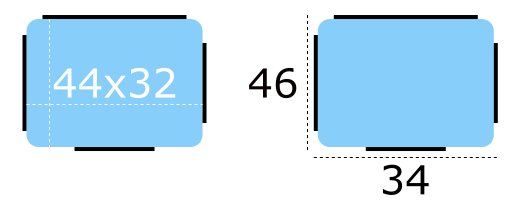
The Imagine style uses https:// in order to give designers control over how a particular element responds to being resized. Here is an example of a 9-patch image that represents a https://'s https://, alongside a magnified version (to make it easier to see the 9-patch lines):

The content of the image is 44 pixels wide by 32 pixels high. Every 9-patch image needs a one pixel thick line (collectively referred to as "9-patch lines") around every side, so the actual size of the image becomes 46 pixels wide by 34 pixels high. Note that the 9-patch lines must be one pixel thick regardless of the target DPI of the image. For example, the 9-patch lines for button-background.9.png and button-background@2x.9.png must both be one pixel thick.
The 9-patch lines must be black, and the remaining areas must be transparent or white:
Stretchable Areas▲
The 9-patch lines on the top and left edges determine which parts of the image are stretched when it is resized.
Below are examples of the 9-patch image being resized to one and a half times its original size in various dimensions:
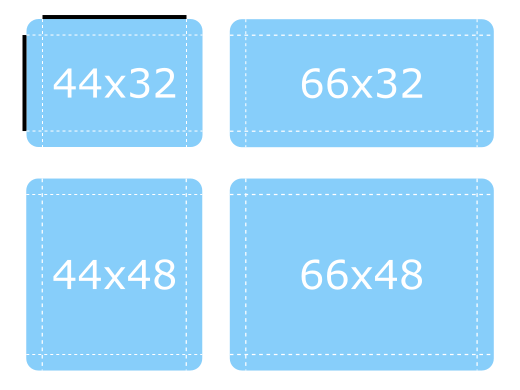
Notice how the the rounded corners keep their original size, as they are outside the range of the lines.
Padding Areas▲
The 9-patch lines on the right and bottom edges determine how much space is available for the control's https://, which means it can also be thought of as controlling the https://. For a diagram that illustrates padding, see https://.
Below are more examples of the 9-patch image being resized, but this time demonstrating how the padding 9-patch lines work.
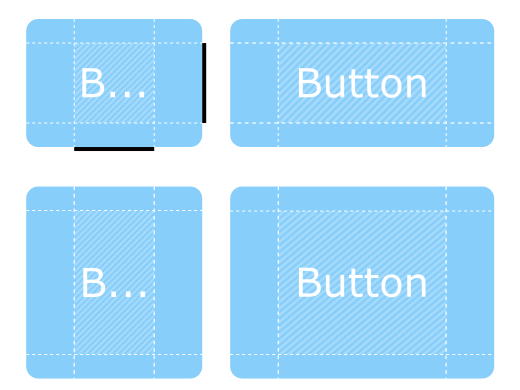
The contentItem can take up as much space as it needs within the shaded areas. If the padding lines are left out, the contentItem will take as much space as it needs without exceeding the stretchable areas.
Inset Areas▲
In some cases it is necessary for a control to have a drop shadow, for example. However, if we were to add a drop shadow to the button above, it would affect its size, which presents problems for both layouting and mouse/touch input boundaries.
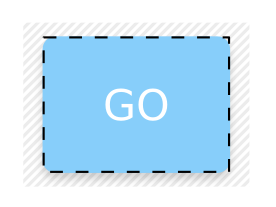
Inset areas accounts for this by telling the control that a certain area of the 9-patch image should go outside of the control:
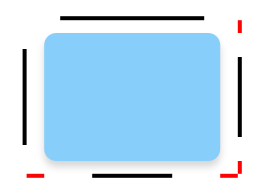
In the image below, the dashed line represents the button's clickable area, as well as the space that it will take up in a layout. The shadow is marked by the striped area behind it:
Exporting 9-Patch Images▲
Various vector and bitmap editors can be used to create 9-patch images suitable for use with the Imagine style. The following sections briefly explain the export process for each editor, and the last section explains how to ensure the exported images are 9-patch-conformant.
Illustrator▲
See Adobe's https:// documentation.
Inkscape▲
The https:// can be used to export assets with Inkscape.
Photoshop▲
See Adobe's https:// documentation.
Sketch▲
See Sketch's https:// documentation.
Qt Quick Controls 2 also provides a http:// for Sketch that automatically fixes the thickness of the 9-patch lines after the assets are exported. To install this file, double-click on it. Once Sketch has confirmed that the 9-patch export plugin has been installed, the plugin will automatically process images when they are exported.
Fixing 9-Patch Lines▲
When exporting 9-patch images in several DPI variants (@2x, @3x, etc.), the 9-patch lines will typically be scaled up along with the image. There are several ways to fix this, but perhaps the simplest approach is to use https:// tool. The tool has a -shave feature that can be used to crop the image to reduce the thickness of the 9-patch lines:
mogrify -shave 1x1 -path path/to/images *@2x.9.png
mogrify -shave 2x2 -path path/to/images *@3x.9.png
mogrify -shave 3x3 -path path/to/images *@4x.9.png
Regular DPI images (those without the @Nx prefix) are not affected, so it is only necessary to run the command on images intended for high DPI displays.
Animated Images▲
The https:// and GIF animated image formats are supported by the Imagine style.
Customization▲
Path▲
The Imagine style allows customizing the https:// that is used to do the image asset selection. The path can be specified for any window or item, and it automatically propagates to children in the same manner as https://. In the following example, the window and all three radio buttons appear with dark image assets (files that are located in "qrc:/themes/dark").
|
Sélectionnez |
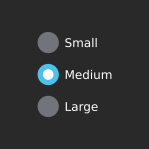 |
In addition to specifying the path in QML, it is also possible to specify it via an https:// or in a https://. Attributes specified in QML take precedence over all other methods.
Configuration File▲
|
Variable |
Description |
|---|---|
|
Path |
Specifies the https:// to the directory that contains the Imagine style assets. If not specified, the built-in assets are used. For example, to specify a path to a directory stored in the https://: Sélectionnez To specify a relative path to a local directory: Sélectionnez Due to a technical limitation, the path should not be named "imagine" if it is relative to the qtquickcontrols2.conf file. |
See https:// for more details about the configuration file.
Environment Variables▲
|
Variable |
Description |
|---|---|
|
QT_QUICK_CONTROLS_IMAGINE_PATH |
Specifies the path to the directory that contains the Imagine style assets. If not specified, the built-in assets are used. For example, to specify a path to a directory stored in the https://: Sélectionnez To specify a relative path to a local directory: Sélectionnez Due to a technical limitation, the path should not be named "imagine" if it is relative to the qtquickcontrols2.conf file. |
See https:// for the full list of supported environment variables.
Palette▲
The Imagine style supports palette customization via the https:// property and the https:// file. As with other styles, the exact palette roles that the Imagine style uses are style-dependent. However, as most of the visual appearance of controls (for example: backgrounds) are managed through image assets, only the roles that are typically used for text will have an effect.
Font▲
Custom fonts can be set via the https:// property and the https:// file.
Dependency▲
The Imagine style must be separately imported to gain access to the attributes that are specific to the Imagine style. It should be noted that regardless of the references to the Imagine style, the same application code runs with any other style. Imagine-specific attributes only have an effect when the application is run with the Imagine style.
If the Imagine style is imported in a QML file that is always loaded, the Imagine style must be deployed with the application in order to be able to run the application regardless of which style the application is run with. By using https://, style-specific tweaks can be applied without creating a hard dependency to a style.
See also https://
Attached Property Documentation▲
Imagine.path : string
This attached property holds the path to the image assets...
Button {
    Imagine.path: "qrc:/themes/dark"
}