


Qt Quick System Dialog Examples▲
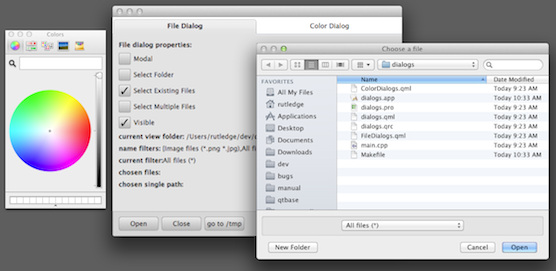
This example demonstrates the system dialogs in the https:// module. The appearance and behavior is platform-dependent.
A https:// is used to choose a single file, multiple files or a single directory, depending on how it is configured.
FileDialog {
    id: fileDialog
    visible: fileDialogVisible.checked
    modality: fileDialogModal.checked ? Qt.WindowModal : Qt.NonModal
    title: fileDialogSelectFolder.checked ? "Choose a folder" :
        (fileDialogSelectMultiple.checked ? "Choose some files" : "Choose a file")
    selectExisting: fileDialogSelectExisting.checked
    selectMultiple: fileDialogSelectMultiple.checked
    selectFolder: fileDialogSelectFolder.checked
    nameFilters: [ "Image files (*.png *.jpg)", "All files (*)" ]
    selectedNameFilter: "All files (*)"
    sidebarVisible: fileDialogSidebarVisible.checked
    onAccepted: {
        console.log("Accepted: " + fileUrls)
        if (fileDialogOpenFiles.checked)
            for (var i = 0; i < fileUrls.length; ++i)
                Qt.openUrlExternally(fileUrls[i])
    }
    onRejected: { console.log("Rejected") }
}
A https:// is used to choose a color, with or without alpha (transparency) depending on how it is configured.
ColorDialog {
    id: colorDialog
    visible: colorDialogVisible.checked
    modality: colorDialogModal.checked ? Qt.WindowModal : Qt.NonModal
    title: "Choose a color"
    color: "green"
    showAlphaChannel: colorDialogAlpha.checked
    onAccepted: { console.log("Accepted: " + color) }
    onRejected: { console.log("Rejected") }
}
The example can be built as a standalone executable, but each type of dialog is demonstrated in a separate QML file which can also be run separately with qmlscene.
List of Files▲
Files:
List of Files▲
-
systemdialogs/ColorDialogs.qml
-
systemdialogs/CustomDialogs.qml
-
systemdialogs/FileDialogs.qml
-
systemdialogs/FontDialogs.qml
-
systemdialogs/MessageDialogs.qml
-
systemdialogs/main.cpp
-
systemdialogs/systemdialogs.pro
-
systemdialogs/systemdialogs.qml
-
systemdialogs/systemdialogs.qrc