


Qt Quick Extras - Dashboard▲
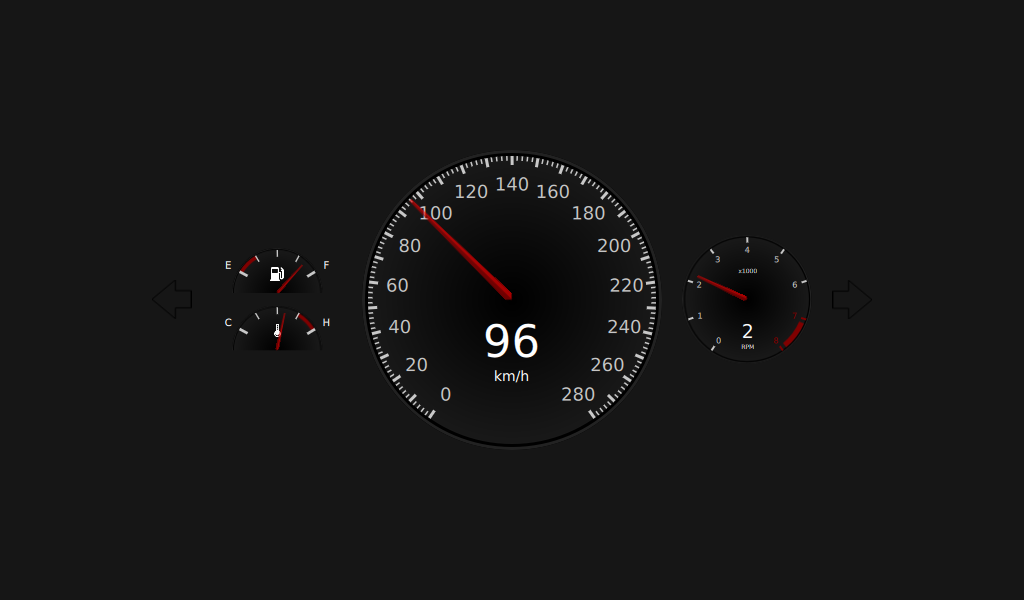
This example project demonstrates the use of https:// to create a car dashboard.
The ValueSource type generates random data for testing the dashboard. The data is random but there is a logical link between some of them, for example, kph and rpm.
Item {
    id: valueSource
    property real kph: 0
    property real rpm: 1
    property real fuel: 0.85
    property string gear: {
        var g;
        if (kph == 0) {
            return "P";
        }
        if (kph < 30) {
            return "1";
        }
        if (kph < 50) {
            return "2";
        }
        if (kph < 80) {
            return "3";
        }
        if (kph < 120) {
            return "4";
        }
        if (kph < 160) {
            return "5";
        }
    }
    property int turnSignal: gear == "P" && !start ? randomDirection() : -1
    property real temperature: 0.6
    property bool start: true
It runs a looping https:// that sets the values of the properties over time.
The https:// object consists of several https:// objects, which in turn consist of two NumberAnimations, one for kph and one for rpm. Both let the value develop to a certain value over a specified duration with the Easing type Easing.InOutSine
            ParallelAnimation {
                NumberAnimation {
                    target: valueSource
                    property: "kph"
                    easing.type: Easing.InOutSine
                    from: 0
                    to: 30
                    duration: 3000
                }
                NumberAnimation {
                    target: valueSource
                    property: "rpm"
                    easing.type: Easing.InOutSine
                    from: 1
                    to: 6.1
                    duration: 3000
                }
            }
The flashTimer object switches the turn signals on or off.
    Timer {
        id: flashTimer
        interval: 500
        running: on
        repeat: true
        onTriggered: flashing = !flashing
    }
The paintOutlinePath(ctx) method does the actual painting of the arrow for the turn signal.
    function paintOutlinePath(ctx) {
        ctx.beginPath();
        ctx.moveTo(0, height * 0.5);
        ctx.lineTo(0.6 * width, 0);
        ctx.lineTo(0.6 * width, height * 0.28);
        ctx.lineTo(width, height * 0.28);
        ctx.lineTo(width, height * 0.72);
        ctx.lineTo(0.6 * width, height * 0.72);
        ctx.lineTo(0.6 * width, height);
        ctx.lineTo(0, height * 0.5);
    }
The screen consists of a foregroundCanvas and a backgroundCanvas. foregroundCanvas displays the green turn signal if the on and flashing booleans are true.
    Canvas {
        id: foregroundCanvas
        anchors.fill: parent
        visible: on && flashing

        onPaint: {
            var ctx = getContext("2d");
            ctx.reset();

            paintOutlinePath(ctx);

            ctx.fillStyle = "green";
            ctx.fill();
        }
    }