


Qt Sensors - Explorer QML Example▲
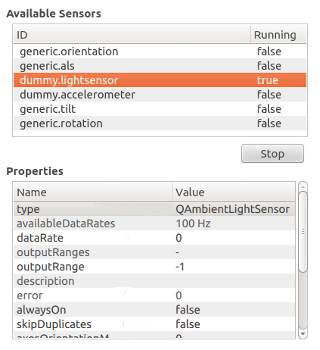
This example is divided into two parts:
-
A https:// that provides QML alternatives for QSensorExplorer, QPropertyInfo and QSensorItem C++ classes.
-
A https:// that uses the QML types to read the sensor meta-data and present it.
This example is built as an executable with C++ code that runs the QML, but it can also be launched directly using the qmlscene tool. You should build the top-level sensor_explorer project before trying to run this example or it will not be able to find its dependencies.
qmlscene -I . sensor_explorer.qmlAbove, the -I . parameter adds the current directory as a module import path to locate the Explorer QML module.
Sensor Explorer QML Import▲
The Sensor Explorer QML import defines the Explorer QML module, exporting QSensorExplorer, QPropertyInfo and QSensorItem C++ classes as QML types. The source code is available in the sensor_explorer/import subdirectory.
Sensor Explorer QML Application▲
To write a QML application that will use the QML types exposed by the Explorer module, following steps are needed:
Import the Explorer 1.0 declarative plugin:
import Explorer 1.0Create a SensorExplorer QML item:
SensorExplorer {
    id: explorer
}
You can retrieve a list of all available sensors using SensorExplorer.availableSensors:
model: explorer.availableSensorsThe example uses the returned list as a model to populate a view of available sensors.
To retrieve the properties of a sensor, use SensorItem.properties:
propertyList.model = explorer.selectedSensorItem.propertiesThe property list is used as a model for another view that displays the property names and values.
It is possible to edit the values of certain sensor properties. Selecting a writable property value will open an editor. SensorExplorer QML type allows you to pass a new value for a sensor property value as follows:
explorer.selectedSensorItem.changePropertyValue(propertyList.selectedItem, loaderEditor.item.text);Starting and stopping a sensor can be done by setting the SensorItem.start property:
if (text === "Start") {
    explorer.selectedSensorItem.start = true;
    text = "Stop";
}
else {
    explorer.selectedSensorItem.start = false;
    text = "Start";
}
List of Files▲
Files:
List of Files▲
-
sensor_explorer/import/explorer.cpp
-
sensor_explorer/import/explorer.h
-
sensor_explorer/import/import.pro
-
sensor_explorer/import/propertyinfo.cpp
-
sensor_explorer/import/propertyinfo.h
-
sensor_explorer/import/qmldir
-
sensor_explorer/import/sensoritem.cpp
-
sensor_explorer/import/sensoritem.h
-
sensor_explorer/main.cpp
-
sensor_explorer/qml.pro
-
sensor_explorer/qml.qrc
-
sensor_explorer/sensor_explorer.pro
-
sensor_explorer/sensor_explorer.qml