


Qt Sensors - C++ Sensor Gestures Example▲
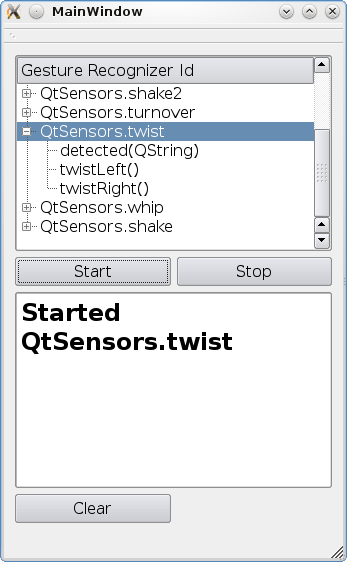
QSensorGestures class defines one predefined signal, void detected(const QString &)
As well, Sensor Gesture Recognizers may implement any number of their own custom signals.
Our shake recognizer defines one custom signal, void shake(), as well as the predefined detected signal.
SensorGestures Class Implementation▲
In order to know about custom signals that may be available, we need to ask the https:// about them,
Using the QSensorGesture::gestureIds() function, the manager will return a https:// of known and valid gesture Ids.
QSensorGestureManager manager;

Q_FOREACH (const QString &gesture, manager.gestureIds()) {

    QTreeWidgetItem *gestureId = new QTreeWidgetItem(ui->treeWidget);
    QStringList recognizerSignals =  manager.recognizerSignals(gesture);
    gestureId->setText(0,gesture);

    for (int i = 0; i < recognizerSignals.count(); i++) {
        QTreeWidgetItem *oneSignal = new QTreeWidgetItem(gestureId);
        oneSignal->setText(0,recognizerSignals.at(i));
    }
    ui->treeWidget->insertTopLevelItem(0,gestureId);
}
We can then use this to create a https:// object that we can use to connect signals to, and start the detection process. A https:// object will take a list of one or more recognizer ids in it's constructor.
QSensorGestureManager manager;
QSensorGesture *thisGesture = new QSensorGesture(QStringList() << currentRecognizer, this);

if (currentRecognizer.contains("QtSensors.shake")) {
    connect(thisGesture,SIGNAL(shake()),
            this,SLOT(onShake()));
}

connect(thisGesture,SIGNAL(detected(QString)),
        this,SLOT(detectedShake(QString)));
thisGesture->startDetection();
and later stop the detection process.
    recognizerMap[currentRecognizer]->stopDetection();

    if (currentRecognizer == "QtSensors.shake") {
        disconnect(recognizerMap[currentRecognizer],SIGNAL(shake()),
                   this,SLOT(onShake()));
    }
    disconnect(recognizerMap[currentRecognizer],SIGNAL(detected(QString)),
               this,SLOT(detectedShake(QString)));
The https:// object will contain all the signals of the valid requested recognizers found on the system.
You can discover which of the requested recognizer ID's that were not found by using https://();
By using https://(), you can get a https:// of usable signals.
List of Files▲
Files:
List of Files▲
-
sensorgestures/main.cpp
-
sensorgestures/mainwindow.cpp
-
sensorgestures/mainwindow.h
-
sensorgestures/mainwindow.ui
-
sensorgestures/sensorgestures.pro