


Multiple Inheritance Example▲
The Multiple Inheritance Example shows how to use a form created with https:// in an application by subclassing both https:// and the user interface class, which is Ui::CalculatorForm.
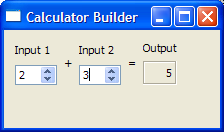
To subclass the calculatorform.ui file and ensure that qmake processes it with the uic, we have to include calculatorform.ui in the .pro file, as shown below:
QT += widgets

HEADERS = calculatorform.h
SOURCES = calculatorform.cpp main.cpp
FORMS = calculatorform.ui
When the project is compiled, the uic will generate a corresponding ui_calculatorform.h.
CalculatorForm Definition▲
In the CalculatorForm definition, we include the ui_calculatorform.h that was generated earlier.
#include "ui_calculatorform.h"As mentioned earlier, the class is a subclass of both https:// and Ui::CalculatorForm.
class CalculatorForm : public QWidget, private Ui::CalculatorForm
{
    Q_OBJECT

public:
    explicit CalculatorForm(QWidget *parent = nullptr);

private slots:
    void on_inputSpinBox1_valueChanged(int value);
    void on_inputSpinBox2_valueChanged(int value);
};
Two slots are defined according to the https:// naming convention required by uic. This is to ensure that https://'s auto-connection facilities connect all the signals and slots involved automatically.
CalculatorForm Implementation▲
In the constructor, we call setupUi() to load the user interface file. Note that setupUi is a method of Ui::CalculatorForm.
CalculatorForm::CalculatorForm(QWidget *parent)
    : QWidget(parent)
{
    setupUi(this);
}
We include two slots, on_inputSpinBox1_valueChanged() and on_inputSpinBox2_valueChanged(). These slots respond to the https://() signal that both spin boxes emit. Whenever there is a change in one spin box's value, we take that value and add it to whatever value the other spin box has.
void CalculatorForm::on_inputSpinBox1_valueChanged(int value)
{
    outputWidget->setText(QString::number(value + inputSpinBox2->value()));
}

void CalculatorForm::on_inputSpinBox2_valueChanged(int value)
{
    outputWidget->setText(QString::number(value + inputSpinBox1->value()));
}
main() Function▲
The main() function instantiates https:// and CalculatorForm. The calculator object is displayed by invoking the https://() function.
int main(int argc, char *argv[])
{
    QApplication app(argc, argv);
    CalculatorForm calculator;
    calculator.show();
    return app.exec();
}
There are various approaches to include forms into applications. The Multiple Inheritance approach is just one of them. See https:// for more information on the other approaches available.
List of Files▲
Files:
List of Files▲
-
multipleinheritance/calculatorform.cpp
-
multipleinheritance/calculatorform.h
-
multipleinheritance/calculatorform.ui
-
multipleinheritance/main.cpp
-
multipleinheritance/multipleinheritance.pro