


WebEngine Recipe Browser▲
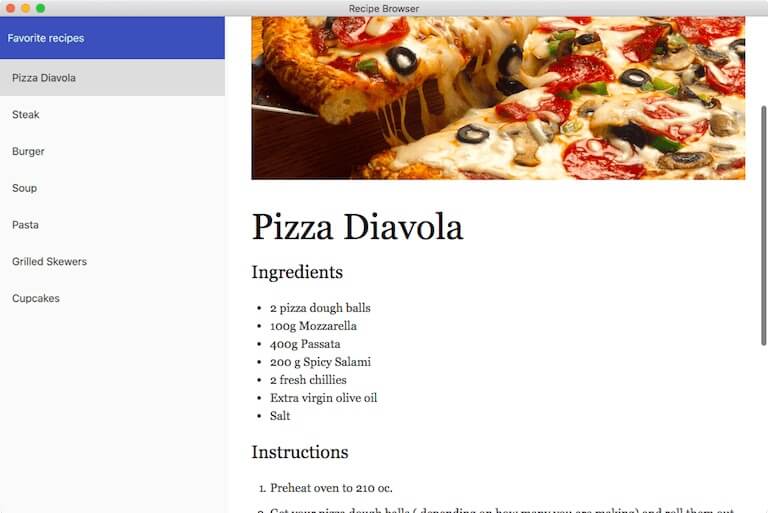
Recipe Browser demonstrates how to use the https:// item, https:// items, and https:// items to develop a small hybrid web browser application. A https://-based item is used to display a list of recipe names. Clicking on a name causes the web view to load the respective recipe page. The overall appearance of the application is provided by the https:// items, which have their active style set to the https:// style. The web content is a mix of HTML and Markdown source compiled to HTML, along with CSS and JavaScript.
Running the Example▲
To run the example from http://, open the Welcome mode and select the example from Examples. For more information, visit http://.
C++ Code▲
In main.cpp, we use the https:// and https:// classes to set up and load the main QML file. We call https:// so we can use https:// in our QML code. We enable high DPI screen support by setting the https:// attribute. We set the default Qt Quick Controls 2 style to the Material style, so we do not have to specify it for each new item we add. Finally, we use a C++ define to check whether the application is compiled for an embedded platform. The value will be used in the main QML code to determine the window size.
#include <QGuiApplication>
#include <QQmlApplicationEngine>
#include <QQmlContext>
#include <QQuickStyle>
#include <qtwebengineglobal.h>

int main(int argc, char *argv[])
{
    QCoreApplication::setOrganizationName("QtExamples");
    QCoreApplication::setAttribute(Qt::AA_EnableHighDpiScaling);
    QGuiApplication app(argc, argv);
    QtWebEngine::initialize();

    QQuickStyle::setStyle(QStringLiteral("Material"));

    QQmlApplicationEngine engine;

    bool isEmbedded = false;
#ifdef QTWEBENGINE_RECIPE_BROWSER_EMBEDDED
    isEmbedded = true;
#endif
    engine.rootContext()->setContextProperty(QStringLiteral("isEmbedded"), isEmbedded);

    engine.load(QUrl(QStringLiteral("qrc:/qml/main.qml")));

    return app.exec();
}
QML Code▲
In the main.qml file, we first create a top-level window and set a title for it. We also set up the size of the window depending on its primary orientation as well as the platform, so that the application is usable on both desktop and embedded platforms. On desktop, the size is constrained by a minimum of 320x480 pixels up to the maximum size that the screen supports. The default window size is 1024 pixels wide and 768 pixels high in landscape orientation. On embedded devices, the window will occupy the whole screen.
ApplicationWindow {
    id: appWindow
    title: qsTr("Recipe Browser")
    visible: true

    property int shorterDesktop: 768
    property int longerDesktop: 1024
    property int shorterMin: 360
    property int longerMin: 480
    property bool isPortrait: Screen.primaryOrientation === Qt.PortraitOrientation
    width: {
        if (isEmbedded)
            return Screen.width
        var potentialWidth = shorterDesktop
        if (!isPortrait)
            potentialWidth = longerDesktop
        return potentialWidth > Screen.width ? Screen.width : potentialWidth
    }
    height: {
        if (isEmbedded)
            return Screen.height
        var potentialHeight = longerDesktop
        if (!isPortrait)
            potentialHeight = shorterDesktop
        return potentialHeight > Screen.height ? Screen.height : potentialHeight
    }
    minimumWidth: isPortrait ? shorterMin : longerMin
    minimumHeight: isPortrait ? longerMin : shorterMin
Next, we add a https:// item so we can divide the window into two parts: one being a custom RecipeList item containing the recipe titles, and the other being the https://, which shows the recipe details. The spacing is set to zero so the items are positioned directly next to each other.
    RowLayout {
        id: container
        anchors.fill: parent
        spacing: 0

        RecipeList {
                ...
            }
        }

        WebEngineView {
                ...
        }
    }
The RecipeList item has a few https://, in order to scale the item to a maximum of one third of the layout width. We give the item focus, so that the keyboard can be used to navigate the recipes, in addition to using mouse and touch. We also add a handler for the custom recipeSelected signal, to tell the https:// to load the URL of the selected recipe.
        RecipeList {
            id: recipeList
            Layout.minimumWidth: 124
            Layout.preferredWidth: parent.width / 3
            Layout.maximumWidth: 300
            Layout.fillWidth: true
            Layout.fillHeight: true
            focus: true
            activeFocusOnTab: true
            onRecipeSelected: function(url) {
                webView.showRecipe(url)
            }
The https:// has similar layout properties, to make it occupy two thirds of the layout width.
        WebEngineView {
            id: webView
            Layout.preferredWidth: 2 * parent.width / 3
            Layout.fillWidth: true
            Layout.fillHeight: true
            // Make sure focus is not taken by the web view, so user can continue navigating
            // recipes with the keyboard.
            settings.focusOnNavigationEnabled: false

            onContextMenuRequested: function(request) {
                request.accepted = true
            }

            property bool firstLoadComplete: false
            onLoadingChanged: function(loadRequest) {
                if (loadRequest.status === WebEngineView.LoadSucceededStatus
                    && !firstLoadComplete) {
                    // Debounce the showing of the web content, so images are more likely
                    // to have loaded completely.
                    showTimer.start()
                }
            }

            Timer {
                id: showTimer
                interval: 500
                repeat: false
                onTriggered: {
                    webView.show(true)
                    webView.firstLoadComplete = true
                    recipeList.showHelp()
                }
            }

            Rectangle {
                id: webViewPlaceholder
                anchors.fill: parent
                z: 1
                color: "white"

                BusyIndicator {
                    id: busy
                    anchors.centerIn: parent
                }
            }

            function showRecipe(url) {
                webView.url = url
            }

            function show(show) {
                if (show === true) {
                    busy.running = false
                    webViewPlaceholder.visible = false
                } else {
                    webViewPlaceholder.visible = true
                    busy.running = true
                }
            }
        }
    }
}
We then disable the https:// setting to make sure that the https:// does not steal focus from the RecipeList item every time its URL is changed. This allows the user to continue navigating through the recipes using the keyboard. We also disable the default context menu by accepting the https://.
When the application starts, instead of directly showing the https://, we show a placeholder https:// with a https:// to provide a nicer user experience while the application is loading. Once the first page in the view is loaded, we start a https:// that will hide the placeholder and show the actual page. The delay provides more time for the recipe images to load, so that when the view is shown, the page is completely rendered. The timer also shows a help https:// that informs the user on how to navigate the recipes.
Let's see what the RecipeList item looks like from the inside. The root item is a https:// to allow transferring focus to the child https:// whenever the root item receives focus. We also declare a custom recipeSelected signal, which will be emitted when the current item of the https:// changes.
FocusScope {
    id: root
    signal recipeSelected(url url)
A https:// holds a header https:// above the https://, and the https:// itself. Again, we set the spacing to zero and make sure the layout occupies the whole space of the parent item.
    ColumnLayout {
        spacing: 0
        anchors.fill: parent
Inside the layout there is a styled https:// item, with a https:// inside of it serving as the https:// header.
        ToolBar {
            id: headerBackground
            Layout.fillWidth: true
            implicitHeight: headerText.height + 20

            Label {
                id: headerText
                width: parent.width
                text: qsTr("Favorite recipes")
                padding: 10
                anchors.centerIn: parent
            }
        }
The second item inside the layout is a https://, whose contents will fill the remaining space in the layout. We set https:// to true, so that the delegates that are scrolled up are not seen under the https:// item. We set https:// to true, so the https:// gains focus when the https:// does. We add a vertical scroll bar, so the user can scroll through the recipes if the window size is small. We also specify the recipe model to be used by the https:// as described later in this topic.
        ListView {
            id: listView
            Layout.fillWidth: true
            Layout.fillHeight: true
            keyNavigationWraps: true
            clip: true
            focus: true
            ScrollBar.vertical: ScrollBar { }

            model: recipeModel
We have an https:// set as the https:// delegate, which displays the recipe title. The contentItem is a https:// item, customized with a few properties to adjust the visual appearance and position of the text. We create a binding to the current delegate's model URL, so we can access the respective URL outside the delegate itself. We set the https:// property to true whenever the item is the current one in the https:// to provide visual feedback. And we set the focus on the https:// whenever a delegate is clicked, so that keyboard navigation works in case the focus was previously in the https://.
            delegate: ItemDelegate {
                width: parent.width
                text: model.name
                contentItem: Text {
                    text: parent.text
                    font: parent.font
                    color: parent.enabled ? parent.Material.primaryTextColor
                                          : parent.Material.hintTextColor
                    elide: Text.ElideRight
                    horizontalAlignment: Text.AlignLeft
                    verticalAlignment: Text.AlignVCenter
                    wrapMode: Text.Wrap
                }

                property url url: model.url
                highlighted: ListView.isCurrentItem

                onClicked: {
                    listView.forceActiveFocus()
                    listView.currentIndex = model.index
                }
            }
A handler is defined for the currentItemChanged signal to emit our own recipeSelected signal with the URL that the https:// should load.
            onCurrentItemChanged: {
                root.recipeSelected(currentItem.url)
            }
We use a https:// with seven https://s, each of which contains a recipe title and the URL to an HTML page contained in a resource file. The model is used to populate the https:// with the recipes and to show the recipe details in the https://.
            ListModel {
                id: recipeModel

                ListElement {
                    name: "Pizza Diavola"
                    url: "qrc:///pages/pizza.html"
                }
                ListElement {
                    name: "Steak"
                    url: "qrc:///pages/steak.html"
                }
                ListElement {
                    name: "Burger"
                    url: "qrc:///pages/burger.html"
                }
                ListElement {
                    name: "Soup"
                    url: "qrc:///pages/soup.html"
                }
                ListElement {
                    name: "Pasta"
                    url: "qrc:///pages/pasta.html"
                }
                ListElement {
                    name: "Grilled Skewers"
                    url: "qrc:///pages/skewers.html"
                }
                ListElement {
                    name: "Cupcakes"
                    url: "qrc:///pages/cupcakes.html"
                }
            }
We use a https:// item that is displayed on application startup to inform the users how they can navigate and view the details of each recipe. The https:// is shown using the showHelp method, which is invoked by the https:// in the main.qml file.
            ToolTip {
                id: help
                implicitWidth: root.width - padding * 3
                y: root.y + root.height
                delay: 1000
                timeout: 5000
                text: qsTr("Use keyboard, mouse, or touch controls to navigate through the\
                            recipes.")

                contentItem: Text {
                    text: help.text
                    font: help.font
                    color: help.Material.primaryTextColor
                    wrapMode: Text.Wrap
                }
            }
        }
    }

    function showHelp() {
        help.open()
    }
}
An example of a recipe page can be seen below. The page uses two stylesheets and two JavaScript files:
-
http:// is a markdown-friendly stylesheet created by Kevin Burke
-
https:// is a markdown parser and compiler designed for speed written by Christopher Jeffrey
-
custom.css makes some small styling adjustments to the final recipe page
-
custom.js is used to invoke the conversion of the recipe content (which is written in markdown syntax) into HTML
The images on the pages are loaded from the compiled resource file.
<!doctype html>
<html lang="en">
<head>
  <meta charset="utf-8">
  <title>Soup</title>
  <link rel="stylesheet" type="text/css" href="assets/3rdparty/markdown.css">
  <link rel="stylesheet" type="text/css" href="assets/custom.css">
</head>
<body>
  <div id="placeholder"></div>
  <div id="content">

<img src="images/soup.jpg" alt="Soup" title="Soup" />

Soup
=============

### Ingredients

* 2 potatoes
* 2 onions
* 2 cloves of garlic
* olive oil
* 400 ml organic stock
* 3 bunches of watercress

### Instructions
* Peel and roughly chop the potatoes, onions and garlic.
* In a large saucepan, heat a little olive oil, then sauté the potato, onion and garlic until the onions are translucent.
* Add the stock and simmer until the potato is soft. Chop and add the watercress and simmer for a further 3 to 4 minutes.
* Using a hand blender, liquidise the soup until smooth.
* Serve with a swirl of crème fraîche and some Fortt’s Bath Oliver biscuits, if you like.

**Enjoy!**

  </div><!--End of content-->
  <script src="assets/3rdparty/marked.js"></script>
  <script src="assets/custom.js"></script>
</body>
</html>
Files and Attributions▲
The example bundles the following code with third-party licenses:
|
https:// |
MIT License |
|
https:// |
Apache License 2.0 |
List of Files▲
Files:
List of Files▲
-
webengine/recipebrowser/main.cpp
-
webengine/recipebrowser/recipebrowser.pro
-
webengine/recipebrowser/resources/pages/assets/3rdparty/markdown.css
-
webengine/recipebrowser/resources/pages/assets/3rdparty/marked.js
-
webengine/recipebrowser/resources/pages/assets/custom.css
-
webengine/recipebrowser/resources/pages/assets/custom.js
-
webengine/recipebrowser/resources/pages/burger.html
-
webengine/recipebrowser/resources/pages/cupcakes.html
-
webengine/recipebrowser/resources/pages/pasta.html
-
webengine/recipebrowser/resources/pages/pizza.html
-
webengine/recipebrowser/resources/pages/skewers.html
-
webengine/recipebrowser/resources/pages/soup.html
-
webengine/recipebrowser/resources/pages/steak.html
-
webengine/recipebrowser/resources/qml/RecipeList.qml
-
webengine/recipebrowser/resources/qml/main.qml
-
webengine/recipebrowser/resources/resources.qrc
List of Files▲
Images:
List of Files▲
-
webengine/recipebrowser/resources/pages/images/burger.jpg
-
webengine/recipebrowser/resources/pages/images/cupcakes.jpg
-
webengine/recipebrowser/resources/pages/images/pasta.jpg
-
webengine/recipebrowser/resources/pages/images/pizza.jpg
-
webengine/recipebrowser/resources/pages/images/skewers.jpg
-
webengine/recipebrowser/resources/pages/images/soup.jpg
-
webengine/recipebrowser/resources/pages/images/steak.jpg