


WebEngine Widgets Html2Pdf Example▲
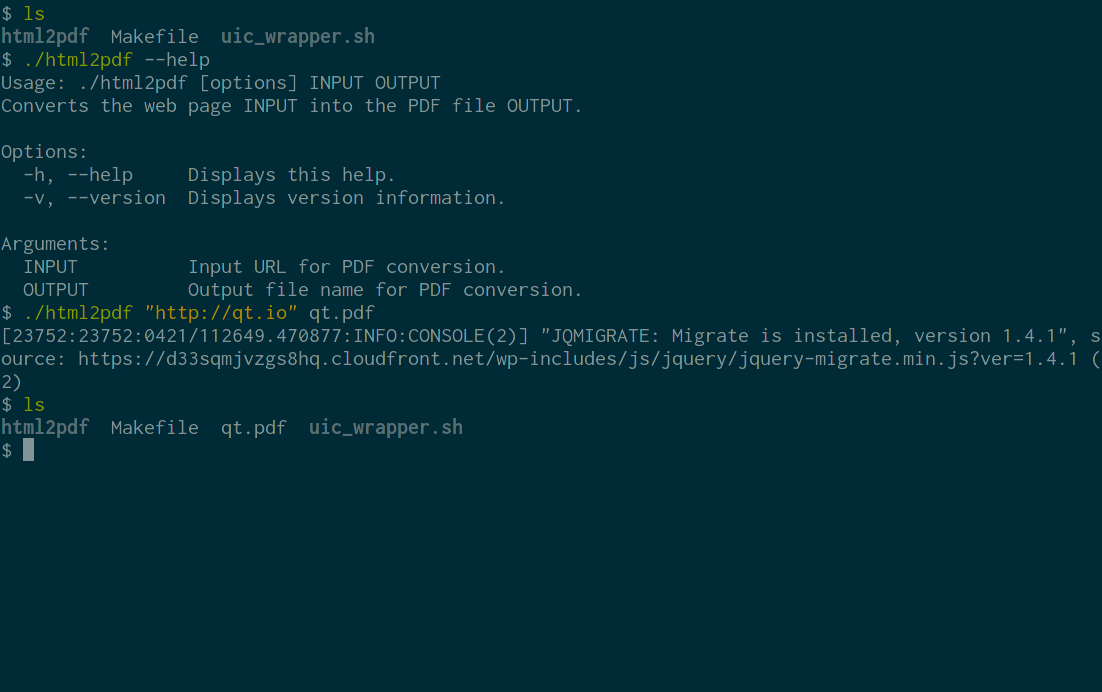
Html2Pdf demonstrates how to use Qt WebEngine to implement a command-line application for converting web pages into PDF documents.
Running the Example▲
To run the example from http://, open the Welcome mode and select the example from Examples. For more information, visit http://.
The Conversion Process▲
In order to convert a web page into a PDF document we need to:
-
Create a https://.
-
Tell the https:// to begin loading the target URL and wait for it to finish.
-
Tell the https:// to begin converting the loaded page into a PDF file and again wait for it to finish.
-
Once the conversion is finished, exit the program.
This process is encapsulated in the Html2PdfConverter class:
#include <QApplication>
#include <QCommandLineParser>
#include <QFile>
#include <QTextStream>
#include <QWebEnginePage>

#include <functional>

using namespace std;
using namespace std::placeholders;

class Html2PdfConverter : public QObject
{
    Q_OBJECT
public:
    explicit Html2PdfConverter(QString inputPath, QString outputPath);
    int run();

private slots:
    void loadFinished(bool ok);
    void pdfPrintingFinished(const QString &filePath, bool success);

private:
    QString m_inputPath;
    QString m_outputPath;
    QScopedPointer<QWebEnginePage> m_page;
};
In the constructor we create the https:// and connect to its https:// and https:// signals:
Html2PdfConverter::Html2PdfConverter(QString inputPath, QString outputPath)
    : m_inputPath(move(inputPath))
    , m_outputPath(move(outputPath))
    , m_page(new QWebEnginePage)
{
    connect(m_page.data(), &QWebEnginePage::loadFinished,
            this, &Html2PdfConverter::loadFinished);
    connect(m_page.data(), &QWebEnginePage::pdfPrintingFinished,
            this, &Html2PdfConverter::pdfPrintingFinished);
}
The run() method will trigger the conversion process by asking https:// to start loading the target URL. We then enter the main event loop:
int Html2PdfConverter::run()
{
    m_page->load(QUrl::fromUserInput(m_inputPath));
    return QApplication::exec();
}
After the loading is finished we begin PDF generation. We ask the https:// method to write the output directly to disk:
void Html2PdfConverter::loadFinished(bool ok)
{
    if (!ok) {
        QTextStream(stderr)
            << tr("failed to load URL '%1'").arg(m_inputPath) << "\n";
        QCoreApplication::exit(1);
        return;
    }

    m_page->printToPdf(m_outputPath);
}
Once we receive the signal that the PDF conversion has finished, all that remains is to report potential errors and exit the program:
void Html2PdfConverter::pdfPrintingFinished(const QString &filePath, bool success)
{
    if (!success) {
        QTextStream(stderr)
            << tr("failed to print to output file '%1'").arg(filePath) << "\n";
        QCoreApplication::exit(1);
    } else {
        QCoreApplication::quit();
    }
}
The Main Function▲
Our main function is responsible for setting up a https:// and parsing command line arguments:
int main(int argc, char *argv[])
{
    QApplication app(argc, argv);
    QCoreApplication::setOrganizationName("QtExamples");
    QCoreApplication::setApplicationName("html2pdf");
    QCoreApplication::setApplicationVersion(QT_VERSION_STR);

    QCommandLineParser parser;
    parser.setApplicationDescription(
        QCoreApplication::translate("main", "Converts the web page INPUT into the PDF file OUTPUT."));
    parser.addHelpOption();
    parser.addVersionOption();
    parser.addPositionalArgument(
        QCoreApplication::translate("main", "INPUT"),
        QCoreApplication::translate("main", "Input URL for PDF conversion."));
    parser.addPositionalArgument(
        QCoreApplication::translate("main", "OUTPUT"),
        QCoreApplication::translate("main", "Output file name for PDF conversion."));

    parser.process(QCoreApplication::arguments());

    const QStringList requiredArguments = parser.positionalArguments();
    if (requiredArguments.size() != 2)
        parser.showHelp(1);

    Html2PdfConverter converter(requiredArguments.at(0), requiredArguments.at(1));
    return converter.run();
}
Note that to use Qt WebEngine Widgets we need to create a https:// and not a https://, even though this is a command line application.