


WebEngine Widgets PrintMe Example▲
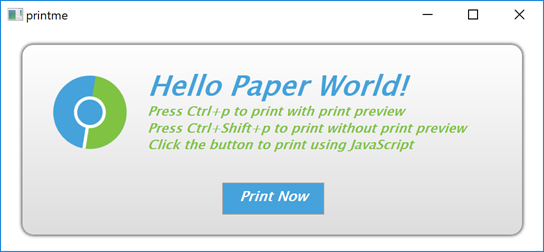
PrintMe demonstrates how to use the https:// and https:// classes to print a web page. Further, it shows how to implement print preview by using the https:// class. For completeness, it also illustrates how to trigger a printing request within JavaScript.
Running the Example▲
To run the example from http://, open the Welcome mode and select the example from Examples. For more information, visit http://.
Simple HTML Page▲
In this example, we create an internal HTML page that is added as a resource collection file (.qrc). The page shows only a small HTML message box that explains how to trigger printing by using keyboard shortcuts or clicking a button. The button has the JavaScript onclick event attribute that calls the JavaScript window.print() function.
<html lang="en">
   <head>
      <meta charset="utf-8">
      <title>PrintMe</title>
      <link rel="stylesheet" type="text/css" href="style.css">
      <script>
      function printNow() {
         window.print();
      }
      </script>
   </head>
   <body>
      <form class="form">
         <img class="logo" src="icon.svg" alt="qtwebengine">
         <div class="header">
            <h1>Hello Paper World!</h1>
            <h2>Press Ctrl+p to print with print preview</h2>
            <h2>Press Ctrl+Shift+p to print without print preview</h2>
            <h2>Click the button to print using JavaScript</h2>
            <p class="button" onclick="printNow()">Print Now</p>
      </form>
   </body>
</html>
Main Function▲
In the main function, we first instantiate a https:// and set the URL to our internal HTML page. Next, we create a PrintHandler instance and pass the requested page. For convenience, we also create keyboard shortcuts that can be used to call a print dialog or print preview dialog.
    QWebEngineView view;
    view.setUrl(QUrl(QStringLiteral("qrc:/index.html")));
    view.resize(1024, 750);
    view.show();

    PrintHandler handler;
    handler.setPage(view.page());

    auto printPreviewShortCut = new QShortcut(QKeySequence(Qt::CTRL + Qt::Key_P), &view);
    auto printShortCut = new QShortcut(QKeySequence(Qt::CTRL + Qt::SHIFT + Qt::Key_P), &view);

    QObject::connect(printPreviewShortCut, &QShortcut::activated, &handler, &PrintHandler::printPreview);
    QObject::connect(printShortCut, &QShortcut::activated, &handler, &PrintHandler::print);
Print Handler▲
In the PrintHandler function, we first implement printPreview(), where we instantiate https:// together with https://. We need the https:// handle to generate a set of preview pages.
void PrintHandler::printPreview()
{
    if (!m_page)
        return;
    if (m_inPrintPreview)
        return;
    m_inPrintPreview = true;
    QPrinter printer;
    QPrintPreviewDialog preview(&printer, m_page->view());
    connect(&preview, &QPrintPreviewDialog::paintRequested,
            this, &PrintHandler::printDocument);
    preview.exec();
    m_inPrintPreview = false;
}
Now we can implement the PrintHandler::printDocument() slot, which is called in response to the https:// signal.
void PrintHandler::printDocument(QPrinter *printer)
{
    QEventLoop loop;
    bool result;
    auto printPreview = [&](bool success) { result = success; loop.quit(); };
    m_page->print(printer, std::move(printPreview));
    loop.exec();
    if (!result) {
        QPainter painter;
        if (painter.begin(printer)) {
            QFont font = painter.font();
            font.setPixelSize(20);
            painter.setFont(font);
            painter.drawText(QPointF(10,25),
                             QStringLiteral("Could not generate print preview."));

            painter.end();
        }
    }
}
To do actual painting on a printer, we call the https://() function. Because this call blocks the main event loop, we need to create a local one. We begin the local event loop by calling https://(). When the local event loop terminates, we check for result and report any errors that occurred.
The last function we implement, PrintHandler::print(), is trivial, because it simply opens https:// and calls the previously implemented PrintHandler::printDocument().
void PrintHandler::print()
{
    QPrinter printer(QPrinter::HighResolution);
    QPrintDialog dialog(&printer, m_page->view());
    if (dialog.exec() != QDialog::Accepted)
        return;
    printDocument(&printer);
}
List of Files▲
Files:
List of Files▲
-
webenginewidgets/printme/data/data.qrc
-
webenginewidgets/printme/data/icon.svg
-
webenginewidgets/printme/data/index.html
-
webenginewidgets/printme/data/style.css
-
webenginewidgets/printme/main.cpp
-
webenginewidgets/printme/printhandler.cpp
-
webenginewidgets/printme/printhandler.h
-
webenginewidgets/printme/printme.pro