


WebEngine StyleSheet Browser Example▲
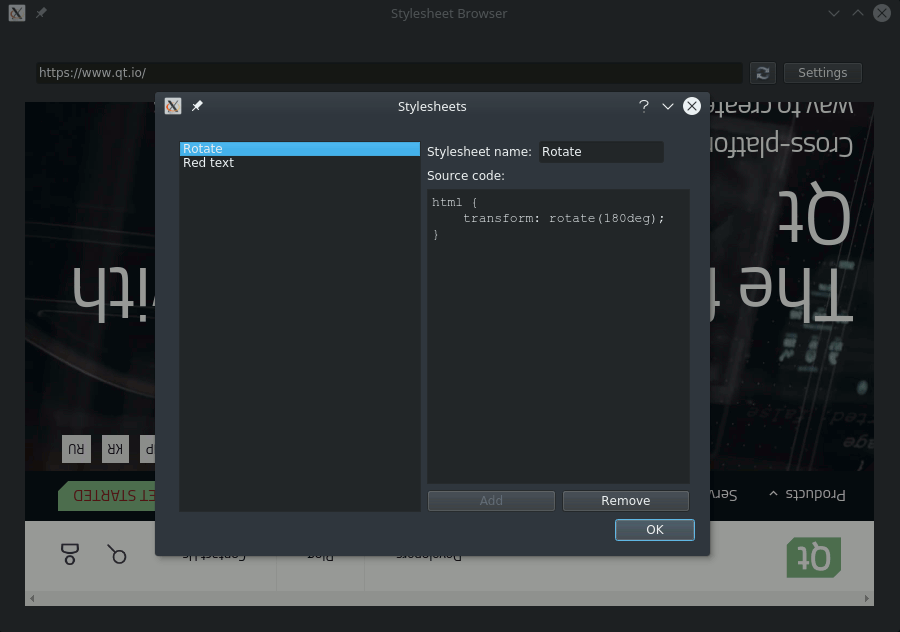
StyleSheet Browser demonstrates how to use the https:// to inject user stylesheets into web pages.
Running the Example▲
To run the example from http://, open the Welcome mode and select the example from Examples. For more information, visit http://.
Working With Stylesheets▲
We use JavaScript to create and append CSS elements to the documents. After declaring the script source, https://() can run it immediately and apply newly created styles on the current content of the web view. Encapsulating the script into a https:// and adding it to the script collection of https:// makes its effect permanent.
void MainWindow::insertStyleSheet(const QString &name, const QString &source, bool immediately)
{
    QWebEngineScript script;
    QString s = QString::fromLatin1("(function() {"\
                                    "    css = document.createElement('style');"\
                                    "    css.type = 'text/css';"\
                                    "    css.id = '%1';"\
                                    "    document.head.appendChild(css);"\
                                    "    css.innerText = '%2';"\
                                    "})()").arg(name).arg(source.simplified());
    if (immediately)
        ui->webEngineView->page()->runJavaScript(s, QWebEngineScript::ApplicationWorld);

    script.setName(name);
    script.setSourceCode(s);
    script.setInjectionPoint(QWebEngineScript::DocumentReady);
    script.setRunsOnSubFrames(true);
    script.setWorldId(QWebEngineScript::ApplicationWorld);
    ui->webEngineView->page()->scripts().insert(script);
}
Removing stylesheets can be done similarly:
void MainWindow::removeStyleSheet(const QString &name, bool immediately)
{
    QString s = QString::fromLatin1("(function() {"\
                                    "    var element = document.getElementById('%1');"\
                                    "    element.outerHTML = '';"\
                                    "    delete element;"\
                                    "})()").arg(name);
    if (immediately)
        ui->webEngineView->page()->runJavaScript(s, QWebEngineScript::ApplicationWorld);

    QWebEngineScript script = ui->webEngineView->page()->scripts().findScript(name);
    ui->webEngineView->page()->scripts().remove(script);
}
Files and Attributions▲
The example uses icons from the Tango Icon Library:
|
https:// |
Public Domain |
List of Files▲
Files:
List of Files▲
-
webenginewidgets/stylesheetbrowser/main.cpp
-
webenginewidgets/stylesheetbrowser/mainwindow.cpp
-
webenginewidgets/stylesheetbrowser/mainwindow.h
-
webenginewidgets/stylesheetbrowser/mainwindow.ui
-
webenginewidgets/stylesheetbrowser/stylesheetbrowser.pro
-
webenginewidgets/stylesheetbrowser/stylesheetbrowser.qrc
-
webenginewidgets/stylesheetbrowser/stylesheetdialog.cpp
-
webenginewidgets/stylesheetbrowser/stylesheetdialog.h
-
webenginewidgets/stylesheetbrowser/stylesheetdialog.ui