


Draggable Icons Example▲
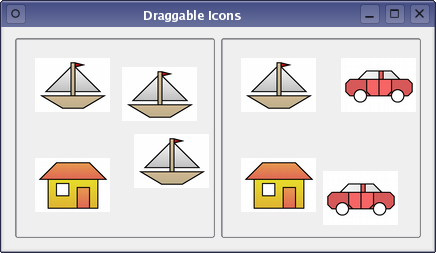
In many situations where drag and drop is used, the user starts dragging from a particular widget and drops the payload onto another widget. In this example, we subclass https:// to create labels that we use as drag sources, and place them inside https://s that serve as both containers and drop sites.
In addition, when a drag and drop operation occurs, we want to send more than just an image. We also want to send information about where the user clicked in the image so that the user can place it precisely on the drop target. This level of detail means that we must create a custom MIME type for our data.
DragWidget Class Definition▲
The icon widgets that we use to display icons are subclassed from https://:
class DragWidget : public QFrame
{
public:
    explicit DragWidget(QWidget *parent = nullptr);

protected:
    void dragEnterEvent(QDragEnterEvent *event) override;
    void dragMoveEvent(QDragMoveEvent *event) override;
    void dropEvent(QDropEvent *event) override;
    void mousePressEvent(QMouseEvent *event) override;
};
Since the https:// class provides most of what we require for the icon, we only need to reimplement the https://() to provide drag and drop facilities.
DragWidget Class Implementation▲
The DragWidget constructor sets an attribute on the widget that ensures that it will be deleted when it is closed:
DragWidget::DragWidget(QWidget *parent)
    : QFrame(parent)
{
    setMinimumSize(200, 200);
    setFrameStyle(QFrame::Sunken | QFrame::StyledPanel);
    setAcceptDrops(true);

    QLabel *boatIcon = new QLabel(this);
    boatIcon->setPixmap(QPixmap(":/images/boat.png"));
    boatIcon->move(10, 10);
    boatIcon->show();
    boatIcon->setAttribute(Qt::WA_DeleteOnClose);

    QLabel *carIcon = new QLabel(this);
    carIcon->setPixmap(QPixmap(":/images/car.png"));
    carIcon->move(100, 10);
    carIcon->show();
    carIcon->setAttribute(Qt::WA_DeleteOnClose);

    QLabel *houseIcon = new QLabel(this);
    houseIcon->setPixmap(QPixmap(":/images/house.png"));
    houseIcon->move(10, 80);
    houseIcon->show();
    houseIcon->setAttribute(Qt::WA_DeleteOnClose);
}
To enable dragging from the icon, we need to act on a mouse press event. We do this by reimplementing https://() and setting up a https:// object.
void DragWidget::mousePressEvent(QMouseEvent *event)
{
    QLabel *child = static_cast<QLabel*>(childAt(event->pos()));
    if (!child)
        return;

    QPixmap pixmap = *child->pixmap();

    QByteArray itemData;
    QDataStream dataStream(&itemData, QIODevice::WriteOnly);
    dataStream << pixmap << QPoint(event->pos() - child->pos());
Since we will be sending pixmap data for the icon and information about the user's click in the icon widget, we construct a https:// and package up the details using a https://.
For interoperability, drag and drop operations describe the data they contain using MIME types. In Qt, we describe this data using a https:// object:
    QMimeData *mimeData = new QMimeData;
    mimeData->setData("application/x-dnditemdata", itemData);
We choose an unofficial MIME type for this purpose, and supply the https:// to the MIME data object.
The drag and drop operation itself is handled by a https:// object:
    QDrag *drag = new QDrag(this);
    drag->setMimeData(mimeData);
    drag->setPixmap(pixmap);
    drag->setHotSpot(event->pos() - child->pos());
Here, we pass the data to the drag object, set a pixmap that will be shown alongside the cursor during the operation, and define the position of a hot spot that places the position of this pixmap under the cursor.
List of Files▲
Files:
List of Files▲
-
draganddrop/draggableicons/draggableicons.pro
-
draganddrop/draggableicons/draggableicons.qrc
-
draganddrop/draggableicons/dragwidget.cpp
-
draganddrop/draggableicons/dragwidget.h
-
draganddrop/draggableicons/main.cpp
List of Files▲
Images:
List of Files▲
-
draganddrop/draggableicons/images/boat.png
-
draganddrop/draggableicons/images/car.png
-
draganddrop/draggableicons/images/house.png