


Fridge Magnets Example▲
The Fridge Magnets example shows how to supply more than one type of MIME-encoded data with a drag and drop operation.
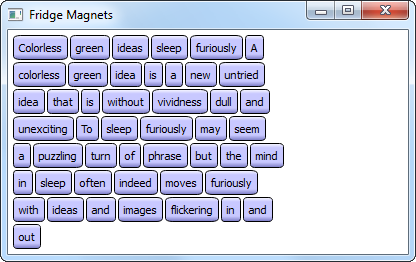
With this application the user can play around with a collection of fridge magnets, using drag and drop to form new sentences from the words on the magnets. The example consists of two classes:
-
DragLabel is a custom widget representing one single fridge magnet.
-
DragWidget provides the main application window.
We will first take a look at the DragLabel class, then we will examine the DragWidget class.
DragLabel Class Definition▲
Each fridge magnet is represented by an instance of the DragLabel class:
class DragLabel : public QLabel
{
public:
    DragLabel(const QString &text, QWidget *parent);
    QString labelText() const;

private:
    QString m_labelText;
};
Each instance of this https:// subclass will be used to display an pixmap generated from a text string. Since we cannot store both text and a pixmap in a standard label, we declare a private variable to hold the original text, and we define an additional member function to allow it to be accessed.
DragLabel Class Implementation▲
In the DragLabel constructor, we first create a https:// object on which we will draw the fridge magnet's text and frame:
DragLabel::DragLabel(const QString &text, QWidget *parent)
    : QLabel(parent)
{
    QFontMetrics metric(font());
    QSize size = metric.size(Qt::TextSingleLine, text);

    QImage image(size.width() + 12, size.height() + 12, QImage::Format_ARGB32_Premultiplied);
    image.fill(qRgba(0, 0, 0, 0));

    QFont font;
    font.setStyleStrategy(QFont::ForceOutline);
Its size depends on the current font size, and its format is https://; i.e., the image is stored using a premultiplied 32-bit ARGB format (0xAARRGGBB).
We then construct a font object that uses the application's default font, and set its style strategy. The style strategy tells the font matching algorithm what type of fonts should be used to find an appropriate default family. The https:// forces the use of outline fonts.
To draw the text and frame onto the image, we use the https:// class. https:// provides highly optimized methods to do most of the drawing GUI programs require. It can draw everything from simple lines to complex shapes like pies and chords. It can also draw aligned text and pixmaps.
    QLinearGradient gradient(0, 0, 0, image.height()-1);
    gradient.setColorAt(0.0, Qt::white);
    gradient.setColorAt(0.2, QColor(200, 200, 255));
    gradient.setColorAt(0.8, QColor(200, 200, 255));
    gradient.setColorAt(1.0, QColor(127, 127, 200));

    QPainter painter;
    painter.begin(&image);
    painter.setRenderHint(QPainter::Antialiasing);
    painter.setBrush(gradient);
    painter.drawRoundedRect(QRectF(0.5, 0.5, image.width()-1, image.height()-1),
                            25, 25, Qt::RelativeSize);

    painter.setFont(font);
    painter.setBrush(Qt::black);
    painter.drawText(QRect(QPoint(6, 6), size), Qt::AlignCenter, text);
    painter.end();
A painter can be activated by passing a paint device to the constructor, or by using the https://() method as we do in this example. The https://() method deactivates it. Note that the latter function is called automatically upon destruction when the painter is actived by its constructor. The https:// render hint ensures that the paint engine will antialias the edges of primitives if possible.
When the painting is done, we convert our image to a pixmap using https://'s https://() method. This method also takes an optional flags argument, and converts the given image to a pixmap using the specified flags to control the conversion (the flags argument is a bitwise-OR of the https://; passing 0 for flags sets all the default options).
    setPixmap(QPixmap::fromImage(image));
    m_labelText = text;
}
Finally, we set the label's https:// and store the label's text for later use.
Note that setting the pixmap clears any previous content, including any text previously set using https://(), and disables the label widget's buddy shortcut, if any.
DragWidget Class Definition▲
The DragWidget class inherits https://, providing support for drag and drop operations:
class DragWidget : public QWidget
{
public:
    explicit DragWidget(QWidget *parent = nullptr);

protected:
    void dragEnterEvent(QDragEnterEvent *event) override;
    void dragMoveEvent(QDragMoveEvent *event) override;
    void dropEvent(QDropEvent *event) override;
    void mousePressEvent(QMouseEvent *event) override;
};
To make the widget responsive to drag and drop operations, we simply reimplement the https://(), https://() and https://() event handlers inherited from https://.
We also reimplement https://() to make the widget responsive to mouse clicks. This is where we will write code to start drag and drop operations.
DragWidget Class Implementation▲
In the constructor, we first open the file containing the words on our fridge magnets:
DragWidget::DragWidget(QWidget *parent)
    : QWidget(parent)
{
    QFile dictionaryFile(QStringLiteral(":/dictionary/words.txt"));
    dictionaryFile.open(QFile::ReadOnly);
    QTextStream inputStream(&dictionaryFile);
https:// is an I/O device for reading and writing text and binary files and resources, and may be used by itself or in combination with https:// or https://. We have chosen to read the contents of the file using the https:// class that provides a convenient interface for reading and writing text.
We then create the fridge magnets. As long as there is data (the https://() method returns true if there is no more data to be read from the stream), we read one line at a time using https://'s https://() method.
    int x = 5;
    int y = 5;

    while (!inputStream.atEnd()) {
        QString word;
        inputStream >> word;
        if (!word.isEmpty()) {
            DragLabel *wordLabel = new DragLabel(word, this);
            wordLabel->move(x, y);
            wordLabel->show();
            wordLabel->setAttribute(Qt::WA_DeleteOnClose);
            x += wordLabel->width() + 2;
            if (x >= 245) {
                x = 5;
                y += wordLabel->height() + 2;
            }
        }
    }
For each line, we create a DragLabel object using the read line as text, we calculate its position and ensure that it is visible by calling the https://() method. We set the https:// attribute on each label to ensure that any unused labels will be deleted; we will need to create new labels and delete old ones when they are dragged around, and this ensures that the example does not leak memory.
We also set the FridgeMagnets widget's palette, minimum size and window title.
    QPalette newPalette = palette();
    newPalette.setColor(QPalette::Window, Qt::white);
    setPalette(newPalette);

    setMinimumSize(400, qMax(200, y));
    setWindowTitle(tr("Fridge Magnets"));
Finally, to enable our user to move the fridge magnets around, we must also set the FridgeMagnets widget's https:// property.
    setAcceptDrops(true);
}
Setting this property to true announces to the system that this widget may be able to accept drop events (events that are sent when drag and drop actions are completed). Later, we will implement the functions that ensure that the widget accepts the drop events it is interested in.
Dragging▲
Let's take a look at the https://() event handler, where drag and drop operations begin:
void DragWidget::mousePressEvent(QMouseEvent *event)
{
    DragLabel *child = static_cast<DragLabel*>(childAt(event->pos()));
    if (!child)
        return;

    QPoint hotSpot = event->pos() - child->pos();

    QByteArray itemData;
    QDataStream dataStream(&itemData, QIODevice::WriteOnly);
    dataStream << child->labelText() << QPoint(hotSpot);
Mouse events occur when a mouse button is pressed or released inside a widget, or when the mouse cursor is moved. By reimplementing the https://() method we ensure that we will receive mouse press events for the widget containing the fridge magnets.
Whenever we receive such an event, we first check to see if the position of the click coincides with one of the labels. If not, we simply return.
If the user clicked a label, we determine the position of the hot spot (the position of the click relative to the top-left corner of the label). We create a byte array to store the label's text and the hot spot, and we use a https:// object to stream the data into the byte array.
With all the information in place, we create a new https:// object. As mentioned above, https:// objects associate the data that they hold with the corresponding MIME types to ensure that information can be safely transferred between applications. The https://() method sets the data associated with a given MIME type. In our case, we associate our item data with the custom application/x-fridgemagnet type.
    QMimeData *mimeData = new QMimeData;
    mimeData->setData(fridgetMagnetsMimeType(), itemData);
    mimeData->setText(child->labelText());
Note that we also associate the magnet's text with the text/plain MIME type using https://'s https://() method. Below, we will see how our widget detects both these MIME types with its event handlers.
Finally, we create a https:// object. It is the https:// class that handles most of the details of a drag and drop operation, providing support for MIME-based drag and drop data transfer. The data to be transferred by the drag and drop operation is contained in a https:// object. When we call https://'s https://() method the ownership of our item data is transferred to the https:// object.
We call the https://() function to set the pixmap used to represent the data during the drag and drop operation. Typically, this pixmap shows an icon that represents the MIME type of the data being transferred, but any pixmap can be used. In this example, we simply use the pixmap used by the label itself to make it look like the fridge magnet itself is being moved.
    QDrag *drag = new QDrag(this);
    drag->setMimeData(mimeData);
    drag->setPixmap(*child->pixmap());
    drag->setHotSpot(hotSpot);

    child->hide();
We also specify the cursor's hot spot, its position relative to the top-level corner of the drag pixmap, to be the point we calculated above. This makes the process of dragging the label feel more natural because the cursor always points to the same place on the label during the drag operation.
We start the drag operation using https://'s https://() function, requesting that the magnet is copied when the drag is completed.
    if (drag->exec(Qt::MoveAction | Qt::CopyAction, Qt::CopyAction) == Qt::MoveAction)
        child->close();
    else
        child->show();
}
The function returns the drop action actually performed by the user (this can be either a copy or a move action in this case); if this action is equal to https:// we will close the activated fridge magnet widget because we will create a new one to replace it (see the https:// implementation). Otherwise, if the drop is outside our main widget, we simply show the widget in its original position.
Dropping▲
When a a drag and drop action enters our widget, we will receive a drag enter event. https:// inherits most of its functionality from https://, which in turn inherits most of its functionality from https://. Note that we must accept this event in order to receive the drag move events that are sent while the drag and drop action is in progress. The drag enter event is always immediately followed by a drag move event.
In our dragEnterEvent() implementation, we first determine whether we support the event's MIME type or not:
void DragWidget::dragEnterEvent(QDragEnterEvent *event)
{
    if (event->mimeData()->hasFormat(fridgetMagnetsMimeType())) {
        if (children().contains(event->source())) {
            event->setDropAction(Qt::MoveAction);
            event->accept();
        } else {
            event->acceptProposedAction();
        }
If the type is application/x-fridgemagnet and the event origins from any of this application's fridge magnet widgets, we first set the event's drop action using the https://() method. An event's drop action is the action to be performed on the data by the target. https:// indicates that the data is moved from the source to the target.
Then we call the event's https://() method to indicate that we have handled the event. In general, unaccepted events might be propagated to the parent widget. If the event origins from any other widget, we simply accept the proposed action.
    } else if (event->mimeData()->hasText()) {
        event->acceptProposedAction();
    } else {
        event->ignore();
    }
}
We also accept the proposed action if the event's MIME type is text/plain, i.e., if https://() returns true. If the event has any other type, on the other hand, we call the event's https://() method allowing the event to be propagated further.
void DragWidget::dragMoveEvent(QDragMoveEvent *event)
{
    if (event->mimeData()->hasFormat(fridgetMagnetsMimeType())) {
        if (children().contains(event->source())) {
            event->setDropAction(Qt::MoveAction);
            event->accept();
        } else {
            event->acceptProposedAction();
        }
    } else if (event->mimeData()->hasText()) {
        event->acceptProposedAction();
    } else {
        event->ignore();
    }
}
Drag move events occur when the cursor enters a widget, when it moves within the widget, and when a modifier key is pressed on the keyboard while the widget has focus. Our widget will receive drag move events repeatedly while a drag is within its boundaries. We reimplement the https://() method, and examine the event in the exact same way as we did with drag enter events.
Note that the https://() event handler behaves slightly differently: We first get hold of the event's MIME data.
void DragWidget::dropEvent(QDropEvent *event)
{
    if (event->mimeData()->hasFormat(fridgetMagnetsMimeType())) {
        const QMimeData *mime = event->mimeData();
The https:// class provides a container for data that records information about its MIME type. https:// objects associate the data that they hold with the corresponding MIME types to ensure that information can be safely transferred between applications, and copied around within the same application.
We retrieve the data associated with the application/x-fridgemagnet MIME type using a data stream in order to create a new DragLabel object.
        QByteArray itemData = mime->data(fridgetMagnetsMimeType());
        QDataStream dataStream(&itemData, QIODevice::ReadOnly);

        QString text;
        QPoint offset;
        dataStream >> text >> offset;
The https:// class provides serialization of binary data to a https:// (a data stream is a binary stream of encoded information which is completely independent of the host computer's operating system, CPU or byte order).
Finally, we create a label and move it to the event's position:
        DragLabel *newLabel = new DragLabel(text, this);
        newLabel->move(event->pos() - offset);
        newLabel->show();
        newLabel->setAttribute(Qt::WA_DeleteOnClose);

        if (event->source() == this) {
            event->setDropAction(Qt::MoveAction);
            event->accept();
        } else {
            event->acceptProposedAction();
        }
If the source of the event is also the widget receiving the drop event, we set the event's drop action to https:// and call the event's https://() method. Otherwise, we simply accept the proposed action. This means that labels are moved rather than copied in the same window. However, if we drag a label to a second instance of the Fridge Magnets example, the default action is to copy it, leaving the original in the first instance.
If the event's MIME type is text/plain (i.e., if https://() returns true) we retrieve its text and split it into words. For each word we create a new DragLabel action, and show it at the event's position plus an offset depending on the number of words in the text. In the end we accept the proposed action. This lets the user drop selected text from a text editor or Web browser onto the widget to add more fridge magnets.
    } else if (event->mimeData()->hasText()) {
        QStringList pieces = event->mimeData()->text().split(QRegularExpression(QStringLiteral("\\s+")),
                             QString::SkipEmptyParts);
        QPoint position = event->pos();

        for (const QString &piece : pieces) {
            DragLabel *newLabel = new DragLabel(piece, this);
            newLabel->move(position);
            newLabel->show();
            newLabel->setAttribute(Qt::WA_DeleteOnClose);

            position += QPoint(newLabel->width(), 0);
        }

        event->acceptProposedAction();
    } else {
        event->ignore();
    }
}
If the event has any other type, we call the event's https://() method allowing the event to be propagated further.
Summary▲
We set our main widget's https:// property and reimplemented https://'s https://(), https://() and https://() event handlers to support content dropped on our widget.
In addition, we reimplemented the https://() function to let the user pick up fridge magnets in the first place.
Because data is communicated using drag and drop operations and encoded using MIME types, you can run more than one instance of this example, and transfer magnets between them.
List of Files▲
Files:
List of Files▲
-
draganddrop/fridgemagnets/draglabel.cpp
-
draganddrop/fridgemagnets/draglabel.h
-
draganddrop/fridgemagnets/dragwidget.cpp
-
draganddrop/fridgemagnets/dragwidget.h
-
draganddrop/fridgemagnets/fridgemagnets.pro
-
draganddrop/fridgemagnets/fridgemagnets.qrc
-
draganddrop/fridgemagnets/main.cpp