


Boxes▲
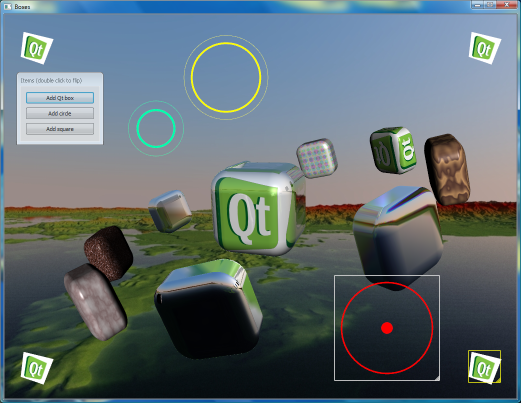
Elements in the demo can be controlled using the mouse in the following ways:
-
Dragging the mouse while pressing the left mouse button rotates the box in the center.
-
Dragging the mouse while pressing the right mouse button rotates the satellite boxes.
-
Scrolling the mouse wheel zooms in and out of the scene.
The options pane can be used to fine-tune various parameters in the demo, including colors and pixel shaders.
List of Files▲
Files:
List of Files▲
-
graphicsview/boxes/3rdparty/fbm.h
-
graphicsview/boxes/boxes.pro
-
graphicsview/boxes/boxes.qrc
-
graphicsview/boxes/glbuffers.cpp
-
graphicsview/boxes/glbuffers.h
-
graphicsview/boxes/glextensions.cpp
-
graphicsview/boxes/glextensions.h
-
graphicsview/boxes/gltrianglemesh.h
-
graphicsview/boxes/main.cpp
-
graphicsview/boxes/qtbox.cpp
-
graphicsview/boxes/qtbox.h
-
graphicsview/boxes/roundedbox.cpp
-
graphicsview/boxes/roundedbox.h
-
graphicsview/boxes/scene.cpp
-
graphicsview/boxes/scene.h
-
graphicsview/boxes/trackball.cpp
-
graphicsview/boxes/trackball.h
List of Files▲
Images:
List of Files▲
-
graphicsview/boxes/cubemap_negx.jpg
-
graphicsview/boxes/cubemap_negy.jpg
-
graphicsview/boxes/cubemap_negz.jpg
-
graphicsview/boxes/cubemap_posx.jpg
-
graphicsview/boxes/cubemap_posy.jpg
-
graphicsview/boxes/cubemap_posz.jpg
-
graphicsview/boxes/qt-logo.jpg
-
graphicsview/boxes/qt-logo.png
-
graphicsview/boxes/smiley.png
-
graphicsview/boxes/square.jpg