


Dir View Example▲
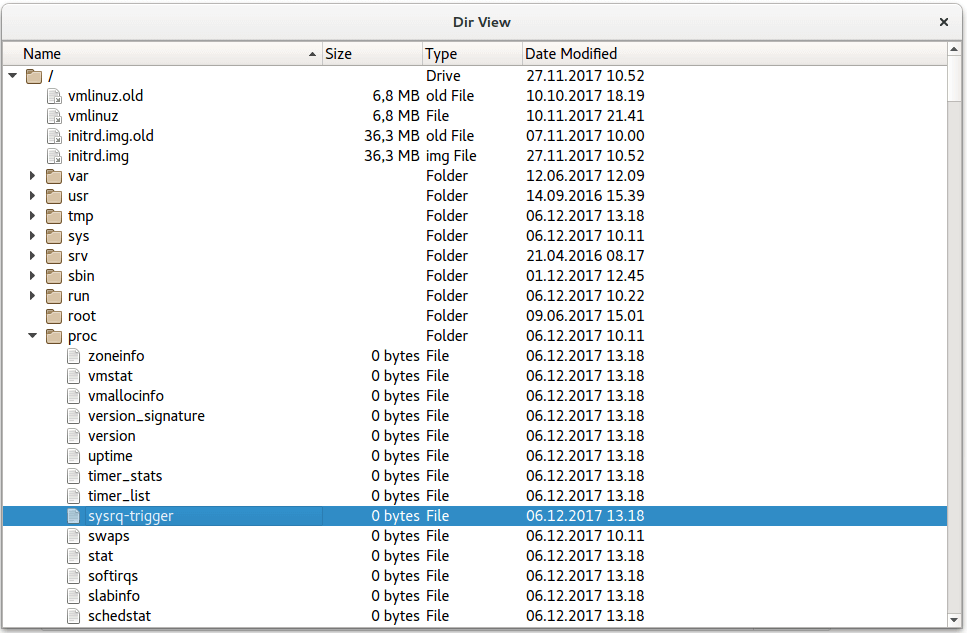
The Dir View example shows a tree view of the local file system. It uses the https:// class to provide file and directory information.
Sélectionnez
    QCommandLineParser parser;
    parser.setApplicationDescription("Qt Dir View Example");
    parser.addHelpOption();
    parser.addVersionOption();
    QCommandLineOption dontUseCustomDirectoryIconsOption("c", "Set QFileIconProvider::DontUseCustomDirectoryIcons");
    parser.addOption(dontUseCustomDirectoryIconsOption);
    parser.addPositionalArgument("directory", "The directory to start in.");
    parser.process(app);
    const QString rootPath = parser.positionalArguments().isEmpty()
The example supports a number of command line options. These options include:
-
Application description
-
-help option
-
-version option
-
if the optionc {-c} is specified, the application will not use custom directory options
Sélectionnez
    QFileSystemModel model;
    model.setRootPath("");
    if (parser.isSet(dontUseCustomDirectoryIconsOption))
        model.iconProvider()->setOptions(QFileIconProvider::DontUseCustomDirectoryIcons);
    QTreeView tree;
    tree.setModel(&model);
Declares model as data model for reading the local filesystem. model.setRootPath("") sets the current folder as the folder from which model will start reading. https:// object tree visualizes the filesystem in a tree structure.
Sélectionnez
    tree.setAnimated(false);
    tree.setIndentation(20);
    tree.setSortingEnabled(true);
    const QSize availableSize = QApplication::desktop()->availableGeometry(&tree).size();
    tree.resize(availableSize / 2);
    tree.setColumnWidth(0, tree.width() / 3);

    tree.setWindowTitle(QObject::tr("Dir View"));
Sets layout options for animation, indentation, sorting, and sizing of the filesystem tree.