


Dynamic Layouts Example▲
Dynamic Layouts implements dynamically placed widgets within running applications. The widget placement depends on whether Horizontal or Vertical is chosen.
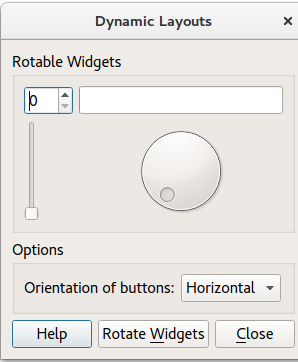
For more information, visit the https:// page.
Dialog Constructor▲
To begin with, the application creates the UI components by calling the following methods:
-
createRotatableGroupBox()
-
createOptionsGroupBox()
-
createButtonBox()
It then adds the UI components to a https:// (mainLayout).
Finally, Dialog::rotateWidgets() is called.
    createOptionsGroupBox();
    createButtonBox();

    mainLayout = new QGridLayout;
    mainLayout->addWidget(rotatableGroupBox, 0, 0);
    mainLayout->addWidget(optionsGroupBox, 1, 0);
    mainLayout->addWidget(buttonBox, 2, 0);
    setLayout(mainLayout);

    mainLayout->setSizeConstraint(QLayout::SetMinimumSize);

    setWindowTitle(tr("Dynamic Layouts"));
Creating the Main Widgets▲
The createRotatableGroupBox() method creates a rotatable group box, then adds a series of widgets:
-
https://
-
https://
-
https://
-
https://
It goes on to add signals and slots to each widget, and assigns a https:// called rotatableLayout.
void Dialog::createRotatableGroupBox()
{
    rotatableGroupBox = new QGroupBox(tr("Rotatable Widgets"));

    rotatableWidgets.enqueue(new QSpinBox);
    rotatableWidgets.enqueue(new QSlider);
    rotatableWidgets.enqueue(new QDial);
    rotatableWidgets.enqueue(new QProgressBar);

    int n = rotatableWidgets.count();
    for (int i = 0; i < n; ++i) {
        connect(rotatableWidgets[i], SIGNAL(valueChanged(int)),
                rotatableWidgets[(i + 1) % n], SLOT(setValue(int)));
    }

    rotatableLayout = new QGridLayout;
    rotatableGroupBox->setLayout(rotatableLayout);

    rotateWidgets();
}
Adding Options▲
createOptionsGroupBox() creates the following widgets:
-
optionsGroupBox
-
buttonsOrientationLabel
-
buttonsOrientationComboBox. The orientation of the https:// is either horizontal (default value) or vertical. These two values are added during the startup of the application. It is not possible to leave the option empty.
void Dialog::createOptionsGroupBox()
{
    optionsGroupBox = new QGroupBox(tr("Options"));

    buttonsOrientationLabel = new QLabel(tr("Orientation of buttons:"));

    buttonsOrientationComboBox = new QComboBox;
    buttonsOrientationComboBox->addItem(tr("Horizontal"), Qt::Horizontal);
    buttonsOrientationComboBox->addItem(tr("Vertical"), Qt::Vertical);

    connect(buttonsOrientationComboBox,
            QOverload<int>::of(&QComboBox::currentIndexChanged),
            this,
            &Dialog::buttonsOrientationChanged);

    optionsLayout = new QGridLayout;
    optionsLayout->addWidget(buttonsOrientationLabel, 0, 0);
    optionsLayout->addWidget(buttonsOrientationComboBox, 0, 1);
    optionsLayout->setColumnStretch(2, 1);
    optionsGroupBox->setLayout(optionsLayout);
}
Adding Buttons▲
void Dialog::createButtonBox()
{
    buttonBox = new QDialogButtonBox;

    closeButton = buttonBox->addButton(QDialogButtonBox::Close);
    helpButton = buttonBox->addButton(QDialogButtonBox::Help);
    rotateWidgetsButton = buttonBox->addButton(tr("Rotate &Widgets"),
                                               QDialogButtonBox::ActionRole);

    connect(rotateWidgetsButton, &QPushButton::clicked, this, &Dialog::rotateWidgets);
    connect(closeButton, &QPushButton::clicked, this, &Dialog::close);
    connect(helpButton, &QPushButton::clicked, this, &Dialog::help);
}
Rotating the Widgets▲
Removes the current widgets and activates the next widget.
void Dialog::rotateWidgets()
{
    Q_ASSERT(rotatableWidgets.count() % 2 == 0);

    foreach (QWidget *widget, rotatableWidgets)
        rotatableLayout->removeWidget(widget);

    rotatableWidgets.enqueue(rotatableWidgets.dequeue());

    const int n = rotatableWidgets.count();
    for (int i = 0; i < n / 2; ++i) {
        rotatableLayout->addWidget(rotatableWidgets[n - i - 1], 0, i);
        rotatableLayout->addWidget(rotatableWidgets[i], 1, i);
    }
}
Running the Example▲
To run the example from http://, open the Welcome mode and select the example from Examples. For more information, visit http://.
List of Files▲
Files:
List of Files▲
-
layouts/dynamiclayouts/dialog.cpp
-
layouts/dynamiclayouts/dialog.h
-
layouts/dynamiclayouts/dynamiclayouts.pro
-
layouts/dynamiclayouts/main.cpp