


Event Transitions Example▲
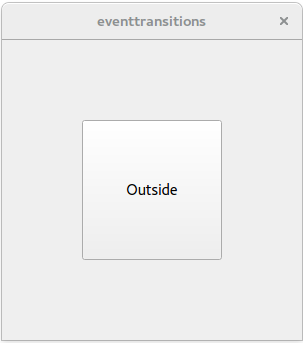
The Event Transitions Example illustrates how states change when a user enters or leaves the area of a button. The states are handled by a https:// object. The screen consists of a https:// with a central button.
When the mouse is outside the button, the text in the button displays "Outside". When the mouse enters the button, it displays "Inside".
class Window : public QWidget
{
public:
    Window(QWidget *parent = 0)
        : QWidget(parent)
    {
        QPushButton *button = new QPushButton(this);
        button->setSizePolicy(QSizePolicy::Expanding, QSizePolicy::Expanding);

        QVBoxLayout *layout = new QVBoxLayout;
        layout->addWidget(button);
        layout->setContentsMargins(80, 80, 80, 80);
        setLayout(layout);
The Window class's constructors begins by creating a button. This button is added to layout, which is a https:// object. Then two states are created: s1 is the state "Outside", and s2 is the state "Inside".
        QStateMachine *machine = new QStateMachine(this);

        QState *s1 = new QState();
        s1->assignProperty(button, "text", "Outside");

        QState *s2 = new QState();
        s2->assignProperty(button, "text", "Inside");
State s1 is the state "Outside" and state s2 is state "Inside".
        QEventTransition *enterTransition = new QEventTransition(button, QEvent::Enter);
        enterTransition->setTargetState(s2);
        s1->addTransition(enterTransition);
When the button receives an event of type https:// and the state machine is in state s1, the machine will transition to state s2.
        QEventTransition *leaveTransition = new QEventTransition(button, QEvent::Leave);
        leaveTransition->setTargetState(s1);
        s2->addTransition(leaveTransition);
When the button receives an event of type https:// and the state machine is in state s2, the machine will transition back to state s1.
        QState *s3 = new QState();
        s3->assignProperty(button, "text", "Pressing...");

        QEventTransition *pressTransition = new QEventTransition(button, QEvent::MouseButtonPress);
        pressTransition->setTargetState(s3);
        s2->addTransition(pressTransition);

        QEventTransition *releaseTransition = new QEventTransition(button, QEvent::MouseButtonRelease);
        releaseTransition->setTargetState(s2);
        s3->addTransition(releaseTransition);
Next, state s3 is created. s3 will be entered when the button receives an event of type https:// and the state machine is in state s2. When the button receives an event of type https:// and the state machine is in state s3, the machine will revert to state s2.
        machine->addState(s1);
        machine->addState(s2);
        machine->addState(s3);

        machine->setInitialState(s1);
        machine->start();
    }
};
Finally, the states are added to the machine as top-level states, the initial state is set to be s1 ("Outside"), and the machine is started.
int main(int argc, char **argv)
{
    QApplication app(argc, argv);
    Window window;
    window.resize(300, 300);
    window.show();

    return app.exec();
}
The main() function constructs a Window object that displays the https:// object layout with its button.
List of Files▲
Files:
List of Files▲
-
statemachine/eventtransitions/eventtransitions.pro
-
statemachine/eventtransitions/main.cpp