


Factorial States Example▲
The statechart for calculating the factorial looks as follows:
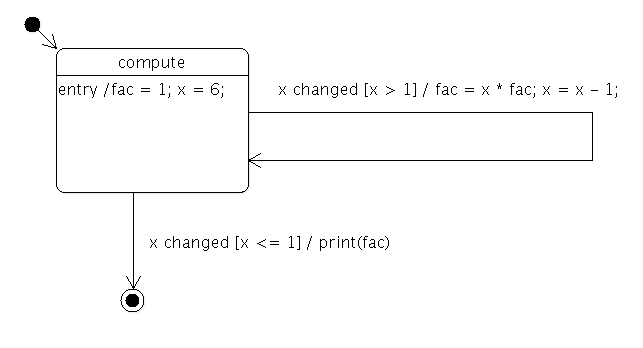
In other words, the state machine calculates the factorial of 6 and prints the result.
class Factorial : public QObject
{
    Q_OBJECT
    Q_PROPERTY(int x READ x WRITE setX)
    Q_PROPERTY(int fac READ fac WRITE setFac)
public:
    Factorial(QObject *parent = 0)
        : QObject(parent), m_x(-1), m_fac(1)
    {
    }

    int x() const
    {
        return m_x;
    }

    void setX(int x)
    {
        if (x == m_x)
            return;
        m_x = x;
        emit xChanged(x);
    }

    int fac() const
    {
        return m_fac;
    }

    void setFac(int fac)
    {
        m_fac = fac;
    }

Q_SIGNALS:
    void xChanged(int value);

private:
    int m_x;
    int m_fac;
};
The Factorial class is used to hold the data of the computation, x and fac. It also provides a signal that's emitted whenever the value of x changes.
class FactorialLoopTransition : public QSignalTransition
{
public:
    FactorialLoopTransition(Factorial *fact)
        : QSignalTransition(fact, SIGNAL(xChanged(int))), m_fact(fact)
    {}

    bool eventTest(QEvent *e) override
    {
        if (!QSignalTransition::eventTest(e))
            return false;
        QStateMachine::SignalEvent *se = static_cast<QStateMachine::SignalEvent*>(e);
        return se->arguments().at(0).toInt() > 1;
    }

    void onTransition(QEvent *e) override
    {
        QStateMachine::SignalEvent *se = static_cast<QStateMachine::SignalEvent*>(e);
        int x = se->arguments().at(0).toInt();
        int fac = m_fact->property("fac").toInt();
        m_fact->setProperty("fac",  x * fac);
        m_fact->setProperty("x",  x - 1);
    }

private:
    Factorial *m_fact;
};
The FactorialLoopTransition class implements the guard (x > 1) and calculations (fac = x * fac; x = x - 1) of the factorial loop.
class FactorialDoneTransition : public QSignalTransition
{
public:
    FactorialDoneTransition(Factorial *fact)
        : QSignalTransition(fact, SIGNAL(xChanged(int))), m_fact(fact)
    {}

    bool eventTest(QEvent *e) override
    {
        if (!QSignalTransition::eventTest(e))
            return false;
        QStateMachine::SignalEvent *se = static_cast<QStateMachine::SignalEvent*>(e);
        return se->arguments().at(0).toInt() <= 1;
    }

    void onTransition(QEvent *) override
    {
        fprintf(stdout, "%d\n", m_fact->property("fac").toInt());
    }

private:
    Factorial *m_fact;
};
The FactorialDoneTransition class implements the guard (x <= 1) that terminates the factorial computation. It also prints the final result to standard output.
int main(int argc, char **argv)
{
    QCoreApplication app(argc, argv);
    Factorial factorial;
    QStateMachine machine;
The application's main() function first creates the application object, a Factorial object and a state machine.
    QState *compute = new QState(&machine);
    compute->assignProperty(&factorial, "fac", 1);
    compute->assignProperty(&factorial, "x", 6);
    compute->addTransition(new FactorialLoopTransition(&factorial));
The compute state is created, and the initial values of x and fac are defined. A FactorialLoopTransition object is created and added to the state.
    QFinalState *done = new QFinalState(&machine);
    FactorialDoneTransition *doneTransition = new FactorialDoneTransition(&factorial);
    doneTransition->setTargetState(done);
    compute->addTransition(doneTransition);
A final state, done, is created, and a FactorialDoneTransition object is created with done as its target state. The transition is then added to the compute state.
    machine.setInitialState(compute);
    QObject::connect(&machine, &QStateMachine::finished, &app, QCoreApplication::quit);
    machine.start();

    return app.exec();
}
The machine's initial state is set to be the compute state. We connect the https://() signal to the https://() slot, so the application will quit when the state machine's work is done. Finally, the state machine is started, and the application's event loop is entered.