


Custom Completer Example▲
Setting Up The Resource File▲
The Custom Completer example requires a resource file, wordlist.txt, that has a list of words to help https:// complete words. This file contains the following:
<!DOCTYPE RCC><RCC version="1.0">
<qresource prefix="/">
   <file>resources/wordlist.txt</file>
</qresource>
</RCC>
TextEdit Class Definition▲
The TextEdit class is a subclass of https:// with a custom insertCompletion() slot and it reimplements the https://() and the https://() functions. TextEdit also contains a private function textUnderCursor() and a private instance of https://, c.
class TextEdit : public QTextEdit
{
    Q_OBJECT

public:
    TextEdit(QWidget *parent = 0);
    ~TextEdit();

    void setCompleter(QCompleter *c);
    QCompleter *completer() const;

protected:
    void keyPressEvent(QKeyEvent *e) override;
    void focusInEvent(QFocusEvent *e) override;

private slots:
    void insertCompletion(const QString &completion);

private:
    QString textUnderCursor() const;

private:
    QCompleter *c;
};
TextEdit Class Implementation▲
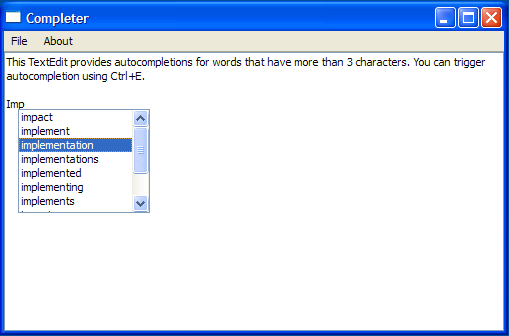
The constructor for TextEdit constructs a TextEdit with a parent and initializes c. The instructions to use the completer is displayed on the TextEdit object, using the https://() function.
TextEdit::TextEdit(QWidget *parent)
: QTextEdit(parent), c(0)
{
    setPlainText(tr("This TextEdit provides autocompletions for words that have more than"
                    " 3 characters. You can trigger autocompletion using ") +
                    QKeySequence("Ctrl+E").toString(QKeySequence::NativeText));
}
In addition, TextEdit also includes a default destructor:
TextEdit::~TextEdit()
{
}
The setCompleter() function accepts a completer and sets it up. We use if (c) to check if c has been initialized. If it has been initialized, the https://() function is invoked to disconnect the signal from the slot. This is to ensure that no previous completer object is still connected to the slot.
void TextEdit::setCompleter(QCompleter *completer)
{
    if (c)
        QObject::disconnect(c, 0, this, 0);

    c = completer;

    if (!c)
        return;

    c->setWidget(this);
    c->setCompletionMode(QCompleter::PopupCompletion);
    c->setCaseSensitivity(Qt::CaseInsensitive);
    QObject::connect(c, SIGNAL(activated(QString)),
                     this, SLOT(insertCompletion(QString)));
}
We then instantiate c with completer and set it as TextEdit's widget. The completion mode and case sensitivity are also set and then we connect the https://() signal to the insertCompletion() slot.
The completer() function is a getter function that returns c.
QCompleter *TextEdit::completer() const
{
    return c;
}
The completer pops up the options available, based on the contents of wordlist.txt, but the text cursor is responsible for filling in the missing characters, according to the user's choice of word.
Suppose the user inputs "ACT" and accepts the completer's suggestion of "ACTUAL". The completion string is then sent to insertCompletion() by the completer's https://() signal.
The insertCompletion() function is responsible for completing the word using a https:// object, tc. It validates to ensure that the completer's widget is TextEdit before using tc to insert the extra characters to complete the word.
void TextEdit::insertCompletion(const QString& completion)
{
    if (c->widget() != this)
        return;
    QTextCursor tc = textCursor();
    int extra = completion.length() - c->completionPrefix().length();
    tc.movePosition(QTextCursor::Left);
    tc.movePosition(QTextCursor::EndOfWord);
    tc.insertText(completion.right(extra));
    setTextCursor(tc);
}
The figure below illustrates this process:
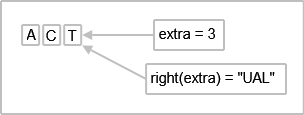
completion.length() = 6
c->completionPrefix().length()=3
The difference between these two values is extra, which is 3. This means that the last three characters from the right, "U", "A", and "L", will be inserted by tc.
The textUnderCursor() function uses a https://, tc, to select a word under the cursor and return it.
QString TextEdit::textUnderCursor() const
{
    QTextCursor tc = textCursor();
    tc.select(QTextCursor::WordUnderCursor);
    return tc.selectedText();
}
The TextEdit class reimplements https://() function, which is an event handler used to receive keyboard focus events for the widget.
void TextEdit::focusInEvent(QFocusEvent *e)
{
    if (c)
        c->setWidget(this);
    QTextEdit::focusInEvent(e);
}
The https://() is reimplemented to ignore key events like https://, https://, https://, https://, and https:// so the completer can handle them.
If there is an active completer, we cannot process the shortcut, Ctrl+E.
void TextEdit::keyPressEvent(QKeyEvent *e)
{
    if (c && c->popup()->isVisible()) {
        // The following keys are forwarded by the completer to the widget
       switch (e->key()) {
       case Qt::Key_Enter:
       case Qt::Key_Return:
       case Qt::Key_Escape:
       case Qt::Key_Tab:
       case Qt::Key_Backtab:
            e->ignore();
            return; // let the completer do default behavior
       default:
           break;
       }
    }

    bool isShortcut = ((e->modifiers() & Qt::ControlModifier) && e->key() == Qt::Key_E); // CTRL+E
    if (!c || !isShortcut) // do not process the shortcut when we have a completer
        QTextEdit::keyPressEvent(e);
We also handle other modifiers and shortcuts for which we do not want the completer to respond to.
    const bool ctrlOrShift = e->modifiers() & (Qt::ControlModifier | Qt::ShiftModifier);
    if (!c || (ctrlOrShift && e->text().isEmpty()))
        return;

    static QString eow("~!@#$%^&*()_+{}|:\"<>?,./;'[]\\-="); // end of word
    bool hasModifier = (e->modifiers() != Qt::NoModifier) && !ctrlOrShift;
    QString completionPrefix = textUnderCursor();

    if (!isShortcut && (hasModifier || e->text().isEmpty()|| completionPrefix.length() < 3
                      || eow.contains(e->text().right(1)))) {
        c->popup()->hide();
        return;
    }

    if (completionPrefix != c->completionPrefix()) {
        c->setCompletionPrefix(completionPrefix);
        c->popup()->setCurrentIndex(c->completionModel()->index(0, 0));
    }
    QRect cr = cursorRect();
    cr.setWidth(c->popup()->sizeHintForColumn(0)
                + c->popup()->verticalScrollBar()->sizeHint().width());
    c->complete(cr); // popup it up!
}
Finally, we pop up the completer.
MainWindow Class Definition▲
The MainWindow class is a subclass of https:// and implements a private slot, about(). This class also has two private functions, createMenu() and modelFromFile() as well as private instances of https:// and TextEdit.
class MainWindow : public QMainWindow
{
    Q_OBJECT

public:
    MainWindow(QWidget *parent = 0);

private slots:
    void about();

private:
    void createMenu();
    QAbstractItemModel *modelFromFile(const QString& fileName);

    QCompleter *completer;
    TextEdit *completingTextEdit;
};
MainWindow Class Implementation▲
The constructor constructs a MainWindow with a parent and initializes the completer. It also instantiates a TextEdit and sets its completer. A https://, obtained from modelFromFile(), is used to populate the completer. The MainWindow's central widget is set to TextEdit and its size is set to 500 x 300.
MainWindow::MainWindow(QWidget *parent)
    : QMainWindow(parent), completer(0)
{
    createMenu();

    completingTextEdit = new TextEdit;
    completer = new QCompleter(this);
    completer->setModel(modelFromFile(":/resources/wordlist.txt"));
    completer->setModelSorting(QCompleter::CaseInsensitivelySortedModel);
    completer->setCaseSensitivity(Qt::CaseInsensitive);
    completer->setWrapAround(false);
    completingTextEdit->setCompleter(completer);

    setCentralWidget(completingTextEdit);
    resize(500, 300);
    setWindowTitle(tr("Completer"));
}
The createMenu() function creates the necessary https:// objects needed for the "File" and "Help" menu and their https://() signals are connected to the quit(), about(), and aboutQt() slots respectively.
void MainWindow::createMenu()
{
    QAction *exitAction = new QAction(tr("Exit"), this);
    QAction *aboutAct = new QAction(tr("About"), this);
    QAction *aboutQtAct = new QAction(tr("About Qt"), this);

    connect(exitAction, SIGNAL(triggered()), qApp, SLOT(quit()));
    connect(aboutAct, SIGNAL(triggered()), this, SLOT(about()));
    connect(aboutQtAct, SIGNAL(triggered()), qApp, SLOT(aboutQt()));

    QMenu* fileMenu = menuBar()->addMenu(tr("File"));
    fileMenu->addAction(exitAction);

    QMenu* helpMenu = menuBar()->addMenu(tr("About"));
    helpMenu->addAction(aboutAct);
    helpMenu->addAction(aboutQtAct);
}
The modelFromFile() function accepts a fileName and attempts to extract the contents of this file into a https://. We display the https:// when we are populating the https://, words, and restore the mouse cursor when we are done.
QAbstractItemModel *MainWindow::modelFromFile(const QString& fileName)
{
    QFile file(fileName);
    if (!file.open(QFile::ReadOnly))
        return new QStringListModel(completer);

#ifndef QT_NO_CURSOR
    QApplication::setOverrideCursor(QCursor(Qt::WaitCursor));
#endif
    QStringList words;

    while (!file.atEnd()) {
        QByteArray line = file.readLine();
        if (!line.isEmpty())
            words << line.trimmed();
    }

#ifndef QT_NO_CURSOR
    QApplication::restoreOverrideCursor();
#endif
    return new QStringListModel(words, completer);
}
The about() function provides a brief description about the Custom Completer example.
void MainWindow::about()
{
    QMessageBox::about(this, tr("About"), tr("This example demonstrates the "
        "different features of the QCompleter class."));
}
main() Function▲
The main() function instantiates MainWindow and invokes the https://() function.
int main(int argc, char *argv[])
{
    Q_INIT_RESOURCE(customcompleter);

    QApplication app(argc, argv);
    MainWindow window;
    window.show();
    return app.exec();
}
List of Files▲
Files:
List of Files▲
-
tools/customcompleter/customcompleter.pro
-
tools/customcompleter/customcompleter.qrc
-
tools/customcompleter/main.cpp
-
tools/customcompleter/mainwindow.cpp
-
tools/customcompleter/mainwindow.h
-
tools/customcompleter/textedit.cpp
-
tools/customcompleter/textedit.h