


Style Plugin Example▲
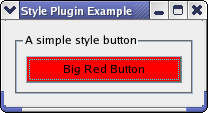
A plugin in Qt is a class stored in a shared library that can be loaded by a https:// at run-time. When you create plugins in Qt, they either extend a Qt application or Qt itself. Writing a plugin that extends Qt itself is achieved by inheriting one of the plugin https://, reimplementing functions from that class, and adding a macro. In this example we extend Qt by adding a new GUI look and feel (i.e., making a new https:// available). A high-level introduction to plugins is given in the plugin https://.
Plugins that provide new styles inherit the https:// base class. Style plugins are loaded by Qt and made available through https://; we will look at this later. We have implemented SimpleStylePlugin, which provides SimpleStyle. The new style contributes to widget styling by drawing button backgrounds in red - not a major contribution, but it still makes a new style.
The new style is platform agnostic in the sense that it is not based on any specific style implementation, but uses https:// to merely tweak the looks in the current application style that defaults to the native system style.
On some platforms, the native style will prevent the button from having a red background. In this case, try to run the example in another style (e.g., fusion).
We test the plugin with StyleWindow, in which we display a https://. The SimpleStyle and StyleWindow classes do not contain any plugin specific functionality and their implementations are trivial; we will therefore leap past them and head on to the SimpleStylePlugin and the main() function. After we have looked at that, we examine the plugin's profile.
SimpleStylePlugin Class Definition▲
SimpleStylePlugin inherits https:// and is the plugin class.
class SimpleStylePlugin : public QStylePlugin
{
    Q_OBJECT
    Q_PLUGIN_METADATA(IID "org.qt-project.Qt.QStyleFactoryInterface" FILE "simplestyle.json")

public:
    SimpleStylePlugin() {}

    QStringList keys() const;
    QStyle *create(const QString &key) override;
};
keys() returns a list of style names that this plugin can create, while create() takes such a string and returns the https:// corresponding to the key. Both functions are pure virtual functions reimplemented from https://. When an application requests an instance of the SimpleStyle style, which this plugin creates, Qt will create it with this plugin.
SimpleStylePlugin Class Implementation▲
Here is the implementation of keys():
QStringList SimpleStylePlugin::keys() const
{
    return QStringList() << "SimpleStyle";
}
Since this plugin only supports one style, we return a https:// with the class name of that style.
Here is the create() function:
QStyle *SimpleStylePlugin::create(const QString &key)
{
    if (key.toLower() == "simplestyle")
        return new SimpleStyle;
    return 0;
}
Note that the key for style plugins are case insensitive. The case sensitivity varies from plugin to plugin, so you need to check this when implementing new plugins.
The main() function▲
int main(int argv, char *args[])
{
    QApplication app(argv, args);
    QApplication::setStyle(QStyleFactory::create("simplestyle"));

    StyleWindow window;
    window.resize(200, 50);
    window.show();

    return app.exec();
}
Qt loads the available style plugins when the https:// object is initialized. The https:// class knows about all styles and produces them with https://() (it is a wrapper around all the style plugins).
The Simple Style Plugin Profile▲
The SimpleStylePlugin lives in its own directory and have its own profile:
TEMPLATE    = lib
CONFIG     += plugin
QT         += widgets
HEADERS     = simplestyle.h \
              simplestyleplugin.h
SOURCES     = simplestyle.cpp \
              simplestyleplugin.cpp
TARGET      = simplestyleplugin
In the plugin profile we need to set the lib template as we are building a shared library instead of an executable. We must also set the config to plugin. We set the library to be stored in the styles folder under stylewindow because this is a path in which Qt will search for style plugins.
Related Articles and Examples▲
In the https:// we show how to implement plugins that extends Qt applications rather than Qt itself, which is the case with the style plugin of this example. The https:// example shows how to implement a static plugin as well as being a more involved example on plugins that extend applications.
List of Files▲
Files:
List of Files▲
-
tools/styleplugin/plugin/plugin.pro
-
tools/styleplugin/plugin/simplestyle.cpp
-
tools/styleplugin/plugin/simplestyle.h
-
tools/styleplugin/plugin/simplestyleplugin.cpp
-
tools/styleplugin/plugin/simplestyleplugin.h
-
tools/styleplugin/styleplugin.pro
-
tools/styleplugin/stylewindow/main.cpp
-
tools/styleplugin/stylewindow/stylewindow.cpp
-
tools/styleplugin/stylewindow/stylewindow.h
-
tools/styleplugin/stylewindow/stylewindow.pro