


Tree Model Completer Example▲
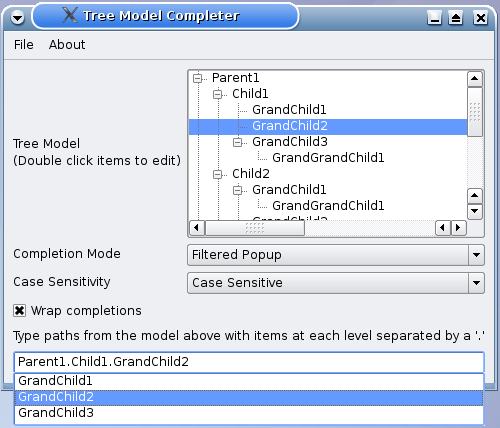
Similar to the https://, we provide https:// objects to enable selection for completion mode and case sensitivity, as well as a https:// for wrap completions.
The Resource File▲
The contents of the TreeModelCompleter is read from treemodel.txt. This file is embedded within the treemodelcompleter.qrc resource file, which contains the following:
<!DOCTYPE RCC><RCC version="1.0">
<qresource prefix="/">
   <file>resources/treemodel.txt</file>
</qresource>
</RCC>
TreeModelCompleter Class Definition▲
The TreeModelCompleter is a subclass of https:// with two constructors - one with parent as an argument and another with parent and model as arguments.
class TreeModelCompleter : public QCompleter
{
    Q_OBJECT
    Q_PROPERTY(QString separator READ separator WRITE setSeparator)

public:
    explicit TreeModelCompleter(QObject *parent = 0);
    explicit TreeModelCompleter(QAbstractItemModel *model, QObject *parent = 0);

    QString separator() const;
public slots:
    void setSeparator(const QString &separator);

protected:
    QStringList splitPath(const QString &path) const override;
    QString pathFromIndex(const QModelIndex &index) const override;

private:
    QString sep;
};
The class reimplements the protected functions https://() and https://() to suit a tree model. For more information on customizing https:// to suit tree models, refer to https://.
TreeModelCompleter also has a separator property which is declared using the https://() macro. The separator has READ and WRITE attributes and the corresponding functions separator() and setSeparator(). For more information on https://(), refer to https://.
TreeModelCompleter Class Implementation▲
The first constructor constructs a TreeModelCompleter object with a parent while the second constructor constructs an object with a parent and a https://, model.
TreeModelCompleter::TreeModelCompleter(QObject *parent)
    : QCompleter(parent)
{
}

TreeModelCompleter::TreeModelCompleter(QAbstractItemModel *model, QObject *parent)
    : QCompleter(model, parent)
{
}
The separator() function is a getter function that returns the separator string.
QString TreeModelCompleter::separator() const
{
    return sep;
}
As mentioned earlier, the splitPath() function is reimplemented because the default implementation is more suited to https:// or list models. In order for https:// to split the path into a list of strings that are matched at each level, we split it using https://() with sep as its separator.
QStringList TreeModelCompleter::splitPath(const QString &path) const
{
    if (sep.isNull()) {
        return QCompleter::splitPath(path);
    }

    return path.split(sep);
}
The pathFromIndex() function returns data for the completionRole() for a tree model. This function is reimplemented as its default implementation is more suitable for list models. If there is no separator, we use https://'s default implementation, otherwise we use the https://() function to navigate upwards and accumulate the data. The function then returns a https://, dataList, using a separator to join objects of different levels.
QString TreeModelCompleter::pathFromIndex(const QModelIndex &index) const
{
    if (sep.isNull()) {
        return QCompleter::pathFromIndex(index);
    }

    // navigate up and accumulate data
    QStringList dataList;
    for (QModelIndex i = index; i.isValid(); i = i.parent()) {
        dataList.prepend(model()->data(i, completionRole()).toString());
    }

    return dataList.join(sep);
}
MainWindow Class Definition▲
The MainWindow class is a subclass of https:// and implements five custom slots: about(), changeCase(), changeMode(), highlight(), and updateContentsLabel().
class MainWindow : public QMainWindow
{
    Q_OBJECT

public:
    MainWindow(QWidget *parent = 0);

private slots:
    void about();
    void changeCase(int);
    void changeMode(int);
    void highlight(const QModelIndex&);
    void updateContentsLabel(const QString&);
In addition, the class has two private functions, createMenu() and modelFromFile(), as well as private instances of https://, https://, https://, TreeModelCompleter and https://.
private:
    void createMenu();
    QAbstractItemModel *modelFromFile(const QString& fileName);

    QTreeView *treeView;
    QComboBox *caseCombo;
    QComboBox *modeCombo;
    QLabel *contentsLabel;
    TreeModelCompleter *completer;
    QLineEdit *lineEdit;
};
MainWindow Class Implementation▲
The MainWindow's constructor creates a MainWindow object with a parent and initializes the completer and lineEdit. The createMenu() function is invoked to set up the "File" menu and "Help" menu. The completer's model is set to the https:// obtained from modelFromFile(), and the https://() signal is connected to MainWindow's highlight() slot.
MainWindow::MainWindow(QWidget *parent)
    : QMainWindow(parent), completer(0), lineEdit(0)
{
    createMenu();

    completer = new TreeModelCompleter(this);
    completer->setModel(modelFromFile(":/resources/treemodel.txt"));
    completer->setSeparator(QLatin1String("."));
    QObject::connect(completer, SIGNAL(highlighted(QModelIndex)),
                     this, SLOT(highlight(QModelIndex)));

    QWidget *centralWidget = new QWidget;

    QLabel *modelLabel = new QLabel;
    modelLabel->setText(tr("Tree Model<br>(Double click items to edit)"));

    QLabel *modeLabel = new QLabel;
    modeLabel->setText(tr("Completion Mode"));
    modeCombo = new QComboBox;
    modeCombo->addItem(tr("Inline"));
    modeCombo->addItem(tr("Filtered Popup"));
    modeCombo->addItem(tr("Unfiltered Popup"));
    modeCombo->setCurrentIndex(1);

    QLabel *caseLabel = new QLabel;
    caseLabel->setText(tr("Case Sensitivity"));
    caseCombo = new QComboBox;
    caseCombo->addItem(tr("Case Insensitive"));
    caseCombo->addItem(tr("Case Sensitive"));
    caseCombo->setCurrentIndex(0);
The https:// objects modelLabel, modeLabel and caseLabel are instantiated. Also, the https:// objects, modeCombo and caseCombo, are instantiated and populated. By default, the completer's mode is "Filtered Popup" and the case is insensitive.
    QLabel *separatorLabel = new QLabel;
    separatorLabel->setText(tr("Tree Separator"));

    QLineEdit *separatorLineEdit = new QLineEdit;
    separatorLineEdit->setText(completer->separator());
    connect(separatorLineEdit, SIGNAL(textChanged(QString)),
            completer, SLOT(setSeparator(QString)));

    QCheckBox *wrapCheckBox = new QCheckBox;
    wrapCheckBox->setText(tr("Wrap around completions"));
    wrapCheckBox->setChecked(completer->wrapAround());
    connect(wrapCheckBox, SIGNAL(clicked(bool)), completer, SLOT(setWrapAround(bool)));

    contentsLabel = new QLabel;
    contentsLabel->setSizePolicy(QSizePolicy::Fixed, QSizePolicy::Fixed);
    connect(separatorLineEdit, SIGNAL(textChanged(QString)),
            this, SLOT(updateContentsLabel(QString)));

    treeView = new QTreeView;
    treeView->setModel(completer->model());
    treeView->header()->hide();
    treeView->expandAll();

    connect(modeCombo, SIGNAL(activated(int)), this, SLOT(changeMode(int)));
    connect(caseCombo, SIGNAL(activated(int)), this, SLOT(changeCase(int)));

    lineEdit = new QLineEdit;
    lineEdit->setCompleter(completer);
We use a https:// to place all the objects in the MainWindow.
    QGridLayout *layout = new QGridLayout;
    layout->addWidget(modelLabel, 0, 0); layout->addWidget(treeView, 0, 1);
    layout->addWidget(modeLabel, 1, 0);  layout->addWidget(modeCombo, 1, 1);
    layout->addWidget(caseLabel, 2, 0);  layout->addWidget(caseCombo, 2, 1);
    layout->addWidget(separatorLabel, 3, 0); layout->addWidget(separatorLineEdit, 3, 1);
    layout->addWidget(wrapCheckBox, 4, 0);
    layout->addWidget(contentsLabel, 5, 0, 1, 2);
    layout->addWidget(lineEdit, 6, 0, 1, 2);
    centralWidget->setLayout(layout);
    setCentralWidget(centralWidget);

    changeCase(caseCombo->currentIndex());
    changeMode(modeCombo->currentIndex());

    setWindowTitle(tr("Tree Model Completer"));
    lineEdit->setFocus();
}
The createMenu() function sets up the https:// objects required and adds them to the "File" menu and "Help" menu. The https://() signals from these actions are connected to their respective slots.
void MainWindow::createMenu()
{
    QAction *exitAction = new QAction(tr("Exit"), this);
    QAction *aboutAct = new QAction(tr("About"), this);
    QAction *aboutQtAct = new QAction(tr("About Qt"), this);

    connect(exitAction, SIGNAL(triggered()), qApp, SLOT(quit()));
    connect(aboutAct, SIGNAL(triggered()), this, SLOT(about()));
    connect(aboutQtAct, SIGNAL(triggered()), qApp, SLOT(aboutQt()));

    QMenu* fileMenu = menuBar()->addMenu(tr("File"));
    fileMenu->addAction(exitAction);

    QMenu* helpMenu = menuBar()->addMenu(tr("About"));
    helpMenu->addAction(aboutAct);
    helpMenu->addAction(aboutQtAct);
}
The changeMode() function accepts an index corresponding to the user's choice of completion mode and changes the completer's mode accordingly.
void MainWindow::changeMode(int index)
{
    QCompleter::CompletionMode mode;
    if (index == 0)
        mode = QCompleter::InlineCompletion;
    else if (index == 1)
        mode = QCompleter::PopupCompletion;
    else
        mode = QCompleter::UnfilteredPopupCompletion;

    completer->setCompletionMode(mode);
}
The about() function provides a brief description on the Tree Model Completer example.
void MainWindow::about()
{
    QMessageBox::about(this, tr("About"), tr("This example demonstrates how "
        "to use a QCompleter with a custom tree model."));
}
The changeCase() function alternates between https:// and https:// modes, depending on the value of cs.
void MainWindow::changeCase(int cs)
{
    completer->setCaseSensitivity(cs ? Qt::CaseSensitive : Qt::CaseInsensitive);
}
main() Function▲
The main() function instantiates MainWindow and invokes the https://() function to display it.
int main(int argc, char *argv[])
{
    Q_INIT_RESOURCE(treemodelcompleter);

    QApplication app(argc, argv);
    MainWindow window;
    window.show();
    return app.exec();
}
List of Files▲
Files:
List of Files▲
-
tools/treemodelcompleter/main.cpp
-
tools/treemodelcompleter/mainwindow.cpp
-
tools/treemodelcompleter/mainwindow.h
-
tools/treemodelcompleter/treemodelcompleter.cpp
-
tools/treemodelcompleter/treemodelcompleter.h
-
tools/treemodelcompleter/treemodelcompleter.pro
-
tools/treemodelcompleter/treemodelcompleter.qrc