


Widgets Tutorial - Nested Layouts▲
Just as widgets can contain other widgets, layouts can be used to provide different levels of grouping for widgets. Here, we want to display a label alongside a line edit at the top of a window, above a table view showing the results of a query.
We achieve this by creating two layouts: queryLayout is a https:// that contains https:// and https:// widgets placed side-by-side; mainLayout is a https:// that contains queryLayout and a https:// arranged vertically.
|
Sélectionnez |
|
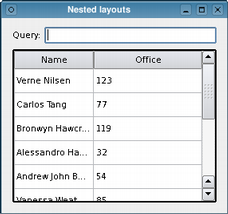
Note that we call the mainLayout's https://() function to insert the queryLayout above the resultView table.
We have omitted the code that sets up the model containing the data shown by the https:// widget, resultView. For completeness, we show this below.
As well as https:// and https://, Qt also provides https:// and https:// classes to help with more complex user interfaces. These can be seen if you run Qt Designer.
Setting up the Model▲
In the code above, we did not show where the table's data came from because we wanted to concentrate on the use of layouts. Here, we see that the model holds a number of items corresponding to rows, each of which is set up to contain data for two columns.
    QStandardItemModel model;
    model.setHorizontalHeaderLabels(
        QStringList() << QApplication::translate("nestedlayouts", "Name")
                      << QApplication::translate("nestedlayouts", "Office"));

    QList<QStringList> rows = QList<QStringList>()
        << (QStringList() << "Verne Nilsen" << "123")
        << (QStringList() << "Carlos Tang" << "77")
        << (QStringList() << "Bronwyn Hawcroft" << "119")
        << (QStringList() << "Alessandro Hanssen" << "32")
        << (QStringList() << "Andrew John Bakken" << "54")
        << (QStringList() << "Vanessa Weatherley" << "85")
        << (QStringList() << "Rebecca Dickens" << "17")
        << (QStringList() << "David Bradley" << "42")
        << (QStringList() << "Knut Walters" << "25")
        << (QStringList() << "Andrea Jones" << "34");

    foreach (QStringList row, rows) {
        QList<QStandardItem *> items;
        foreach (QString text, row)
            items.append(new QStandardItem(text));
        model.appendRow(items);
    }

    resultView->setModel(&model);
    resultView->verticalHeader()->hide();
    resultView->horizontalHeader()->setStretchLastSection(true);
The use of models and views is covered in the https:// and in the https:// overview.
List of Files▲
Files:
List of Files▲
-
tutorials/widgets/nestedlayouts/main.cpp
-
tutorials/widgets/nestedlayouts/nestedlayouts.pro