


Digital Clock Example▲
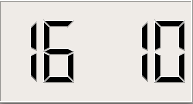
This example also demonstrates how https:// can be used to update a widget at regular intervals.
DigitalClock Class Definition▲
The DigitalClock class provides a clock widget showing the time with hours and minutes separated by a blinking colon. We subclass https:// and implement a private slot called showTime() to update the clock display:
class DigitalClock : public QLCDNumber
{
    Q_OBJECT

public:
    DigitalClock(QWidget *parent = 0);

private slots:
    void showTime();
};
DigitalClock Class Implementation▲
DigitalClock::DigitalClock(QWidget *parent)
    : QLCDNumber(parent)
{
    setSegmentStyle(Filled);

    QTimer *timer = new QTimer(this);
    connect(timer, &QTimer::timeout, this, &DigitalClock::showTime);
    timer->start(1000);

    showTime();

    setWindowTitle(tr("Digital Clock"));
    resize(150, 60);
}
In the constructor, we first change the look of the LCD numbers. The https:// style produces raised segments filled with the foreground color (typically black). We also set up a one-second timer to keep track of the current time, and we connect its https://() signal to the private showTime() slot so that the display is updated every second. Then, we call the showTime() slot; without this call, there would be a one-second delay at startup before the time is shown.
void DigitalClock::showTime()
{
    QTime time = QTime::currentTime();
    QString text = time.toString("hh:mm");
    if ((time.second() % 2) == 0)
        text[2] = ' ';
    display(text);
}
The showTime() slot is called whenever the clock display needs to be updated.
The current time is converted into a string with the format "hh:mm". When https://() is a even number, the colon in the string is replaced with a space. This makes the colon appear and vanish every other second.
Finally, we call https://() to update the widget.
List of Files▲
Files:
List of Files▲
-
widgets/digitalclock/digitalclock.cpp
-
widgets/digitalclock/digitalclock.h
-
widgets/digitalclock/digitalclock.pro
-
widgets/digitalclock/main.cpp