


XML Schema Validation Example▲
The XML Schema Validation example shows how to use Qt XML Patterns to validate XML with a W3C XML Schema.
Introduction▲
The example application shows different XML schema definitions and for every definition two XML instance documents, one that is valid according to the schema and one that is not. The user can select the valid or invalid instance document, change it and validate it again.
The User Interface▲
The UI for this example was created using https://:
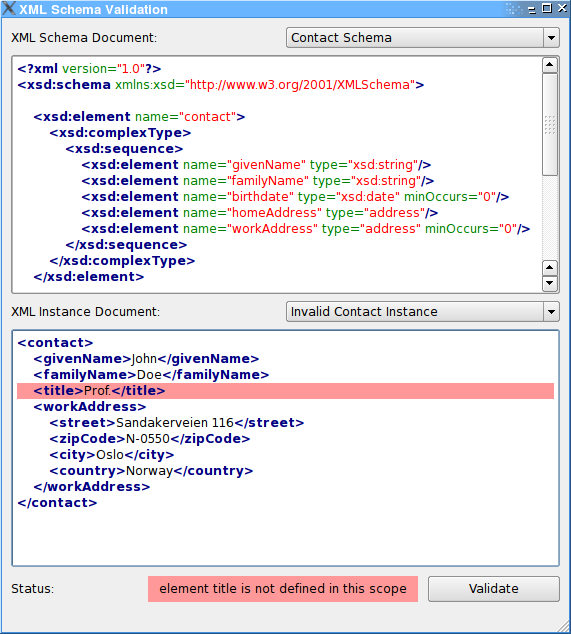
The UI consists of three parts, at the top the XML schema https:// and the schema https://, below the XML instance https:// and the instance https:// and at the bottom the validation status https:// next to the validation https://.
Validating XML Instance Documents▲
You can select one of the three predefined XML schemas and for each schema an valid or invalid instance document. A click on the 'Validate' button will validate the content of the XML instance editor against the schema from the XML schema viewer. As you can modify the content of the instance editor, different instances can be tested and validation error messages analysed.
Code Walk-Through▲
The example's main() function creates the standard instance of https://. Then it creates an instance of the mainwindow class, shows it, and starts the Qt event loop:
int main(int argc, char* argv[])
{
    Q_INIT_RESOURCE(schema);
    QApplication app(argc, argv);
    MainWindow* const window = new MainWindow;
    window->show();
    return app.exec();
}
The UI Class: MainWindow▲
The example's UI is a conventional Qt GUI application inheriting https:// and the class generated by https://:
class MainWindow : public QMainWindow,
                   private Ui::SchemaMainWindow
{
    Q_OBJECT

public:
    MainWindow();

private Q_SLOTS:
    void schemaSelected(int index);
    void instanceSelected(int index);
    void validate();
    void textChanged();

private:
    void moveCursor(int line, int column);
};
The constructor fills the schema and instance https:// selections with the predefined schemas and instances and connects their https://() signals to the window's schemaSelected() resp. instanceSelected() slot. Furthermore the signal-slot connections for the validation https:// and the instance https:// are set up.
The call to schemaSelected(0) and instanceSelected(0) will trigger the validation of the initial Contact Schema example.
MainWindow::MainWindow()
{
    setupUi(this);

    new XmlSyntaxHighlighter(schemaView->document());
    new XmlSyntaxHighlighter(instanceEdit->document());

    schemaSelection->addItem(tr("Contact Schema"));
    schemaSelection->addItem(tr("Recipe Schema"));
    schemaSelection->addItem(tr("Order Schema"));

    instanceSelection->addItem(tr("Valid Contact Instance"));
    instanceSelection->addItem(tr("Invalid Contact Instance"));

    connect(schemaSelection, SIGNAL(currentIndexChanged(int)), SLOT(schemaSelected(int)));
    connect(instanceSelection, SIGNAL(currentIndexChanged(int)), SLOT(instanceSelected(int)));
    connect(validateButton, SIGNAL(clicked()), SLOT(validate()));
    connect(instanceEdit, SIGNAL(textChanged()), SLOT(textChanged()));

    validationStatus->setAlignment(Qt::AlignCenter | Qt::AlignVCenter);

    schemaSelected(0);
    instanceSelected(0);
}
In the schemaSelected() slot the content of the instance https:// is adapted to the selected schema and the corresponding schema is loaded from the https:// and displayed in the schema https://. At the end of the method a revalidation is triggered.
void MainWindow::schemaSelected(int index)
{
    instanceSelection->clear();
    if (index == 0) {
        instanceSelection->addItem(tr("Valid Contact Instance"));
        instanceSelection->addItem(tr("Invalid Contact Instance"));
    } else if (index == 1) {
        instanceSelection->addItem(tr("Valid Recipe Instance"));
        instanceSelection->addItem(tr("Invalid Recipe Instance"));
    } else if (index == 2) {
        instanceSelection->addItem(tr("Valid Order Instance"));
        instanceSelection->addItem(tr("Invalid Order Instance"));
    }
    textChanged();

    const QString fileName = QStringLiteral(":/schema_")
        + QString::number(index) + QStringLiteral(".xsd");
    QFile schemaFile(fileName);
    if (!schemaFile.open(QIODevice::ReadOnly)) {
        qWarning() << "Cannot open" << QDir::toNativeSeparators(fileName)
            << ':' << schemaFile.errorString();
        return;
    }

    const QString schemaText(QString::fromUtf8(schemaFile.readAll()));
    schemaView->setPlainText(schemaText);

    validate();
}
In the instanceSelected() slot the selected instance is loaded from the https:// and loaded into the instance https:// an the revalidation is triggered again.
void MainWindow::instanceSelected(int index)
{
    if (index < 0) {
        instanceEdit->setPlainText(QString());
        return;
    }
    const QString fileName = QStringLiteral(":/instance_")
        + QString::number(2 * schemaSelection->currentIndex() + index)
        + QStringLiteral(".xml");
    QFile instanceFile(fileName);
    if (!instanceFile.open(QIODevice::ReadOnly)) {
        qWarning() << "Cannot open" << QDir::toNativeSeparators(fileName)
            << ':' << instanceFile.errorString();
        return;
    }
    const QString instanceText(QString::fromUtf8(instanceFile.readAll()));
    instanceEdit->setPlainText(instanceText);

    validate();
}
The validate() slot does the actual work in this example. At first it stores the content of the schema https:// and the https:// into temporary https://. Then it instanciates a MessageHandler object which inherits from https:// and is a convenience class to store error messages from the XmlPatterns system.
class MessageHandler : public QAbstractMessageHandler
{
public:
    MessageHandler()
        : QAbstractMessageHandler(0)
    {
    }

    QString statusMessage() const
    {
        return m_description;
    }

    int line() const
    {
        return m_sourceLocation.line();
    }

    int column() const
    {
        return m_sourceLocation.column();
    }

protected:
    virtual void handleMessage(QtMsgType type, const QString &description,
                               const QUrl &identifier, const QSourceLocation &sourceLocation)
    {
        Q_UNUSED(type);
        Q_UNUSED(identifier);

        m_description = description;
        m_sourceLocation = sourceLocation;
    }

private:
    QString m_description;
    QSourceLocation m_sourceLocation;
};
After the https:// is instanciated and the message handler set on it, the https://() method is called with the schema data as argument. If the schema is invalid or a parsing error has occurred, https://() returns false and the error is flagged in errorOccurred. If the loading was successful, a https:// is instanciated and the schema passed in the constructor. A call to https://() will validate the passed XML instance data against the XML schema. The return value of that method signals whether the validation was successful. Depending on the success the status https:// is set to 'validation successful' or the error message stored in the MessageHandler
The rest of the code does only some fancy coloring and eyecandy.
void MainWindow::validate()
{
    const QByteArray schemaData = schemaView->toPlainText().toUtf8();
    const QByteArray instanceData = instanceEdit->toPlainText().toUtf8();

    MessageHandler messageHandler;

    QXmlSchema schema;
    schema.setMessageHandler(&messageHandler);

    schema.load(schemaData);

    bool errorOccurred = false;
    if (!schema.isValid()) {
        errorOccurred = true;
    } else {
        QXmlSchemaValidator validator(schema);
        if (!validator.validate(instanceData))
            errorOccurred = true;
    }

    if (errorOccurred) {
        validationStatus->setText(messageHandler.statusMessage());
        moveCursor(messageHandler.line(), messageHandler.column());
    } else {
        validationStatus->setText(tr("validation successful"));
    }

    const QString styleSheet = QString("QLabel {background: %1; padding: 3px}")
                                      .arg(errorOccurred ? QColor(Qt::red).lighter(160).name() :
                                                           QColor(Qt::green).lighter(160).name());
    validationStatus->setStyleSheet(styleSheet);
}
List of Files▲
Files:
List of Files▲
-
https://
-
https://
-
https://
-
https://
-
https://
-
https://
-
schema/main.cpp
-
schema/mainwindow.cpp
-
schema/mainwindow.h
-
schema/schema.pro
-
schema/schema.qrc
-
schema/schema.ui