


Style Sheet Example▲
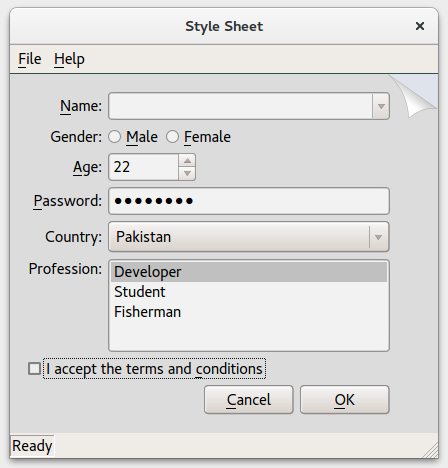
The Style Sheet example shows how widgets can be styled using Qt Style Sheets. You can open the style editor by selecting File > Edit Style Sheet, to select an existing style sheet or design your own style and load it.
The Style Sheet example consists of 2 classes:
-
MainWindow
-
StyleSheetEditor
MainWindow Class▲
MainWindow inherits QWidget, and is the application's main window defined in mainwindow.ui. The style of MainWindow can be modified with StyleSheetEditor.
StyleSheetEditor Class▲
StyleSheetEditor enables you to open an editor where you can load an existing style sheet. It is also possible to define a new stylesheet and load it. Its layout is defined in stylesheeteditor.ui.
void StyleSheetEditor::on_styleCombo_activated(const QString &styleName)Sets the specified styleName and grays the applyButton.
void StyleSheetEditor::on_styleSheetCombo_activated(const QString &sheetName)Loads the stylesheet from styleSheetName.
void StyleSheetEditor::on_styleTextEdit_textChanged()Enables the applyButton when the text in the buffer has changed.
void StyleSheetEditor::on_applyButton_clicked()Sets the stylesheet properties in qApp and disables the applyButton.
void StyleSheetEditor::loadStyleSheet(const QString &sheetName)Loads the specified sheetName, and sets its properties in qApp.