


Presenting Data in a Table View▲
<Unknown command>contentspageSQL Programming
The QSqlQueryModel, QSqlTableModel, and QSqlRelationalTableModel classes can be used as a data source for Qt's view classes such as QListView, QTableView, and QTreeView. In practice, QTableView is by far the most common choice, because an SQL result set is essentially a two-dimensional data structure.

The following example creates a view based on an SQL data model:
    QTableView *view = new QTableView;
    view->setModel(model);
    view->show();
If the model is a read-write model (e.g., QSqlTableModel), the view lets the user edit the fields. You can disable this by calling
view->setEditTriggers(QAbstractItemView::NoEditTriggers);You can use the same model as a data source for multiple views. If the user edits the model through one of the views, the other views will reflect the changes immediately. The https:// example shows how it works.
View classes display a header at the top to label the columns. To change the header texts, call setHeaderData() on the model. The header's labels default to the table's field names. For example:
    model->setHeaderData(0, Qt::Horizontal, QObject::tr("ID"));
    model->setHeaderData(1, Qt::Horizontal, QObject::tr("Name"));
    model->setHeaderData(2, Qt::Horizontal, QObject::tr("City"));
    model->setHeaderData(3, Qt::Horizontal, QObject::tr("Country"));
QTableView also has a vertical header on the left with numbers identifying the rows. If you insert rows programmatically using QSqlTableModel::insertRows(), the new rows will be marked with an asterisk (*) until they are submitted using submitAll() or automatically when the user moves to another record (assuming the edit strategy is QSqlTableModel::OnRowChange).
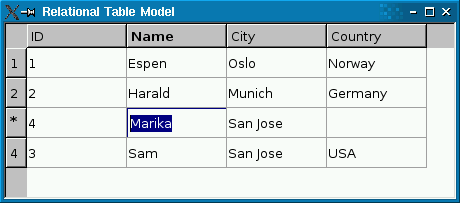
Likewise, if you remove rows using removeRows(), the rows will be marked with an exclamation mark (!) until the change is submitted.
The items in the view are rendered using a delegate. The default delegate, QItemDelegate, handles the most common data types (int, QString, QImage, etc.). The delegate is also responsible for providing editor widgets (e.g., a combobox) when the user starts editing an item in the view. You can create your own delegates by subclassing QAbstractItemDelegate or QItemDelegate. See https:// for more information.
QSqlTableModel is optimized to operate on a single table at a time. If you need a read-write model that operates on an arbitrary result set, you can subclass QSqlQueryModel and reimplement flags() and setData() to make it read-write. The following two functions make fields 1 and 2 of a query model editable:
Qt::ItemFlags EditableSqlModel::flags(
        const QModelIndex &index) const
{
    Qt::ItemFlags flags = QSqlQueryModel::flags(index);
    if (index.column() == 1 || index.column() == 2)
        flags |= Qt::ItemIsEditable;
    return flags;
}

bool EditableSqlModel::setData(const QModelIndex &index, const QVariant &value, int /* role */)
{
    if (index.column() < 1 || index.column() > 2)
        return false;

    QModelIndex primaryKeyIndex = QSqlQueryModel::index(index.row(), 0);
    int id = data(primaryKeyIndex).toInt();

    clear();

    bool ok;
    if (index.column() == 1) {
        ok = setFirstName(id, value.toString());
    } else {
        ok = setLastName(id, value.toString());
    }
    refresh();
    return ok;
}
The setFirstName() helper function is defined as follows:
bool EditableSqlModel::setFirstName(int personId, const QString &firstName)
{
    QSqlQuery query;
    query.prepare("update person set firstname = ? where id = ?");
    query.addBindValue(firstName);
    query.addBindValue(personId);
    return query.exec();
}
The setLastName() function is similar. See the https:// example for the complete source code.
Subclassing a model makes it possible to customize it in many ways: You can provide tooltips for the items, change the background color, provide calculated values, provide different values for viewing and editing, handle null values specially, and more. See https:// as well as the QAbstractItemView reference documentation for details.
If all you need is to resolve a foreign key to a more human-friendly string, you can use QSqlRelationalTableModel. For best results, you should also use QSqlRelationalDelegate, a delegate that provides combobox editors for editing foreign keys.
The https:// example illustrates how to use QSqlRelationalTableModel in conjunction with QSqlRelationalDelegate to provide tables with foreign key support.
▲
| https:// | https:// |