


Simple MQTT Client Example▲
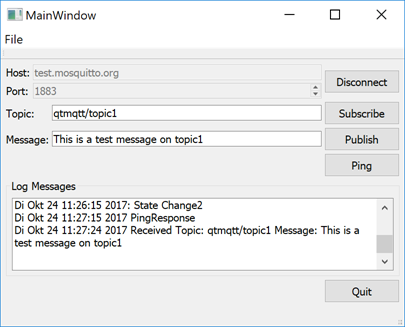
Simple MQTT Client demonstrates how to create a minimalistic client application.
To use the application, you first specify a broker, such as test.mosquitto.org or broker.hivemq.com and the port number 1883, and connect to it. You can then subscribe to a topic and send a message, which you will also receive.
Port number 1883 is not encrypted, and therefore it is suitable only for development and testing purposes. In production, always use encrypted connections.
Creating a Client▲
First, we use the https:// class to create an MQTT client. The class provides properties for setting a unique client ID as well as the broker host name and port to connect to:
    m_client = new QMqttClient(this);
    m_client->setHostname(ui->lineEditHost->text());
    m_client->setPort(ui->spinBoxPort->value());
We do not set the client ID, and therefore it will be automatically generated for us.
Next, we connect to https://() to receive all messages sent to the broker:
    connect(m_client, &QMqttClient::messageReceived, this, [this](const QByteArray &message, const QMqttTopicName &topic) {
        const QString content = QDateTime::currentDateTime().toString()
                    + QLatin1String(" Received Topic: ")
                    + topic.name()
                    + QLatin1String(" Message: ")
                    + message
                    + QLatin1Char('\n');
        ui->editLog->insertPlainText(content);
    });
When users subscribe to topics in the client, we call QMqttClient::subscribe() on the specified topic:
void MainWindow::on_buttonSubscribe_clicked()
{
    auto subscription = m_client->subscribe(ui->lineEditTopic->text());
    if (!subscription) {
        QMessageBox::critical(this, QLatin1String("Error"), QLatin1String("Could not subscribe. Is there a valid connection?"));
        return;
    }
In this example, we subscribe to all topics. For more information about how to receive messages on particular topics, see https://.
For an example of how to use the https:// class in a Qt Quick application, see https://.
List of Files▲
Files:
List of Files▲
-
simpleclient/CMakeLists.txt
-
simpleclient/main.cpp
-
simpleclient/mainwindow.cpp
-
simpleclient/mainwindow.h
-
simpleclient/mainwindow.ui
-
simpleclient/simpleclient.pro